Refresh and schedules
A refresh reads a model’s data again from its sources, on the server, with the server’s credentials. It runs on demand or on a schedule, never alters the published version, and keeps the last good data when it fails.
Three ways to refresh
- Refresh now: the model’s … menu in its workspace, or the button at the top of its Settings. It asks first. The workspace’s Contributors, Members and Admins may, with the credentials and schedule its Members and Admins set.
- A schedule, set by the workspace’s Members and Admins (below).
- The command line, on the server. It runs there and then, as the account you run it as, so a Windows sign-in to a source is yours, not the service’s:
OpenBI.Server.exe refresh --workspace "Sales" --item "Sales"
First, the model’s data sources need credentials: see Data sources and credentials. A live model has nothing to refresh: its data stays on its own server.
Set a schedule
In the model’s Settings, Refresh, Configure a refresh schedule:
- The switch: On or Off.
- Refresh frequency: Daily, or Weekly with its Days.
- Time zone: the server’s, unless you choose another.
- Time: one or more times of day; Add another time for more.
- Send refresh failure notifications to: The model’s publisher, The workspace’s contacts (set in its Workspace settings), and more addresses under These contacts.
Apply saves it, and the page shows the next refresh.
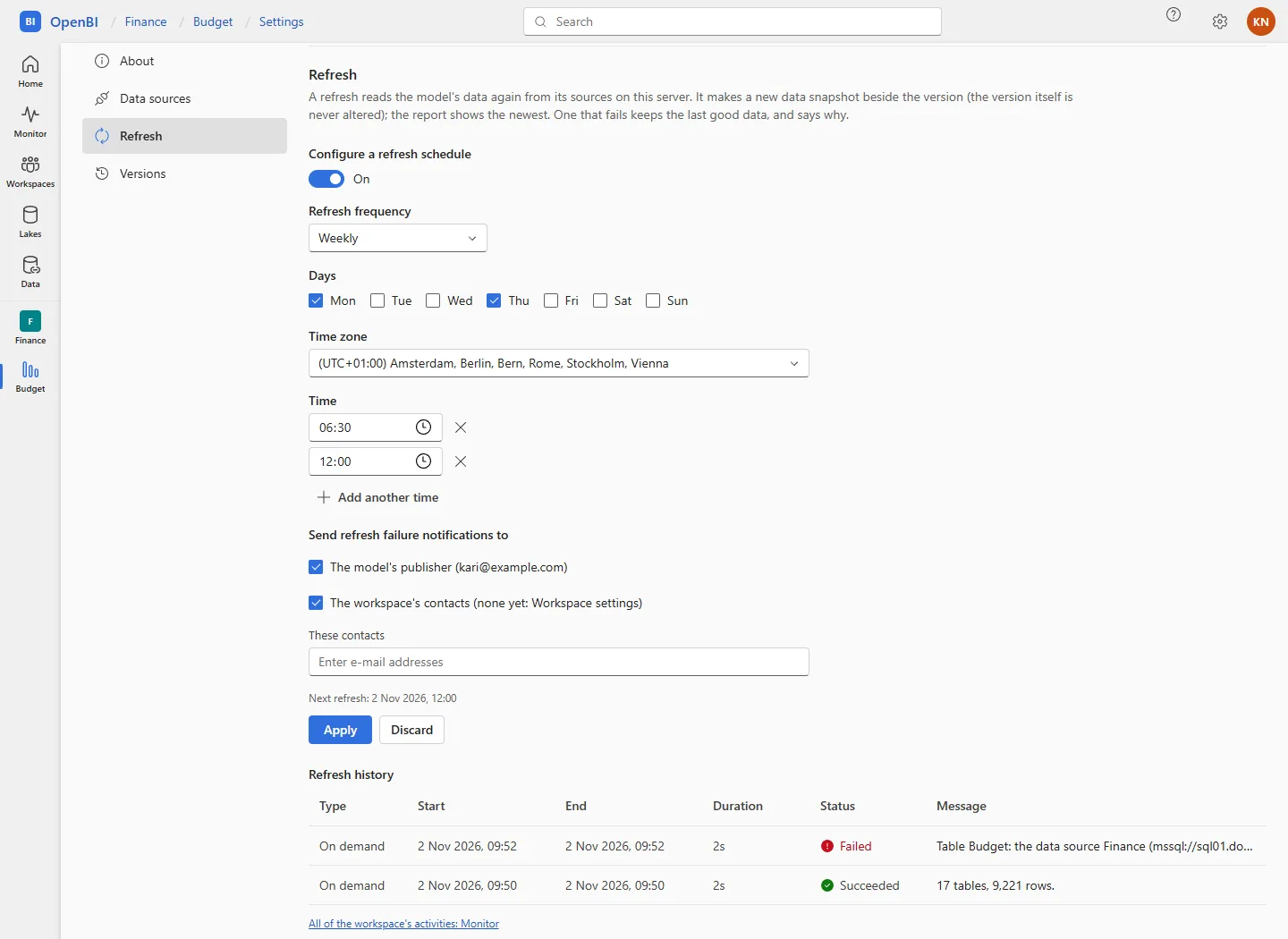
The same from the command line:
OpenBI.Server.exe schedule set --workspace "Sales" --item "Sales" --on --weekly mon,thu --times 06:30,12:00 --timezone "W. Europe Standard Time" --notify-contacts
OpenBI.Server.exe schedule show --workspace "Sales" --item "Sales"
--daily instead of --weekly; --off stops it; --emails a@norwayanalytics.no,b@norwayanalytics.no adds addresses; --no-notify-owner leaves the publisher out. Time zones are Windows’ ids, such as "W. Europe Standard Time".
The server looks at the schedules every 30 seconds. A time missed by more than an hour, because the server was stopped, is skipped, not run late. In a cluster, one node runs them.
How a refresh runs
- On a scratch copy of the model’s current version, OpenBI’s engine reads its sources with the server’s credentials, handed to it in its environment only.
- In a memory-capped process, for at most 2 hours; a longer one is stopped.
- A refresh that loads every table becomes the version’s newest data, kept beside the version as a data snapshot. The version itself is never altered.
- The report opens on the newest data, and Data updated says when, “refreshed on this server”. The last 30 snapshots of a version are kept.
Publishing a new version starts it with the data published with it, until its first refresh here. Lake loads in a model run as part of its refresh: see Lakes and lake backups.
When a refresh fails
The report keeps its last good data. The refresh says why in plain words: which table, which source, and what it said. For example, no credentials on this server, a sign-in refused, an object the source doesn’t have, or a file the server’s file guard refuses. The model’s settings page then shows The last refresh failed with the reason, and its history has the details.
Failure e-mails
A failed scheduled refresh is e-mailed to the addresses its schedule names, with why it failed and a link to the model’s settings. A refresh started by hand isn’t: whoever started it sees the result. The e-mails go through OpenBI Accounts’ e-mail; without it set up, none are sent (see E-mail from your own mailbox).
History and the Monitor
- Refresh history, in the model’s settings: Type (Scheduled, On demand, Via API), Start, End, Duration, Status and Message; a row opens its details.
- A warning after the numbers. New in 0.1.45 When the model loads with something Power BI refuses and OpenBI keeps, the refresh still succeeds, and its Message says so after its tables and rows: today, a calculated column whose
PATHmeets a parent that is no row’s id (“Warning: Calculated column …”, naming its first such rows; see Known differences). It is shown to those who refresh the item; a Viewer never sees it. - The Monitor (in the rail) has every refresh, publish and export of the workspaces you are an Admin or Member of: see Monitor and the activity log.
OpenBI.Server.exe history --workspace "Sales" --item "Sales" --lines 20
OpenBI.Server.exe activities --status Failed --kind refresh --hours 24
How many run at once
- One per model: a second refresh of a model that is refreshing is refused, with “is refreshing already”.
- Two on the server by default (
Refresh:MaxParallel); others wait for their turn. - Reports keep answering meanwhile, from the data they have.
Settings
IT sets the server’s refresh settings in settings.json in the data folder (C:\ProgramData\OpenBI Server, or /Library/Application Support/OpenBI Server on a Mac), which upgrades keep. Add a "Refresh" block beside what is there, then restart the service:
{
  "Refresh": {
    "FileFolders": "D:\\Data;\\\\files\\Finance",
    "WebHosts": "intranet.norwayanalytics.no;10.0.0.5"
  }
}
OpenBI.Server.exe service restart
OpenBI.Server.exe doctor| Setting | Default | Means |
|---|---|---|
Refresh:Timeout | 02:00:00 | How long a refresh may take before it is stopped. |
Refresh:MaxParallel | 2 | Refreshes at once on this server. |
Refresh:Keep | 30 | Data snapshots kept per version. |
Refresh:CheckEvery | 00:00:30 | How often the schedules are looked at. |
Refresh:FileFolders | none | Folders a refresh may read files from besides the model’s own, separated by semicolons. Give NT SERVICE\OpenBIServer read access. |
Refresh:FileGuard | true | false turns the file guard off; needed for PostgreSQL and MySQL that DuckDB attaches itself. Cloud storage (S3, Google Cloud Storage, Azure) is read under the guard, in the buckets and containers the model’s sources name (from 0.1.46). |
Refresh:WebHosts | none | Hosts inside your network a refresh may read from the web, separated by semicolons, such as intranet.norwayanalytics.no;*.norwayanalytics.local;10.0.0.5. |
Refresh:WebGuard | true | false turns the web guard off. |
Publish:MaxBytes | 1 GB | The largest file publishing takes, in bytes. Run iis setup again after raising it, so IIS lets as much through. |
What a refresh may read explains the two guards. Keep both on unless a source needs otherwise.
Through the gateway
A model mapped to an OpenBI Gateway refreshes on a machine in your own network instead, by the same Refresh now and schedule; its history says where it ran. A refresh waits up to 15 minutes for a member that is busy, and a scheduled one also for a member that is offline. See Point a model at the gateway.
Data computed by an older OpenBI
OpenBI Studio 0.3.0 to 0.3.67 computed a few M functions wrongly: Date.StartOfMonth, Date.StartOfQuarter, Number.RoundUp, Number.FromText of a number, and the week functions without a first day in a culture whose week starts on Monday. A model whose published data was computed with them is flagged at the top of its settings page, for the workspace’s Admins and Members, naming the tables and functions:
- Where the server reaches the model’s sources, Refresh now computes the data again, correctly.
- Otherwise (no credentials for a source, or its last test or refresh here failed), refresh it in OpenBI Studio, where its sources are, and publish it again.
Nothing is read again by itself: you decide when.
The licence and refresh
While a domain’s licence is restricted, its models’ refreshes are refused, with the licence’s reason; reports keep opening on the data they have. See What each state means.
Frequently asked questions
A scheduled refresh didn’t run
Was the server stopped, or the Mac asleep, at that time? A time missed by more than an hour is skipped. Also check that the schedule is On, the model isn’t archived, and the licence isn’t restricted.
The model was published without its data
Set its sources’ credentials, then Refresh now: its first refresh loads the data on the server.