Sign-in and OpenBI Accounts
People sign in before they see anything on OpenBI Server: with OpenBI Accounts, the sign-in service that comes with the server, or with your company’s own provider, such as Microsoft Entra ID or Okta. This page covers both, the invitations and their e-mail, and what people see.
Two ways to sign people in
| OpenBI Accounts | Your own provider | |
|---|---|---|
| Where people sign in | accounts.<your domain>, on your server | At your provider: Entra ID, Okta, or any OpenID Connect provider |
| Passwords and MFA | A password of at least 12 characters and an authenticator app, always both | As your provider sets them |
| New people | Invited by e-mail, from your own mailbox | Nothing to invite: they use their company accounts |
| Set up with | signin use-accounts | signin set |
Either way, the report server never sees a password: it gets proof from the sign-in of who the person is, and a person is known by their e-mail address. How they work together shows the flow.
What people see
The first time
- An invitation e-mail from your company, with the button Set up my sign-in. The link works once, for 7 days.
- Welcome: three short steps. They choose a password, at least 12 characters (“A short sentence is easiest to remember”).
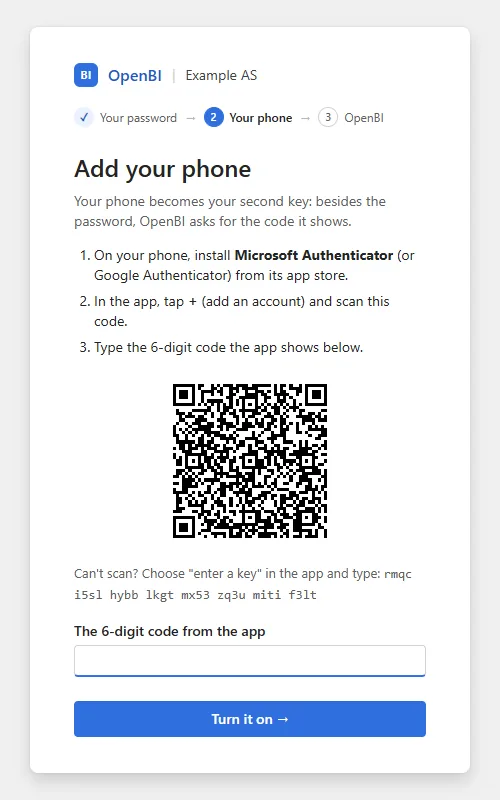
- Add your phone: they install Microsoft Authenticator or Google Authenticator, scan the code, and type the 6-digit code the app shows, then Turn it on.
- You’re set up: ten recovery codes, shown once, each signing them in once if they lose their phone. Then their workspace, at its own address, with a button to open it.
Signing in
At bi.<your domain>, someone not signed in is sent to Sign in: their e-mail and password, Next, then Your code, the 6-digit code their authenticator app shows now, or one of their recovery codes. Then back to where they were going. After five wrong tries, they wait 15 minutes.
Their own account
In the portal, Settings (the gear), Password and phone opens their account at OpenBI Accounts: Change your password, New recovery codes, and Sign out. A new password, whether changed here or through Forgot your password?, signs them out everywhere else: OpenBI Studio and the server ask them to sign in again, and their AI agents’ connections end.
Invitations
Someone is invited when they are given access and don’t have a sign-in yet:
- From a workspace: its Manage access, Add people, with Notify by e-mail ticked. The e-mail names the workspace and its address. See Give people access.
- From the admin portal (server administrators): Settings, Users, Invite people: their e-mail, name, and a workspace and role if you like.
- From the command line:
The first gives a workspace role and invites; the second makes only the sign-in, andOpenBI.Server.exe workspace member add --workspace "Sales" --email ola@norwayanalytics.no --name "Ola Nordmann" --role viewer OpenBI.Server.exe accounts user invite --email ola@norwayanalytics.no --name "Ola Nordmann" --domain norwayanalytics.no--domainsays under which domain’s address they land once set up.
Someone who signs in already is told of their new workspace by e-mail instead. Someone invited before whose link still works is told too, and keeps that link: a new invitation would end it. Without e-mail set up, each of these gives you the link to hand over yourself.
Resend an invitation
- A workspace’s Admin: Manage access, Resend to everyone pending.
- A server administrator: Users, the person’s … menu: Resend invitation, or Copy invitation link to send it yourself, in a chat or a text message (it works once, for 7 days, and the copy is in the audit). Either way, the link sent before stops working.
- IT, for a whole workspace: those whose invitation no longer works or never reached them, paced at about 30 e-mails a minute, as Microsoft 365 takes them.
--dry-runonly counts:OpenBI.Server.exe workspace member resend --workspace "Sales" --dry-run OpenBI.Server.exe workspace member resend --workspace "Sales"
To see who hasn’t set up yet and what came of their e-mails: workspace show --workspace "Sales" --pending, accounts user mail --email <e-mail>, or E-mail history in the person’s menu under Users.
E-mail from your own mailbox
OpenBI Accounts sends invitations, “Forgot your password?” links, workspace notices and failed-refresh notices from a mailbox of yours. Nothing goes through Norway Analytics. E-mail is optional: without it, invitations are links you hand over, and the sign-in page offers no “Forgot your password?”.
Through Microsoft 365
An app registration in Microsoft Entra signs in as itself and sends as one mailbox through Microsoft Graph. Give it Exchange Online’s Application Mail.Send role scoped to that mailbox only, not the Mail.Send permission in Entra, which would let it send as anyone in the company; the command warns if it has that. It asks for the client secret, hidden:
OpenBI.Server.exe accounts mail set --graph --tenant <tenant id> --client-id <app id> --from support@norwayanalytics.noThrough any SMTP server
STARTTLS, on port 587 unless you say otherwise; with --user, it asks for the password, hidden:
OpenBI.Server.exe accounts mail set --smtp --host smtp.norwayanalytics.no --user support@norwayanalytics.no --from support@norwayanalytics.noTo try it without sending anything, --folder <path> --from <address> writes each e-mail as an .eml file instead.
Test it, and your domain’s records
OpenBI.Server.exe accounts mail test --to it@norwayanalytics.no
OpenBI.Server.exe accounts mail check
mail test sends a test e-mail and checks the sender’s domain: SPF, DKIM and DMARC, as receiving mail servers judge it, and says what to add. An e-mail can leave and still land in quarantine without them. mail check checks the domain only.
Forgot your password?
With e-mail set up, the sign-in page has Forgot your password?. The person types their e-mail and gets a link to choose a new password, which works once, for 2 hours. Their phone stays their second key, so someone who reads their mail still can’t sign in as them.
- The page answers the same whether the address has a sign-in or not.
- One e-mail per address every 5 minutes, and at most 10 requests an hour from one network address.
- A lost phone is never fixed by e-mail: that takes a new invitation from an administrator.
A lost phone, or someone who leaves
Server administrators do this under Settings, Users, in the person’s … menu, or on the command line:
| When | Portal | Command line | What happens |
|---|---|---|---|
| A lost phone, or a password others may know | Reset sign-in | accounts user reset --email <e-mail> | Their password, codes and Excel passwords stop working, they are signed out everywhere within minutes, their AI agents’ connections end, and they get a new invitation to set up again. |
| Someone leaves | Disable | accounts user disable --email <e-mail> | They can no longer sign in, are signed out everywhere within minutes, and their AI agents’ connections end. Their workspaces and roles stay; Enable brings them back. |
People’s e-mail addresses changed
New in 0.1.49 When a company is renamed and gets a new domain (anna@gammelt.no becomes anna@nyttnavn.no), or one person gets a new address, everyone keeps who they are: their sign-in (password and phone), workspaces and roles, server and gateway administration, seat, favourites, data alerts, Excel passwords, drafts and history.
Server administrators do it in the Admin portal, Users, Change e-mail addresses… (One person or A whole domain, then Preview and Change addresses), or on the command line, where it is a dry run until --apply:
OpenBI.Server.exe accounts user rename --from anna@gammelt.no --to anna@nyttnavn.no --apply --notify
OpenBI.Server.exe accounts user rename-domain --from gammelt.no --to nyttnavn.no --apply --notify --lang nb- A preview first: each address, what it becomes and what it holds, and why one can’t change: a new address that is already someone else’s is refused (an address is one person’s), and so is one two people would get. It also shows the seats before and after (a new address is not a new person) and the published models that still name the old addresses. A whole domain keeps the part before each
@; subdomains are not included. - Each person all or nothing: a person whose records can’t all follow keeps the old address. A change that stopped half way, for example on a node that went down, is finished by running it again. In a cluster, one change runs at a time and every node sees it at once.
- Signed out everywhere: their sessions, OpenBI Studio’s sign-in and their AI agents’ connections end. They sign in again with the new address and the same password and phone. Excel takes the new address as the user name, with the same Excel password. Someone invited but not set up yet: the link sent to the old address stops working; with
--notify, or the portal’s Tell each person at the new address, a new invitation goes to the new address. - Told, if you choose: an e-mail at the new address, in Norwegian or English, sent at your mailbox’s pace.
- In the audit log: each person’s change, and each of their workspaces. History stays as it was: who published and who did what keep the address they had then.
- Your own sign-in provider (Microsoft Entra ID and others): the server knows people by the address the provider gives. Change the addresses there too. Afterwards a sign-in as an old address is refused, naming the new one.
- Row-level security in a model is never changed: roles’ members and a model’s data can hold addresses. The preview and the result name the models that still mention the old ones; their publisher changes them in OpenBI Studio and publishes again.
- The workspaces stay under the old domain’s licence: Change domain moves the licence.
How long people stay signed in
- 10 hours from their last use of the portal; using it keeps them signed in.
- Checked with the sign-in every 5 minutes: someone disabled or reset there is signed out of the server within minutes, not when their session ends.
- Sign out in the portal’s account menu ends their session on the server and at the sign-in.
Several domains
One server can serve several companies’ domains, a licence each, and one OpenBI Accounts signs everyone in for all of them. Register each address the server answers to:
OpenBI.Server.exe signin use-accounts --server-url https://bi.norwayanalytics.no --server-url https://bi.<other domain>
OpenBI.Server.exe service restart- One sign-in for both names: signed in under one, the other lets the person in at once.
- Each workspace opens under its own domain’s name only, and people land at their own workspace’s address after setting up.
- OpenBI Accounts has one address, under one of the licensed domains, and every company’s people sign in there.
Move OpenBI Accounts to another address
The new address must be under one of the server’s licensed domains. Give it a DNS record first, then:
OpenBI.Server.exe accounts setup --public-url https://accounts.<new domain> --name "Norway Analytics AS"
OpenBI.Server.exe iis setup --host accounts.<new domain> --apply
OpenBI.Server.exe https letsencrypt --host accounts.<new domain> --email it@norwayanalytics.no --apply
OpenBI.Server.exe signin use-accounts --server-url https://bi.norwayanalytics.no
OpenBI.Server.exe iis web-config --apply
OpenBI.Server.exe accounts service restart
OpenBI.Server.exe service restart
iis web-config --apply rewrites only the IIS site’s routing, so that the new address and the former one both reach OpenBI Accounts; it keeps the file before. On a Mac, leave out the two iis lines: the server routes both itself. Everyone signs in once more, OpenBI Studio too. The former address keeps answering, so links already sent from it still open and a setup begun there ends there, until accounts setup … --forget-former-urls. Keep its domain registered and under your control until those links have expired: 7 days after the last invitation sent from it.
Your own sign-in provider
Microsoft Entra ID, Okta, or any provider that speaks OpenID Connect. People sign in with their company accounts and their provider’s MFA; OpenBI Accounts isn’t used.
- Register OpenBI Server at your provider as a web application with the redirect address
https://bi.<your domain>/signin-oidc(one for each address the server answers to) and a client secret. The server asks foropenid profile email offline_access. - Register OpenBI Studio, for publishing, as a public client (no secret) with the redirect address
http://127.0.0.1/callback, and give it a scope for the server’s API. - Tell the server both registrations: the Studio’s client id, the scopes it asks for, and the audience of the access tokens for the server’s API. For Entra ID, the authority is
https://login.microsoftonline.com/<tenant id>/v2.0. The command asks for the server’s client secret, hidden:OpenBI.Server.exe signin set --authority https://login.microsoftonline.com/<tenant id>/v2.0 --client-id <id> --studio-client-id <studio id> --studio-scope "<scopes>" --audience <audience> OpenBI.Server.exe signin status OpenBI.Server.exe service restartsignin statussays whether the provider answers.
- Who is who: a person is known by the e-mail their provider gives (its
email,preferred_usernameorupnclaim). Give them workspace roles by that address. - Leavers: someone disabled at your provider is signed out at the next check, within minutes, when the provider gives refresh tokens (
offline_access); otherwise when their 10 hours end. Their Excel passwords stop when their workspace access ends, or when a server administrator revokes them: the server can’t see a disable at your provider. signin clearremoves the sign-in; the network then sees only the server’s public page.
Frequently asked questions
Can people sign in without an authenticator app?
Not with OpenBI Accounts: the phone is set up before anyone is ever signed in. With your own provider, its rules apply.
The invitation has expired
The page says it can no longer be used. Resend it (Resend an invitation): the new link works for another 7 days.
The invitation never arrived
Look in the junk or quarantine folder first, then run accounts mail test: missing SPF, DKIM or DMARC records are the usual cause. accounts user mail --email <e-mail> shows what was sent and what came of it, with Microsoft 365’s request ids for its message trace.