Lakes and lake backups
An OpenBI Lake keeps tables as Parquet files on your own storage, with a catalog of their versions (DuckLake). On the server, a published project’s lake loads write lakes when it refreshes, and models read them. Backups go from your server to your own storage, each catalog encrypted with a backup key you keep; the lake’s Parquet files are copied as they are.
How lakes are made and used in OpenBI Studio is in OpenBI Lake: the same project works on the server unchanged.
Lakes on the server
Each workspace’s own lake
Every workspace has a lake of its own: the one its items call Lake, as the studio’s project lake is called, so a published project needs no change. It is made by its first lake load, where the server’s administrators say:
- A server alone keeps each workspace lake’s catalog in SQLite, in the data folder (
lakes\ws_<workspace>), with its files there too or under a storage of their own: a share, S3 or Azure Blob storage. - A cluster keeps the catalogs in its PostgreSQL (the database
openbi_lake, a schema per workspace) and the files on a share or in a bucket every node reaches.
Set it once, in the Admin portal, Lakes, Workspace lakes, or on the server:
OpenBI.Server.exe lake setup --storage \\<file server>\lakes --applyWithout --apply, it says what it would do. With it, it also downloads DuckDB’s extensions once, from DuckDB’s own repository, into the data folder, and checks them: an engine on the server downloads nothing. Lakes run only on extensions that pass the extension gate. A server without internet gets them from a folder: see A server without internet.
Encryption
New in 0.1.44 A new workspace lake on the server’s own disk, its SQLite catalog and its files in the data folder, is made unencrypted: its address says encrypted=false, so its runs need no httpfs. Protect the lakes folder with the disk’s own encryption: BitLocker on Windows, FileVault on a Mac. A lake whose files are on a share, S3, Google Cloud Storage, Azure or a web address stays encrypted, each file with its own key, kept in the catalog.
An existing lake on the server’s own disk whose catalog keeps no encrypted file can say so too: on its page in the Admin portal, Turn encryption off…, or on the server:
OpenBI.Server.exe lake encryption off --name <lake> --applyIts address then says encrypted=false too, and its runs load no httpfs. The change is in the audit log. A lake whose files are encrypted keeps needing httpfs, which decrypts them; its page says so.
Removing a workspace’s lake
New in 0.1.44 A workspace’s Admins can remove its own lake, as the server’s administrators can: on the workspace’s page, the lake’s … menu, Remove… (in the Admin portal, Lakes, the lake’s page). It is refused while an item of the workspace writes the lake (a lake load) or reads it (its model), or while a run of it is on, and says which. Otherwise it asks, saying what ends: its maintenance, its backup schedule, the versions kept refreshes read. The server forgets the lake; its catalog and files stay where they are, and are never deleted by the server. The workspace’s next lake load makes a new, empty lake at another address; the old one is used again only if a server administrator adds it back with lake add.
OpenBI.Server.exe lake remove --name ws-<workspace> --applyShared lakes
A shared lake is one the server’s administrators add, on storage you already have, and grant to workspaces: to read, or to read and write. In the Admin portal, Lakes, Add lake is a numbered path: its catalog (with its SQL name), its storage, its credentials, a test, and its grants. A lake outside this machine is said so, in red, before anything is written there.
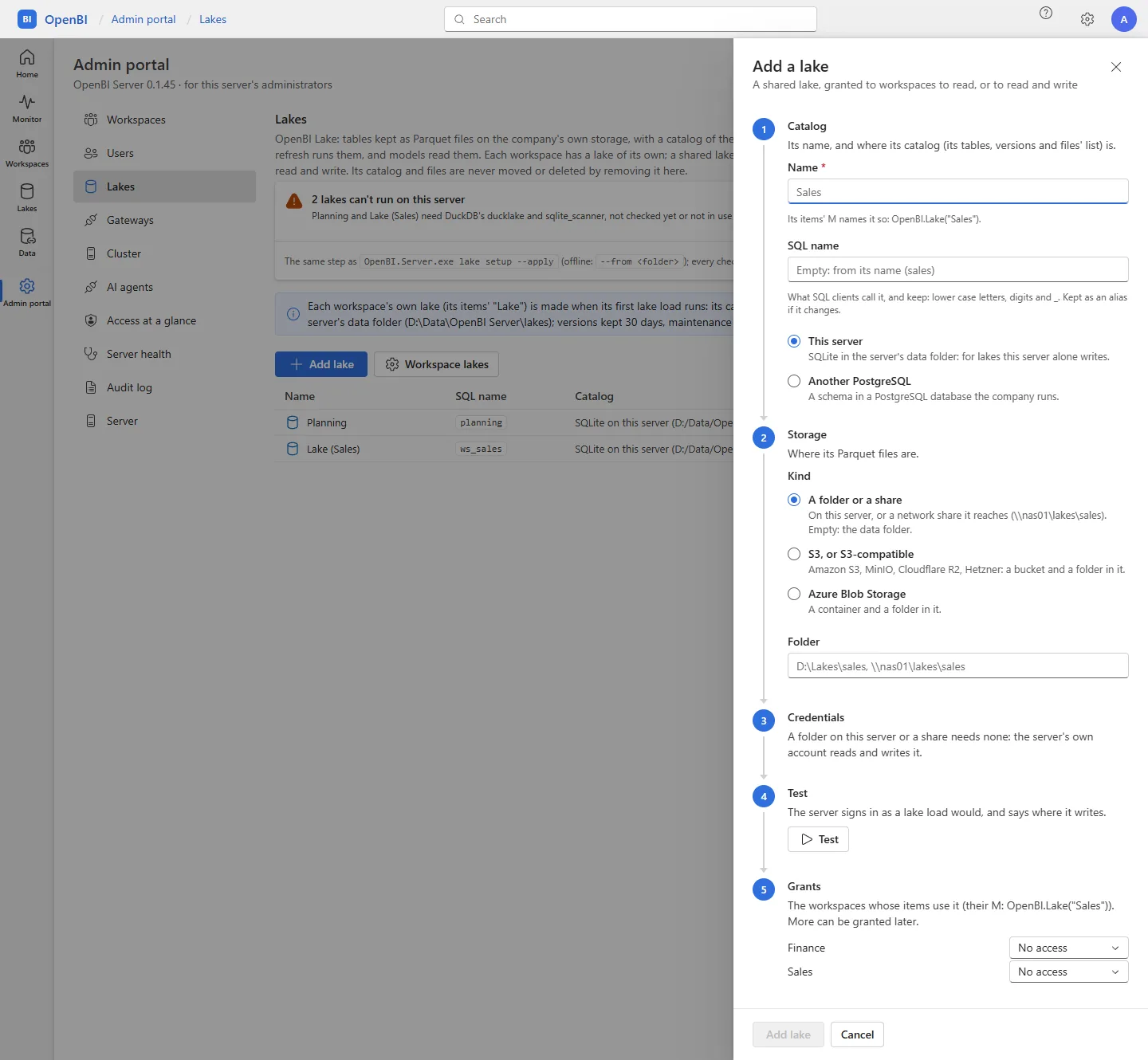
A lake’s address names its catalog and where its files are:
lake://folder/<path>- A lake in one folder of this server: its SQLite catalog and its files.
lake://sqlite/<catalog file>?data=<storage>- A SQLite catalog on this server, its files elsewhere: a share, or a bucket.
lake://postgres/<host>:<port>/<database>?schema=<schema>&data=<storage>- A catalog in PostgreSQL, for a lake written from several machines.
OpenBI.Server.exe lake add --name Sales --url "<lake://…>" --apply
OpenBI.Server.exe lake grant --name Sales --workspace "Finance"
OpenBI.Server.exe lake grant --name Sales --workspace "Sales" --write
OpenBI.Server.exe lake test --name Sales
A PostgreSQL catalog takes --catalog-user, and a bucket --storage-auth and --storage-user; their password and secret are read from the input, never given as arguments, and sealed on the server. Without --apply, lake add says where it would write and what it would sign in with. Every lake has a stable SQL name too, lower case, shown in lake list and on its page; lake rename changes a shared lake’s name, or a lake’s SQL name, and keeps the old ones as aliases, so projects and SQL clients that use them still find it. lake remove makes the server forget a shared lake, and its grants end; its catalog and files stay where they are.
Who may use a lake
- A workspace’s items write its own lake, and use the shared lakes granted to it as granted. A model’s refresh only reads, whatever the grant. DuckLake has no table permissions, so a grant is for the whole lake.
- A project that names any other lake, such as one on the developer’s computer, is refused before anything runs, saying which lakes it may use.
- People use their workspaces’ lakes as their role there allows: a workspace’s Contributors, Members and Admins as its items; its Viewers none. A lake has no row-level security, so Viewers see a lake’s data only through the models that read it, as those models’ roles show it. In the portal, the rail’s Lakes lists the lakes they may use, each with its tables, versions, loads and a table’s first rows: see The portal.
- The server’s administrators manage every lake, but read a lake’s data only as a member of a workspace that may.
Two more guards hold this in place:
- A reader role. A PostgreSQL catalog can have a login role that may only read the lake. A run that only reads signs in with it, so the catalog itself refuses its writes.
lake add --make-readerorlake setup-readermakes it; its password is random, sealed and never shown. New in 0.1.47 Two sign-ins share the work, as PostgreSQL wants it: a PostgreSQL administrator (--admin-user, its password read from the input) only creates the role, and needsCREATEROLE, not superuser; the lake’s writer, which owns the lake’s schema and tables, grants the role what it reads. Without--admin-user, the writer creates the role too, when it may. A step PostgreSQL refuses is named, with the sign-in that ran it and what it needs. On PostgreSQL 16 and later an administrator that isn’t a superuser changes the password only of roles it created, or was givenWITH ADMIN OPTION. - Read-only SQL. On the server, a model’s own SQL (a SQL partition, or M’s
DuckDB.Query) runs only when it is one statement that reads, and calls neither of DuckDB’s SQLite and PostgreSQL scanners (see An item’s own SQL). The refresh fails otherwise, and says to change it in OpenBI Studio.
The extension gate
New in 0.1.43 Lakes run on DuckDB’s extensions, which the server downloads once rather than ships. OpenBI Server checks them as its bill of materials checks what it ships, and refuses an extension with a known vulnerability until a server administrator accepts it. An engine on the server installs and loads no extension by itself: only those in the server’s own folder that passed.
Set them up
In the Admin portal, Lakes, Set up lakes, or on the server:
OpenBI.Server.exe lake setup --applyIt downloads six of DuckDB’s extensions, about 330 MB in all, from DuckDB’s own repository, extensions.duckdb.org, into the data folder’s duckdb\extensions. The server must reach that address once (behind a proxy, set it with netsh winhttp set proxy <proxy:port>).
| Extension | What it does here |
|---|---|
ducklake | The lake format itself: every lake load and every model that reads a lake. |
sqlite_scanner | A lake whose catalog is a SQLite file on this server, a server alone’s default. |
postgres_scanner | A lake whose catalog is in PostgreSQL, a cluster’s or one the company runs. |
httpfs | A lake whose files are on S3 or S3-compatible storage, Google Cloud Storage or a web address; and a lake whose files are encrypted, which it decrypts. |
azure | A lake whose files are on Azure Blob Storage. |
delta | DeltaLake.Table in a model’s M, lakes or not. |
DuckDB downloads over HTTPS only through httpfs, so httpfs itself comes first, over plain HTTP from DuckDB’s default address, its signature checked before it loads, as every extension’s is; the page marks it over HTTP. The other five then come over HTTPS. Until a lake needs them, the Lakes page shows this as a quiet note, not a warning.
A server without internet
New in 0.1.44 A server that can’t reach DuckDB’s repository gets the extensions from a folder, brought on a disk:
- On a machine with internet and OpenBI Server, export them for the offline server’s DuckDB and platform. Its
lake setup --fromdry run, or Install from a folder… on its Lakes page, says which. The export downloads the six over HTTPS, checks their signatures, looks the libraries they carry up in NVD, writes what it found beside them (openbi-lake-extensions.json), and shows that file’s fingerprint, its SHA-256. - Copy the folder to the offline server, and carry the fingerprint apart from it: an e-mail, a ticket, on paper.
- On the offline server, install from the folder with that fingerprint, on the command line or in the Admin portal, Lakes, Install from a folder….
OpenBI.Server.exe lake setup --export <empty folder> --duckdb v2.0.0 --platform windows_amd64 --apply
OpenBI.Server.exe lake setup --from <folder> --fingerprint <the export’s> --apply
DuckDB checks each extension’s signature before anything is installed: an unsigned or altered file, or one for another DuckDB or platform, is never installed, and nobody can accept it. The export’s NVD look-ups are used only when the fingerprint given is that file’s and each extension is the very file it saw. Without them nothing is looked up: each library is NOT-CHECKED-<LIBRARY>, and the extension is refused until a server administrator accepts that by name. The platforms are windows_amd64, osx_arm64 and linux_amd64.
The check
Once they are downloaded, the server reads the libraries each extension carries (OpenSSL, SQLite, libcurl and zlib, by their version strings in the file) and looks each version up in NVD, NIST’s vulnerability database. An extension that carries a library with a known vulnerability nobody has accepted is refused: it is moved out of the folder the engines load from, into duckdb\extensions-refused beside it. So is one whose libraries couldn’t be looked up, NVD not answering.
The Lakes page lists each extension with what it does, what it carries, its findings, and In use or Refused; each finding says what NVD says of it and where it could be reached on this server. Check again runs the check once more. A lake load, a refresh or a lake’s page that needs a refused extension says so before anything runs: which extension, the library in it and its finding, and how to accept it.
Checked every day
As the service starts, and every day after, it compares each extension’s SHA-256 with the one its last check recorded:
- An unchanged file keeps its answer, in use or refused, without asking NVD again.
- A changed or unknown file is checked again, and refused unless it is clean or the findings accepted for it still match.
- NVD not reached: nothing refused is let in, and nothing accepted and unchanged is refused.
Each node of a cluster checks its own folder. Run as administrator, sbom --verify runs the check too, and exits 2 while an extension is refused.
Accept findings
A refused extension can be put back to work as it is, with its vulnerabilities, until DuckDB rebuilds it: a server administrator accepts its findings one by one, by their ids, in one extension at a time, for those very files. The same finding in another extension stays open until it is accepted there too. Read what each finding says, and where it could be reached here, first.
- In the portal, Lakes: a refused extension’s Accept…, in its row, or Accept findings… for all of them. Each open finding is listed by extension, with what it touches here, and only those you tick are accepted, after a warning in red.
- On the server, name only the ones you accept, as the check prints them, separated by commas, and the extension they are accepted in:
OpenBI.Server.exe lake setup --apply --accept <finding,finding> --extension httpfsWithout --extension, the findings named are accepted in every extension the last check saw them in. When the check refuses something, it prints the command that would accept its open findings: copy only the ids you mean. Each acceptance is in the audit log: who, when, which findings, which file. A new download, or another DuckDB, is judged again.
What was refused on 2 November 2026
When we checked on 2 November 2026, NVD’s findings refused three of the six:
| Extension | Carries | Needed for |
|---|---|---|
sqlite_scanner | SQLite 3.38.1 | Lakes with a SQLite catalog: a server alone’s workspace lakes, and lake://folder and lake://sqlite lakes |
postgres_scanner | OpenSSL 3.6.0 | Lakes with a PostgreSQL catalog |
httpfs | OpenSSL 3.6.0 | Lakes on S3 or a web address, and lakes whose files are encrypted |
ducklake, azure and delta passed. NVD’s findings change, and DuckDB rebuilds its extensions: what your server’s own check says is what counts.
On the server, the scanners’ flaws are reached only through what the server itself attaches: an item’s own SQL may no longer call them (below), so a SQLite file or a PostgreSQL database a published item names never reaches them. A lake with a SQLite catalog reaches sqlite_scanner through the server’s own catalog files; a lake with a PostgreSQL catalog reaches postgres_scanner’s OpenSSL through its connection to that PostgreSQL.
Map backgrounds
New in 0.1.44 The background tiles of a report’s maps, and a page’s images, need none of DuckDB’s extensions. The engine fetches them with the operating system’s own web client: WinHTTP on Windows, the system’s libcurl on a Mac, each through the system’s proxy settings. A server with maps but no lakes needs no lake setup at all, and can leave refused extensions refused. What the tile server receives, and how to point maps at your own, is in Security.
An item’s own SQL
On the server, an item’s own SQL may not call DuckDB’s SQLite and PostgreSQL scanners: sqlite_scan, sqlite_attach, postgres_scan, postgres_scan_pushdown, postgres_attach and postgres_query. They would open a file or a database the item names, past the server’s file guard and the sign-in and TLS its administrator set, with libraries of their own. The refresh fails, in the Monitor and the model’s refresh history, with the way round it:
On OpenBI Server an item's SQL may not call sqlite_scan(): it opens a file or a database the item names, past the server's file guard and the sign-in and TLS its administrator set. Fix: read the database as a data source of the model (PostgreSQL.Database, with its Query option for a native query; Sqlite files: copy the table into a lake with a lake load in OpenBI Studio).The server’s own lake catalogs aren’t affected: the engine attaches them itself.
Refreshes and lake loads
A refresh runs the project’s lake loads first, then refreshes the model, which reads its lakes. Each lake load is one transaction per lake: all its tables land in one new version, or none does. It is an activity of its own in the Monitor (Lake load). The lake’s new version is signed by whoever asked for the refresh, by their e-mail address, or by the server’s role, such as OpenBI Server (scheduled refresh); never by the computer’s name.
- A lake load that fails fails the refresh, and the report keeps its last good data. It says why, in the lake’s and the table’s names, and what to do on this server.
- Two loads writing the same lake at once: the one that loses wrote nothing, and runs once more 30 seconds later.
- Versions kept for an audit: a lake keeps its versions for 30 days, and never expires those a kept refresh made or read, so a report’s numbers can always be traced to the lake data they came from.
Maintenance
Every night, at each lake’s maintenance time (02:00 by default, the server’s time), the server expires versions older than the lake’s retention (never the current one, nor those kept refreshes need), merges small files, and deletes files no version reads once they are 7 days old. Each run is a Lake maintenance activity in the Monitor. On a lake’s page, Maintain now shows a dry run first. An archived workspace’s own lake is left as it is, with its versions, until the workspace is restored; shared lakes are maintained as before.
OpenBI.Server.exe lake settings --name Sales --retention 30 --maintenance 02:00
OpenBI.Server.exe lake maintain --name Sales --dry-run
A lake made by an older DuckLake is never upgraded by itself: lake migrate --name <lake> upgrades its catalog once, keeping a copy of it first.
When maintenance fails
New in 0.1.47 A night’s maintenance that fails runs again within the six hours after its time, as its error says:
- An error only an administrator can put right, such as a DuckDB extension the server refused, the lake’s credentials, a lake no longer at its address, or a catalog of another DuckLake version: it runs once a night and is logged once, saying what it waits for. It runs again at once when the lake’s settings or credentials, or the acceptance of the extensions it loads, change.
- Any other error, such as the catalog or the storage not answering, or the engine taking too long: it runs again after 1, 5 and 15 minutes, then every hour.
The lake’s page says Failed, when, the error with what to do, and when it runs again; the Admin portal’s Lakes shows Maintenance failed beside the lake, and lake list says it too. The next night’s run comes as usual. (Before 0.1.47, a cluster’s node ran a failed maintenance again every minute for six hours.)
Backups
A backup is the lake at one version: its catalog, encrypted with your backup key, and the files that version reads, each copied once, as it is, and never written over, with each table’s rows and checksum. The files are not encrypted, so keep the target as closed as the lake’s own storage. It goes from your server to your own storage. Nothing goes to Norway Analytics.
| Where | Target |
|---|---|
| A folder or NAS, a disk of this server or a share it reaches | \\<file server>\<share>\<folder>, or a folder |
| Azure Blob Storage | az://<container>/<prefix>?account=<account> |
| Amazon S3 or S3-compatible storage | s3://<bucket>/<prefix>?endpoint=…®ion=… |
| Google Cloud Storage | gs://<bucket>/<prefix> |
Back up in the portal
Open a lake’s Backups page from the lake’s own page (the rail’s Lakes, then the lake, Backups), from its page in the Admin portal, or from a model’s settings, under Lakes. The server’s administrators manage every lake’s backups; a workspace’s Admins manage the backups of the lakes their workspace may write. A numbered path:
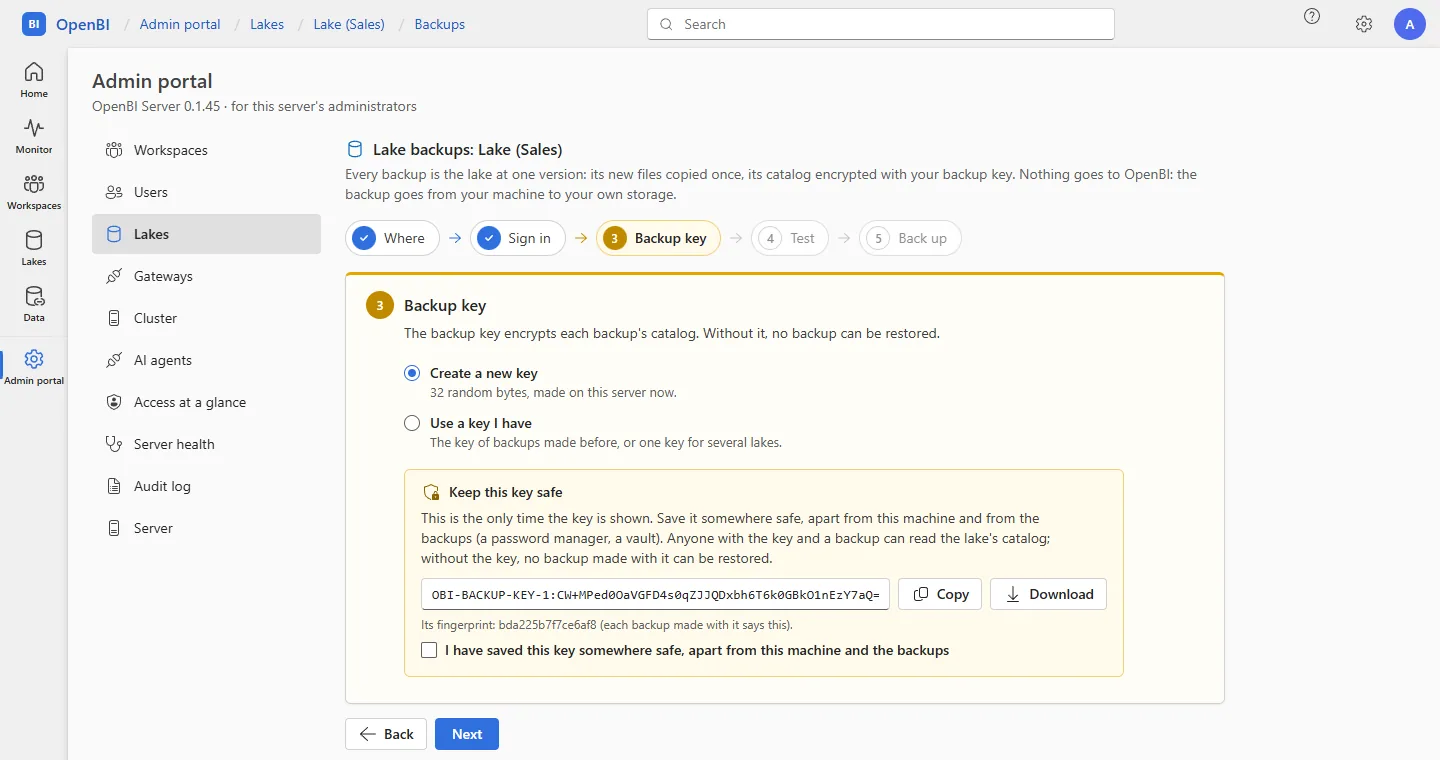
- Where: the kind of storage and its address. Folders and shares are the server’s administrators’ to choose.
- Sign in: how the server signs in there (a folder needs none: the service’s own account writes it). The secret is sealed on the server and never shown again. On Azure, best is a SAS that may read, write, create and list only, not delete, so the backup can’t remove what it wrote.
- Backup key: Create a new key (32 random bytes, shown once: save it somewhere safe, apart from this machine and the backups), Use a key I have, or Keep the key this server has. Without the key, no backup made with it can be restored.
- Test: the server signs in and lists what is there. Nothing is written.
- Back up: Back up now, and if you like Back up every day at a time, keeping as many as you say, with E-mail when a scheduled backup fails. Before the first backup outside this machine, it asks.
Below, the lake’s backups, newest first, each with Verify (the backup read where it is: its catalog decrypted, every file’s checksum, and restored apart, every table compared) and Restore…. Backups, verifies and restores are activities in the Monitor.
The daily schedule
A lake’s daily backup runs on the server (in a cluster, on the node that holds the cluster’s jobs), then deletes the older backups past what you keep, and only the files no remaining backup needs. A backup that fails runs again as a failed maintenance does (see When maintenance fails), and the night’s first failure is e-mailed, saying when it runs again (see Alerts); a backup the server stopped halfway runs again once. A backup and the lake’s maintenance never run at the same time.
Restore
A restore always makes a new lake from a backup, next to the one you have, and never writes over a lake. Its files are copied to the new lake’s storage, its catalog is decrypted with your key, and every table is checked against the backup. A backup can be restored on any machine that has the key.
On the server
OpenBI.Server.exe lake backup-key new --out <file>
OpenBI.Server.exe lake backup --name Sales --to "az://backups/openbi?account=<account>" --key-file <file>
OpenBI.Server.exe lake backups --name Sales --to "az://backups/openbi?account=<account>"
OpenBI.Server.exe lake verify --name Sales --to "az://backups/openbi?account=<account>" --backup <id> --key-file <file>
OpenBI.Server.exe lake restore --name Sales --from "az://backups/openbi?account=<account>" --backup <id> --to "lake://folder/E:/restored/sales" --key-file <file>
OpenBI.Server.exe lake backup-prune --name Sales --to "az://backups/openbi?account=<account>" --keep 7 --keep-days 30
OpenBI.Server.exe lake backup-schedule --name Sales --to "az://backups/openbi?account=<account>" --key-file <file> --time 01:00 --keep 7 --emails kari@norwayanalytics.no
backup-key new writes a new key once to a file you then keep apart from the server and the backups. The target’s secret (here, a SAS) is read from the input. restore refuses an address where a lake already is, unless you add --replace. backup-schedule --name <lake> alone shows the schedule and its last run; --off stops it. Every option is in the Server command line reference.
Frequently asked questions
Where is a lake’s data?
On your storage only: the server’s disks, your shares, or your own S3, Azure or Google Cloud storage. The catalog is in SQLite on the server or in your PostgreSQL. Nothing of it is on Norway Analytics’ machines.
We lost the backup key. Can Norway Analytics help?
No. Only you hold the key, and without it no backup made with it can be restored. For a daily backup, the server keeps the key sealed and goes on backing up, but it is shown only once: make a new key, back up again, and keep it safe this time.