Alerts
OpenBI Server e-mails people when something needs their attention: a value on a report crosses their threshold, a scheduled refresh or a lake backup fails, or a new computer joins a gateway. Every alert goes out through your own e-mail, set up in OpenBI Accounts.
What alerts there are
| Alert | When | Who gets it |
|---|---|---|
| Data alert | A card’s or a value’s number goes above or below the threshold someone set | The person who set it, only |
| Failed scheduled refresh | A scheduled refresh of a model fails | As its schedule says: the model’s publisher, the workspace’s contacts, more addresses |
| Failed lake backup | A lake’s daily backup fails | The addresses its backup schedule names |
| New gateway member | A computer joins an OpenBI Gateway | The gateway’s admins and the server’s administrators |
Data alerts
As in the Power BI service: anyone who can open a report sets alerts on it, for themselves, Viewers too.
- Open the report and choose Alerts in its toolbar. The Alerts pane lists the page’s cards and values On this page.
- Choose Set alert on one. The pane shows its value now.
- Choose the Condition (Above or Below), the Threshold, and E-mail me: At most once an hour or At most once a day. Add a note for the e-mail if you like, then Save.
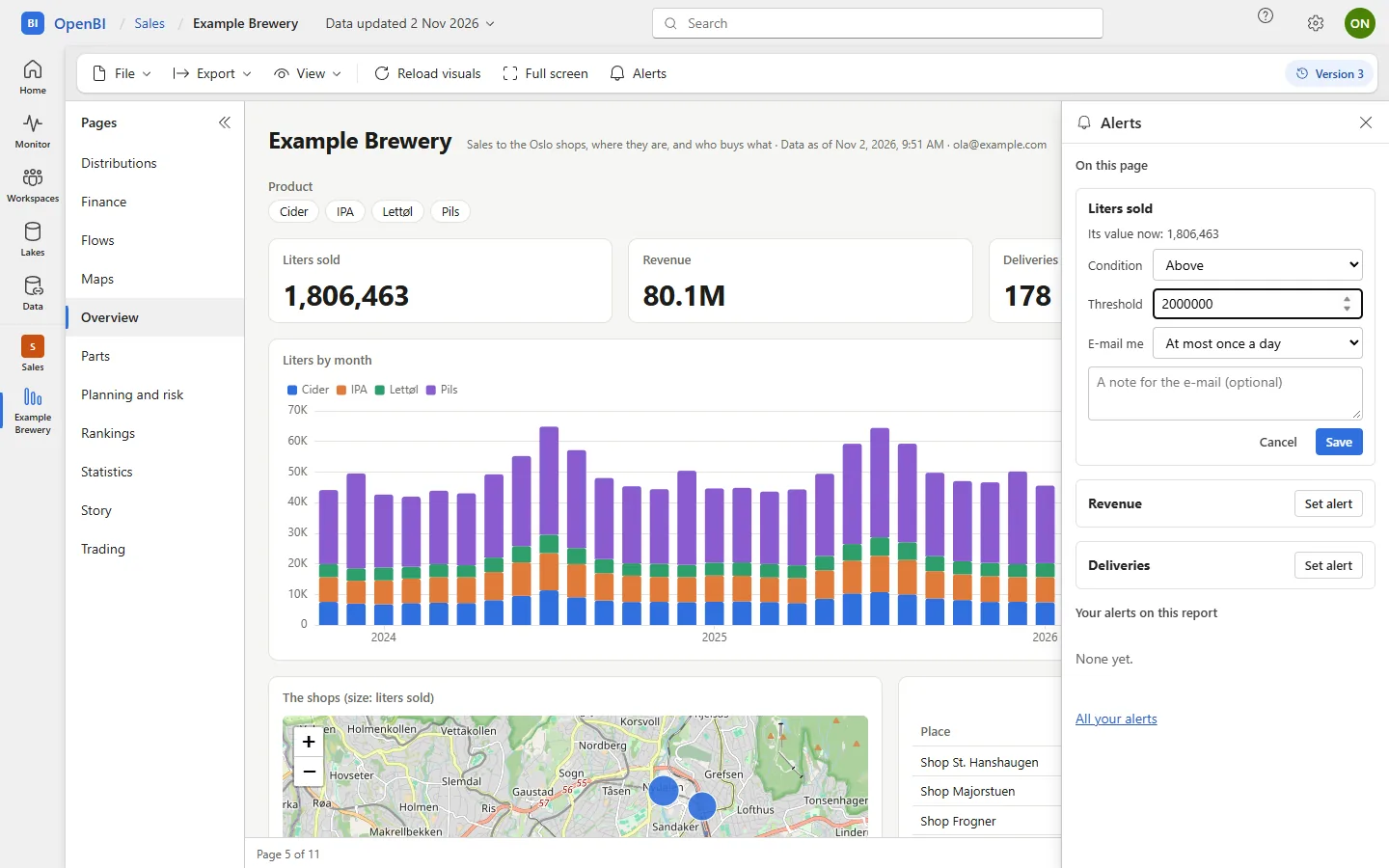
An alert watches a card or a value in text: a visual that shows one number. It is set on the report’s current version.
When it is checked
- After every refresh of the model, and every new version of it.
- For a live model, every hour.
The value is read as the person sees the model: their roles, and for a live model, their access to it. When the value is above (or below) the threshold, they get an e-mail with the value, the threshold, their note and a link to the page, then no other for that alert within the hour or the day they chose. Someone who loses access to the report gets no more e-mails: the alert says why on their Alerts page.
Your alerts
Each person’s alerts are theirs alone: no one else sees or changes them. Find them in the report’s Alerts pane, under Your alerts on this report, or on the Alerts page, from Settings or the account menu: what each watches, its last value and check, and why it couldn’t be checked if it couldn’t. Choose Turn off, Turn on or Remove.
Setting, changing, removing and sending an alert are in the audit log.
Failed scheduled refreshes
When a scheduled refresh fails, the server e-mails whom the model’s schedule names: by default the person who published the version, and on request the workspace’s contacts and more addresses. The e-mail says why it failed and links to the model’s refresh settings. A refresh started by hand isn’t e-mailed: whoever started it sees it fail.
The schedule is set in the model’s settings, or on the server:
OpenBI.Server.exe schedule set --workspace "<name>" --item "<item>" --notify-contacts --emails kari@norwayanalytics.no,ola@norwayanalytics.no--no-notify-owner leaves the publisher out. More on schedules in Refresh and schedules.
Failed lake backups
A lake’s daily backup e-mails the addresses its schedule names when it fails: E-mail when a scheduled backup fails on the lake’s Backups page, or --emails on the server. From 0.1.47 a failed backup runs again by itself, and only the night’s first failure is e-mailed, saying when it runs again; the later ones are in the Monitor. A backup you run by hand isn’t e-mailed. See Lakes and lake backups.
OpenBI.Server.exe lake backup-schedule --name <lake> --to <target> --key-file <file> --emails kari@norwayanalytics.noNew gateway members
When a computer joins an OpenBI Gateway, the gateway’s admins and the server’s administrators get an e-mail: which gateway, who added it, when, its key’s fingerprint and the workspaces it serves. This one needs OpenBI Accounts on the server: with your own sign-in provider it isn’t e-mailed, and the audit log records it instead. See The OpenBI Gateway.
How they are sent
- From your own mailbox, through OpenBI Accounts’ e-mail: Microsoft 365 or your SMTP server. Nothing goes through Norway Analytics.
- Each e-mail is recorded by OpenBI Accounts: sent, or failed and why.
OpenBI.Server.exe accounts user mail --email <e-mail>lists the e-mails a person was sent and what came of each. - A copy for support:
accounts mail set --copy-to <address> --copy-kinds alert,refresh-failed,backup-failedsends a copy of these kinds to a support mailbox too. - On a cluster, the node that holds the cluster’s jobs runs the schedules and the live models’ alerts, so each is sent once.
Frequently asked questions
My alert holds, but no e-mail came. Why?
Open your Alerts page: it shows the alert’s last check and value, and why it wasn’t sent if it wasn’t (e-mail not set up on the server, the e-mail failed, or you no longer have access). An alert e-mails at most once an hour or once a day, as you chose.
Can I set an alert for someone else?
No. An alert is checked as its owner sees the model, with their roles, so each person sets their own.