Data sources and credentials
A published model never brings credentials with it. OpenBI Server signs in to each of a model’s data sources with credentials of its own, set once per model by its workspace’s Members or Admins, sealed on the server, and used for every version of the model.
How it works
- Per model and source. The engine lists the sources a model reads; each gets its own credentials on the server, kept for every version of that model.
- The server’s, not a person’s. A refresh, or a live report, signs in with what is set here, whoever started it.
- Who may: the workspace’s Members and Admins, and server administrators. The server’s own Windows account is the server administrators’ alone to give (below).
- In the audit log: every change and every test: who, which source, how it signs in. Never the secret.
Set credentials in the portal
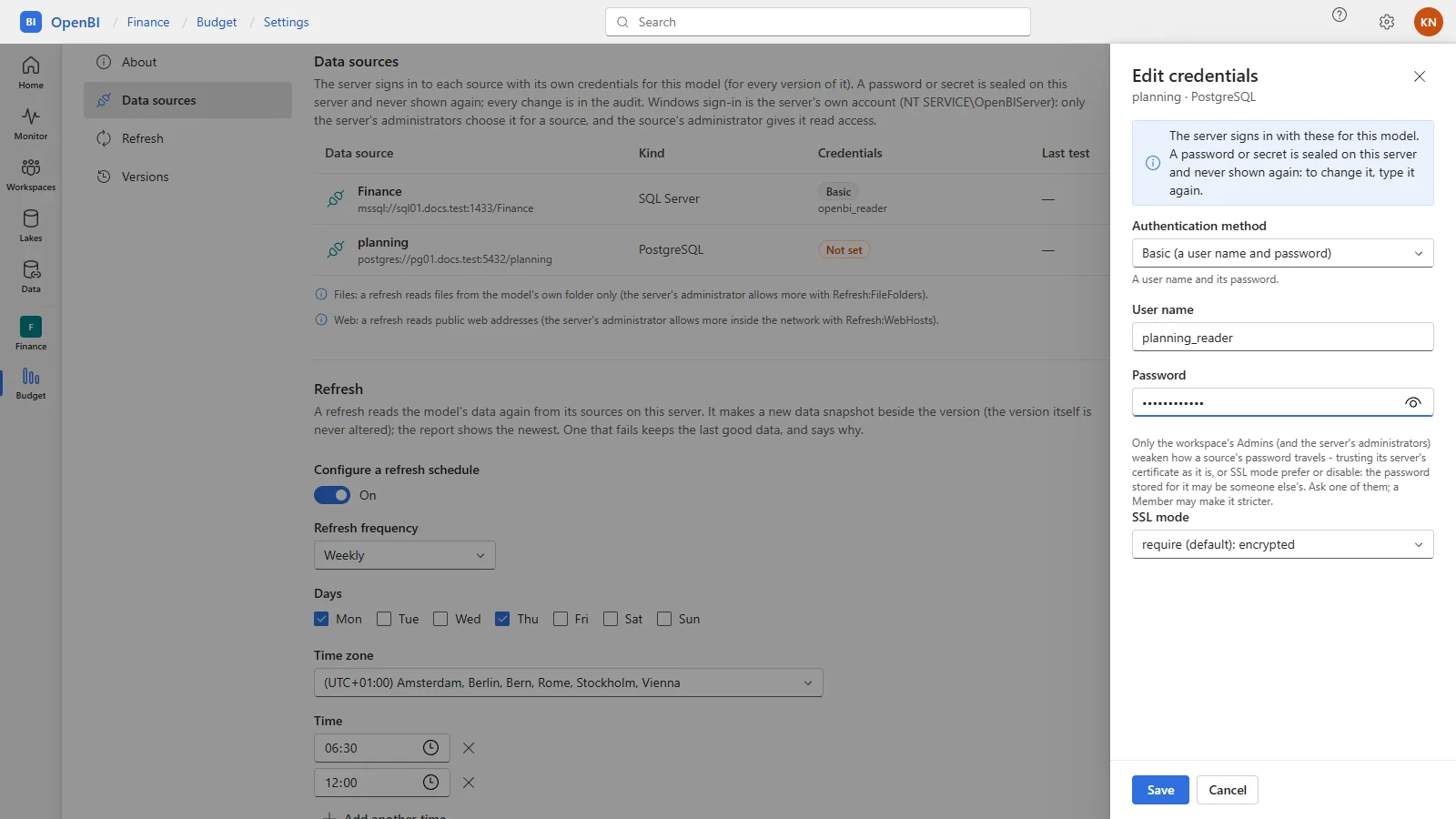
- In the workspace, the model’s … menu, Settings, then Data sources. Each source is listed with its Kind, its Credentials (Not set, or how it signs in) and its Last test. The rail’s Data lists the sources of every model you look after, in every workspace, each opening here: see The portal.
- Edit credentials: choose the Authentication method, then fill in what it asks for, such as User name and Password, and Save. A password or secret is sealed on the server and never shown again: to change it, type it again.
- Test connection (the play button) signs in now, as a refresh would, and says what the source answered.
Remove credentials, at the bottom of the drawer, takes them away: the model’s refreshes, or its live report, stop until someone sets them again.
Authentication methods
| Method | For | What it is |
|---|---|---|
| Basic (a user name and password) | SQL Server, PostgreSQL, MySQL, Analysis Services, ODBC, ADBC, most others | A database account for the server. Give it read access only. |
| Windows (the server’s own account) | SQL Server, Analysis Services, ODBC, most others | The service’s account, NT SERVICE\OpenBIServer. The source’s administrator gives that account read access. Server administrators only choose it: it reaches whatever that account may, for every version of the model. |
| Key, Connection string, Anonymous, Shared access signature | S3 and Azure storage, ODBC, and others as their kind takes them | As the source asks. Azure Storage takes the ways Power BI offers (from 0.1.46): anonymous, an organizational account, a service principal, the account key or a shared access signature. |
| Driver options | ADBC | The driver’s own options, sealed as a secret. |
| Service principal (Microsoft Entra) | The Power BI service, Fabric, Azure Analysis Services; Azure Storage (from 0.1.46) | An app registration: tenant, client id and secret. |
| Organizational account (Microsoft Entra) | The same | Sign in, then Sign in with a code: you enter a code at Microsoft’s sign-in page, on any device, with the account the server should use. The server keeps that sign-in sealed and renews its access itself. |
The drawer offers only the methods the source’s kind takes.
How the password travels
The engine on the server encrypts every connection that carries the server’s stored credentials, and a model’s own connection settings can’t weaken that on the server.
- SQL Server and ODBC: the source’s certificate is verified. A server whose certificate is of its own making (self-signed) is trusted only with Trust this server’s certificate in its credentials: the connection stays encrypted, but its server isn’t verified.
- PostgreSQL and MySQL: TLS is required. The credentials’ SSL mode can make it stricter, verify-ca or verify-full, or weaker, prefer or disable, with which the password may travel in clear.
| Change | Who may |
|---|---|
| Make a source stricter | Whoever sets its credentials: the workspace’s Members and Admins |
| Weaken it: trust its certificate, or SSL mode prefer or disable | The workspace’s Admins and server administrators only: the password stored for it may be someone else’s |
| Any change to a source that signs in with the server’s own Windows account | Server administrators only |
Each change is in the audit log. Sources set up before OpenBI Server 0.1.38 kept working when it came: SQL Server sources with credentials were set to trust their certificate, and a PostgreSQL or MySQL model’s weaker SSL mode was kept. Look them over, and make them stricter where you can. Sources set up since are strict.
How credentials are stored
- Sealed for the machine: with Windows’ DPAPI on Windows, with a key of the Mac’s own on a Mac, and with the cluster’s key in a cluster, in the server’s records.
- Never shown again, in a page, an answer of the API, a log or the audit.
- Used only by the engine that signs in, handed to it in its environment, never on its command line or in a file.
- Microsoft Entra: the server gets the access tokens, renews them a quarter of an hour before they expire, and hands the engine a token, never the secret.
From the command line
The same, on the server, by the same rules. A secret is typed hidden or piped in, never given as an argument:
OpenBI.Server.exe datasource list --workspace "Sales" --item "Sales"
OpenBI.Server.exe datasource set --workspace "Sales" --item "Sales" --source "<name or key>" --auth password --user report_reader
OpenBI.Server.exe datasource set --workspace "Sales" --item "Sales" --source "<name or key>" --sslmode verify-full
OpenBI.Server.exe datasource test --workspace "Sales" --item "Sales" --source "<name or key>"
OpenBI.Server.exe datasource clear --workspace "Sales" --item "Sales" --source "<name or key>"--authtakeswindows,password,key,connectionString,anonymousorservice-principal(with--user <client id>and--tenant <id>). An organizational account is signed in from the portal only.--trust-certificate yes|noand--sslmode require|verify-ca|verify-full|prefer|disable, alone, change only that.datasource testruns here, as the account you run it as: a Windows sign-in is yours, not the service’s. The portal’s Test connection tests the service’s.
What a refresh may read
So that a model published to one workspace never reads another’s files, the server’s own, or its internal network for someone to see in a report, a refresh on the server is guarded:
- Files: only from the model’s own folder and the folders IT allows (
Refresh:FileFolders), links and junctions followed and checked. GrantNT SERVICE\OpenBIServerread access to those folders. Cloud storage that DuckDB reads itself (S3, Google Cloud Storage, Azure) is read only in the buckets and containers the model’s own data sources name, with the credentials set for them here (from 0.1.46; before, it needed the file guard off). PostgreSQL and MySQL that DuckDB attaches itself still need the file guard off (Refresh:FileGuard). - The web: public addresses only. The server itself, its networks (
10.x,172.16–31.x,192.168.x,169.254.x,localhost, names without a dot,.local) and names that lead to them only for the hosts IT lists (Refresh:WebHosts), every redirect checked the same way. - No Python or R runs in a refresh on the server.
The model’s Data sources section says what the guards allow. Settings shows how IT sets them.
Live connections
A model that is a live connection to Analysis Services, the Power BI service or Fabric asks its own server, with the credentials under Data sources. Its settings have Live connection in place of Refresh. Contributors, Members and Admins see what the connection sees. Under What the workspace’s Viewers see:
| Choice | Means |
|---|---|
| Viewers don’t open it (the default) | They are told why, and to ask an Admin. |
| Each Viewer as themselves | The server asks as the person (Analysis Services’ EffectiveUserName, with their e-mail): the source’s own roles decide what they see. The connection’s account must be allowed to act as others: an Analysis Services administrator; in Power BI, a model’s writer. Test as a Viewer checks it with a Viewer’s address. |
| Everyone in this workspace sees everything this connection sees | A workspace Admin’s decision, in the audit log. |
OpenBI.Server.exe live --workspace "Sales" --item "Sales live" --viewers as-viewerAnswers are kept 24 hours per person asked as; Reload visuals asks the source again.
Through a gateway
Files that only a machine in your own network reaches, an Excel workbook on a notebook or a folder on a file server, are read by OpenBI Gateway on that machine. Point the model at it under Gateway connection in its settings: see Point a model at the gateway.
Frequently asked questions
Do we set credentials again after each publish?
No. They belong to the model, for every version of it, until someone changes or removes them.
The model lists no data sources
It reads none that needs a sign-in: files in its own folder and data published with it need none.
A SQL Server source is refused: its certificate isn’t trusted
Give the SQL Server a certificate the server trusts, or, for a server on a network you control, tick Trust this server’s certificate in its credentials (a workspace Admin or a server administrator).