The licence
An OpenBI Server licence is for one domain. The server checks it with Keygen, the licensing service Norway Analytics uses, and keeps a signed licence file that works offline for 14 days. This page says exactly what that check sends, what happens when it can’t be made, and how seats are counted.
One licence per domain
- A domain and its subdomains. A licence for norwayanalytics.no covers bi.norwayanalytics.no and accounts.norwayanalytics.no. The server, and OpenBI Accounts, refuse any name no licence on the server covers.
- Another domain needs its own licence. A server that serves two companies’ domains holds two licences, and each workspace belongs to one of them.
- Its servers. A licence from before seats is for one server: activating it while it is in use on another is refused, so free it there first (Move to another server). A seat licence may be active on up to five servers, such as a cluster’s nodes, which share its seats; a server holds one seat licence.
- A licence may name its domains. A seat licence names the domain it was bought for, and any licence may be issued for given domains only: it then activates for one of those and refuses any other. A seat licence’s domain is changed in Billing: see Change domain.
Add a licence
Buy one on the server’s setup page, and the server adds it by itself (see Buy OpenBI Server). With a key you have, three ways, all as an administrator on the server:
- The setup page, at
http://localhost:5780/on the server itself: under I have a license key, your server’s web address and the licence key, then Add. The address may be typed or pasted, as when buying (see Your server’s web address). The page is there without a sign-in only until sign-in is set up; after that, like every page, it asks for one, and licences are the command line’s. - The command line, which takes the domain exactly as given. Without
--keyit asks for the key, hidden, so the key stays out of your command history:OpenBI.Server.exe domain add norwayanalytics.no - When installing on Windows:
msiexec … DOMAIN=norwayanalytics.no LICENSE_KEY=<licence key>, as Install on Windows shows.
The server asks Keygen to check the key for OpenBI Server and this machine, activates the machine for the domain, and receives a licence file: the licence as Keygen signed it, encrypted for this key and machine. The server checks Keygen’s signature itself, so the file can be trusted offline and can’t be edited. The key is kept sealed for the machine in the data folder, readable by the service and administrators only.
See its state
OpenBI.Server.exe domain list
OpenBI.Server.exe doctor
domain list shows each domain’s state and what it means, the machine’s id at Keygen, and until when the current licence file holds. Server administrators see the same in the portal: Settings (the gear), Server and license, under Licensed domains.
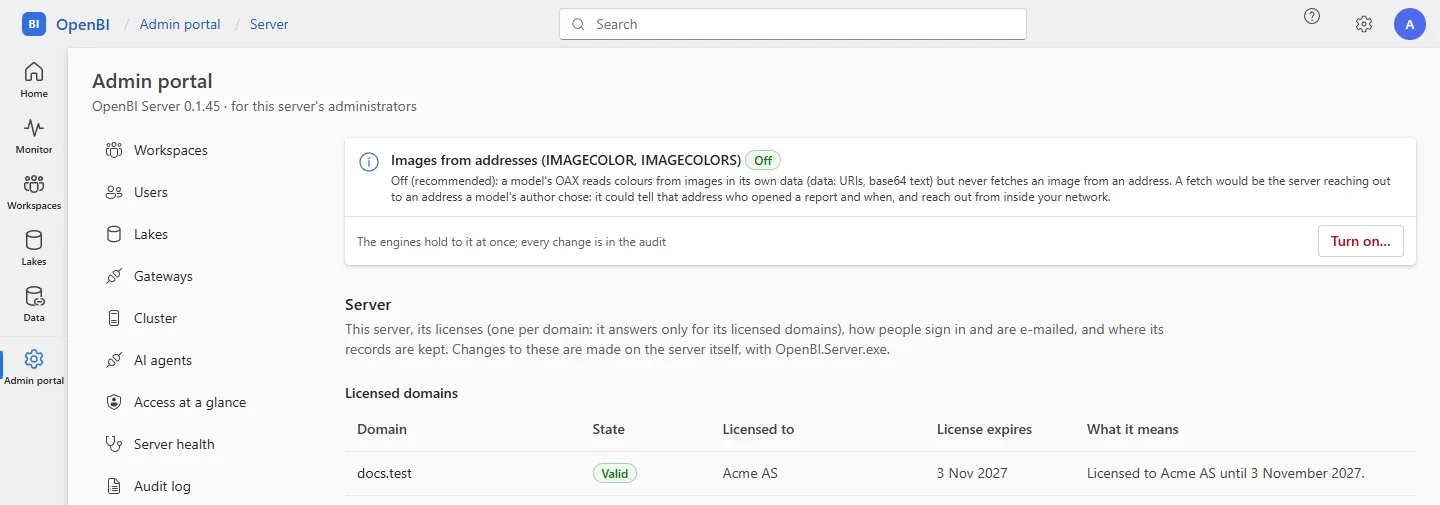
What each state means
| State | When | The server |
|---|---|---|
| Valid | The licence is current and its file fresh | Everything works. |
| Grace | The licence expired, or Keygen hasn’t been reached since the licence file ran out: for 14 days. Never after a free trial, which ends on its day | Everything still works. doctor, domain list and the admin portal say why, and by which date to act; the server’s log says so too. |
| Restricted | After the grace period, at the end of a free trial not bought, or at once when the licence is suspended | Reports still open, with everyone’s access as before. Refreshes, on demand or scheduled, are refused, with the reason. |
| Unlicensed | Never activated, or the licence file is another machine’s or domain’s | The domain isn’t served: a visitor reads “<name> is not one of this server’s licensed domains.” The command line on the server itself still works (domain add), and so does the setup page until sign-in is set up. |
What the check sends
Only to Keygen, over HTTPS, at api.keygen.sh. The key travels inside the request, never in an address.
- When a domain’s licence is activated on the server: the licence key, the domain, the server’s machine name, its platform (operating system, its version and processor type) and the machine fingerprint.
- Every six hours after that, while the server runs: a heartbeat with the licence key and the id Keygen gave the server at activation, which brings back a new signed licence file. If Keygen had freed the server in the meantime (its heartbeat stopped for too long), the server activates again, sending what activation sends.
- When a domain is removed: the licence key and the server’s id at Keygen, to free the licence.
- With every request: the version of OpenBI Server and, as with any connection, the server’s public IP address.
The fingerprint is an HMAC-SHA256 hash of the operating system’s own machine id (Windows’ MachineGuid, a Mac’s hardware UUID), never the id itself. It tells your server from another machine, and says nothing about people.
Never sent: your data, your reports, your workspaces, or the names or addresses of the people who sign in. A seat licence’s count of them goes to the seller’s billing service as a number, never to Keygen (see What the server sends to the seller). OpenBI.Server.exe refresh, alone, runs the six-hourly check at once.
Offline
- The licence file holds for 14 days from when Keygen issued it. A running server fetches a new one every six hours, so it normally has close to 14 days in hand.
- When Keygen can’t be reached (the internet down, a firewall, a proxy), the file held stands, and everything works until it runs out.
- Then 14 days of grace: everything still works, and the state says to let the server reach api.keygen.sh by a date.
- Then restricted, until the server reaches Keygen again: at its next check it gets a new file and is valid again.
The server compares dates with its own clock, and a clock set back counts as the latest time it has seen. doctor warns when the clock is more than five minutes off.
When the licence expires
The server works on for 14 days of grace after the licence’s end date, then is restricted: reports still open, refreshes stop. A seat licence runs as long as its subscription is paid, to 3 days past each paid month or year (see Billing); a licence from before seats is renewed where it was bought. The server picks up the renewed licence at its next check, or at once with:
OpenBI.Server.exe refreshA suspended licence is restricted at once; ask your OpenBI seller why.
Move to another server
- On the old server, free the licence:
OpenBI.Server.exe domain remove norwayanalytics.no - On the new server, add it:
domain add norwayanalytics.no.
If the old server is gone and can’t free it, ask your OpenBI seller to free the licence. The same goes for a server whose Windows is reinstalled: it has a new machine id, so Keygen sees a new machine. Free the licence first, or ask your seller, then add it again.
Seats
OpenBI Server is sold per seat (see Buy OpenBI Server). A seat licence says, signed, how many seats it gives; the server counts the people who take them, and stops new people at the limit. A licence from before seats, an annual licence for one server, has no seat limit, as before, and nothing is counted against it.
Who takes a seat
Someone who can sign in to the server, each e-mail address once:
- everyone in OpenBI Accounts who isn’t disabled. An invitation not yet used holds its seat until it is ended;
- every open workspace’s members, and the server’s administrators;
- with your own sign-in provider, such as Microsoft Entra ID or Okta, also whoever signed in within the last 90 days.
Disabling someone frees their seat at once. The count is made on the server, from its own records; only the number leaves it (see What the server sends to the seller).
When every seat is taken
New people stop; nobody already in is cut off. Refused until seats are added or someone is removed: Invite, a workspace’s Add people, enabling someone, making someone a server administrator, Import people, the command line’s accounts user invite, workspace member add and admin add (no option overrides it), and a newcomer’s first sign-in through your own provider. In the Admin portal’s Users, a server administrator who invites someone then is offered one more seat there and then; anyone else is told to ask a server administrator. Seats are taken one at a time, so two administrators can’t both take the last.
A licence with true-up, for enterprises, lets people in beyond the seats bought, and counts them.
See the seats
OpenBI.Server.exe license seatsIt says how many seats are in use, of how many, and counts only, never a name. In the Admin portal, Overview and Billing show “12 of 15 seats in use”, amber from 90 % and red when every seat is taken. A seat licence active on several servers shares its seats among them, and each shows the seats in use on all.
Frequently asked questions
What if Keygen is down?
Nothing happens at once: the licence file in hand holds for up to 14 days, then 14 days of grace. Reports never stop opening because of the licence check.
Why is the machine name sent?
So that Keygen, and Norway Analytics when you ask for help, can tell which of your servers holds which domain’s licence: freeing the right one when you move.
Which servers count?
Each machine that serves a domain holds that domain’s licence: one server, or each node of a cluster. A seat licence is the same key on every node, up to five, and its seats are shared; a licence from before seats is one per node. A machine running only OpenBI Gateway needs no licence of its own, takes no seat, and works while your server’s licence allows refresh.