OpenBI

New in OpenBI Studio and OpenBI Server: OpenBI Lake

Your own data lake. No capacity to rent.

Your company’s data as open Parquet files on your own disks or cloud storage, with a catalog that remembers every version. Power Query fills it, your reports read it, and it backs up to the cloud account you already have.

Transcript

This is OpenBI Lake. Your company's data, kept as open files on your own disks or your own cloud storage, with a catalog that remembers every version. Power Query fills it. Your reports read it. And it backs up to the cloud account you already have. No capacity to rent: everything runs on machines you own.

Parquet · Every version kept · Bronze, silver, gold · Azure, S3, Google Cloud, NAS · 1

A hillside above a still lake at dusk: three stone-rimmed basins step down the slope, copper-brown water at the top fed by five thin streams of tinted light, pale silver water in the middle, glowing gold water at the bottom; a golden channel runs from the gold basin to a dark timber house on the shore with lit windows, and small blue lights rise from the house to a soft glowing cloud.

Open files, on your own disks.

Every table is Parquet, the open column format other tools read too. Nothing is locked in a format of ours.2

A catalog that remembers.

Each load is a new version, signed by whoever made it. Read any table as it was, and go back.3

On machines you own.

A laptop, a Mac mini, a cluster. OpenBI hosts nothing: the lake lives where your machines and your storage are.

What a lake is

One place for your data.
Every version kept.

A data lake is where a company’s data lands before it becomes reports: the raw exports, the cleaned tables, the figures the reports read. OpenBI Lake keeps it as plain files, with a small catalog beside them.

Transcript

What is a data lake? It is one place where your company's data lands, kept in an open format that any tool can read: Parquet files. Beside the files sits a catalog, a small database that remembers every change as a new version, so you can always go back. Why did we build one? Because loading data and reading reports should not fight over the same machine. One company we work with spent about ninety percent of its Fabric capacity on preparing data, and a single report was enough to cause an outage. With OpenBI Lake, the loads run on your own machines, and your reports keep answering.

  • Parquet files.

    Tables are stored as Apache Parquet, an open column format. Any tool that reads Parquet reads your data.4

  • A catalog.

    A small database keeps the tables, their columns and every version: SQLite on one machine, PostgreSQL for a team or a cluster. The open DuckLake 1.1 format.2

  • Versions.

    Every load is one version: who, when, what changed. Read a table as it was; restore a version as a new one. History is never rewritten.3

  • Where it lives.

    A folder on your computer, a NAS, Amazon S3 or S3-compatible storage such as MinIO, or Azure Blob Storage. Encrypted files when it lives off your machine.

  • Power Query writes it.

    A query’s destination is kept in its M, as Microsoft Fabric’s Dataflow Gen2 keeps one. Replace, append, or only the periods that changed.

  • Your reports read it.

    A model reads the lake like any source, every table at one version per refresh, or straight from the lake in Power BI’s Direct Lake shape.5

Why OpenBI has a lake

Loads and reports stop competing.

In Microsoft Fabric, refreshes, dataflows and report queries all draw on one capacity. When it is overloaded, Fabric first delays and then rejects the interactive requests: the reports.6

One company we work with runs Fabric on an F64 capacity. About 90 % of it went on loading and transforming data, and one report was enough to cause an outage.7

OpenBI Lake runs the loads on your own machines, outside any shared capacity, and reports read the lake at a fixed version, so a load in progress never hands them half-old, half-new tables.5

One shared capacity, as that company described it

The rest, about 10 %, for everything else: the reports included.7

With OpenBI Lake

Two jobs, two places. Neither waits for the other.

The top basin at dusk: murky copper-brown water churning inside a stone rim, five thin streams of differently tinted water - teal, violet, rose, green and cream - running down the hillside and pouring in over its edge.

Bronze

Raw data lands as it arrives.

Exports, files, databases: each source flows into bronze unchanged. A daily file is appended. Nothing is cleaned yet.

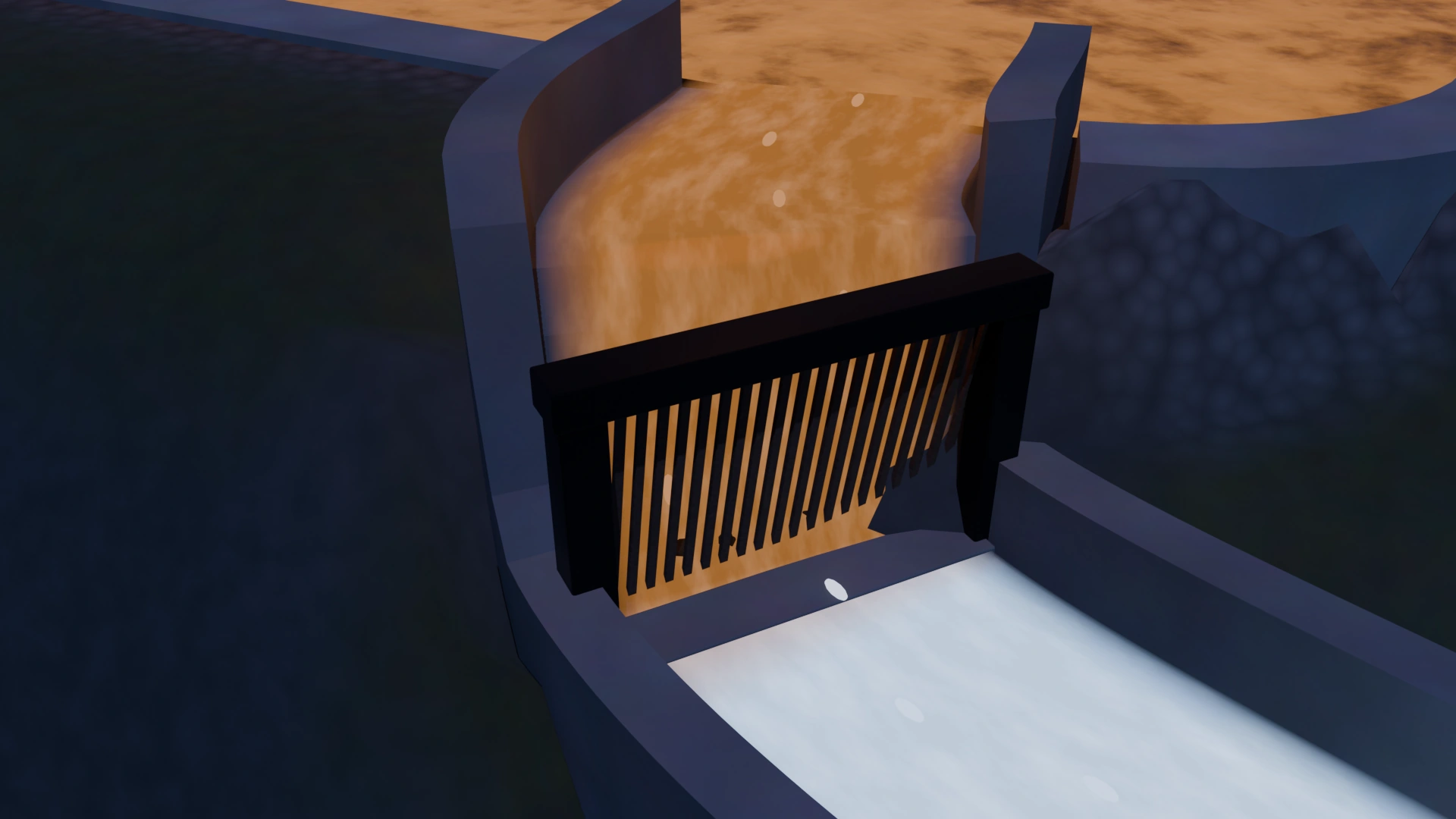
Close on a stone channel at dusk: murky copper-brown water spills down a step and runs through a screen of dark wooden slats, and comes out the other side clear and pale silver, a few dark specks held back on the slats.

Power Query

Cleaned on the way down.

Your queries fix the types, trim the text, drop duplicates and broken rows: the same Power Query M as in Power BI, run by OpenBI’s own engine.

A calm basin of clear, pale silver-blue water in a stone rim at dusk, soft light rippling on it; beyond, a smaller gold basin and the lit windows of a dark timber house by the lake.

Silver

Clean, typed, one row per fact.

The data you trust. Replaced at each load, or only the periods that changed.

A basin of glowing golden water at dusk, a stepped channel bringing water into it from the left; from its far side a narrow golden channel runs down toward a dark timber house with warm lit windows.

Gold

Shaped for your reports.

Sales by month and region, ready for a model to read.

A study at dusk: an oak desk under a window looking out over a still lake, a laptop showing a report of gold bars, a small silver computer with a soft blue light under it, a white desk lamp and a mug; a thin golden line of light arrives at the computer from the right.

Your reports

Read at one version.

A refresh reads every lake table at one version and records which. The numbers can always be traced to the data they came from.5, 8

Bronze, silver, gold

Three layers.
One flow.

Bronze stores everything exactly as it arrives. Silver fixes errors, standardizes formats and removes duplicates. Gold is organized for reports. In OpenBI Lake the layers are a lake’s schemas, filled by Power Query, one load at a time.9

Transcript

The data flows through three layers. Bronze is the raw data, exactly as it arrives. Silver is that data cleaned by Power Query: the right types, no duplicates, no broken rows. Gold is shaped for your reports. Each load is one transaction: all of its tables land in one new version, or none of them do. A load that fails writes nothing.

The flow from bronze through the filters to silver and gold, in a 3D render made for this page.8

Sources

A daily export, a database, files in a folder or a bucket.

Bronze

bronze.orders

Raw, as it arrives. Append: each load adds its rows.

1,073 rows the first day, 9 more the next

Silver

silver.orders

Clean and typed. Replace: the table becomes the query’s rows.

1,052 rows

Gold

gold.sales_by_month

Shaped for the reports. Replace.

20 rows

Reports

A model reads gold at one version, in OpenBI Studio or on OpenBI Server.

The example below, with fictional orders, as the lake holds it after two days.10

Bronze → silver: the query “Clean orders”

  1. Removed blank rows
  2. Trimmed text
  3. Fixed region names
  4. Removed bad quantities
  5. Changed type
  6. Removed duplicates
  7. Added Amount

Silver → gold: the query “Sales by month”

  1. Added Month
  2. Grouped Rows by Month and Region: Sales, Orders
  3. Sorted Rows

Each load is one transaction: all of its tables land in one new version, or none do. A load that fails writes nothing.11

Measured.

On a PC, on two Mac minis and on a real Azure Storage account, October 25 and 26, 2026.

0.54s

to load 3,378,764 rows of a real sales table into a lake on a PC. A month appended: 0.12 s.12

0.23s

to append 100,000 rows from the Mac mini M2 Pro, the engine’s start included.13

1.2s

to load 20,000 rows in encrypted files into a lake on a real Azure Storage account in Norway East.14

0

answers changed by the lake: 12,632 of 12,632 answers of the engine’s test sweep, byte for byte the same.15

Save to lake

From an open query
to the lake, in five steps.

In Transform data, open your query and press Save to lake. A numbered path takes you through it, and nothing is written until you say so.10

Transcript

Saving a query into the lake takes five numbered steps. Open the query in Transform data, and press Save to lake. Pick the lake. Pick the table, for example silver dot orders. Choose how: replace, append, or incremental, which reloads only the periods that changed. Check the columns. Then check, and save. A yellow bar tells you it writes on this computer; red means it leaves it, and the studio asks first. Every load becomes a version you can go back to.

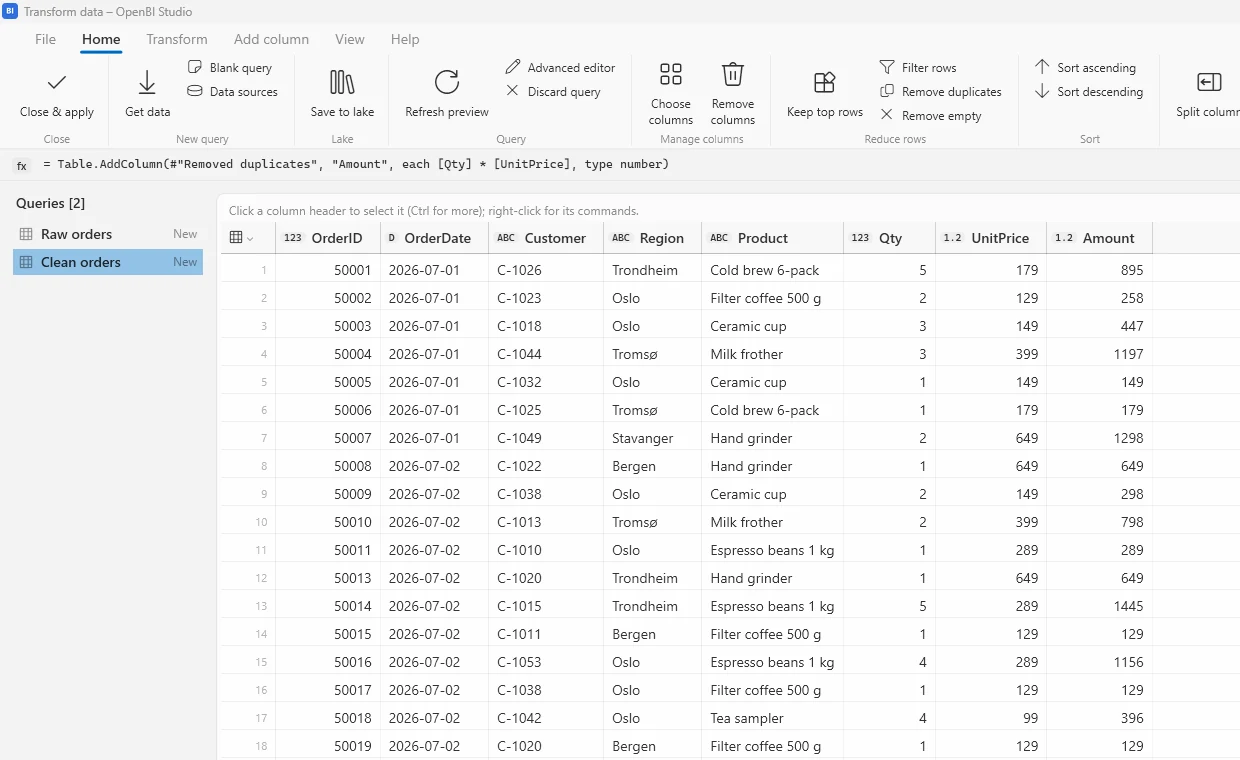
OpenBI Studio's Transform data window: the Home ribbon with Close and apply, Get data, Save to lake in the Lake group, Refresh preview and the row commands; the queries Raw orders and Clean orders on the left; the preview of Clean orders with OrderID, OrderDate, Customer, Region, Product, Qty, UnitPrice and Amount.
Transform data, with the query “Clean orders” open. Save to lake is on the Home ribbon, in the Lake group.

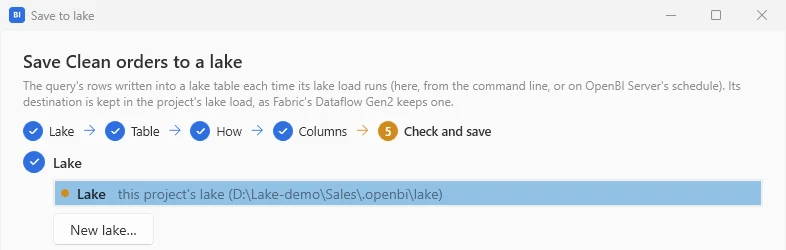
1Lake

Pick a lake, or press New lake…. Every project can have a lake of its own, in a folder beside it. A team’s lake has its catalog in PostgreSQL and its files on a NAS, S3 or Azure.

Step 1, Lake: the lake named Lake, this project's lake, selected in the list, and the button New lake.

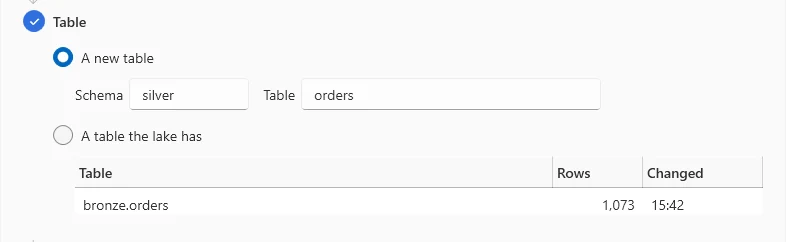
2Table

A new table, with its schema and name, or A table the lake has, with its rows and when it changed. Here the schema is silver and the table orders.

Step 2, Table: A new table chosen, schema silver, table orders; below, A table the lake has, listing bronze.orders with 1,073 rows.

3How

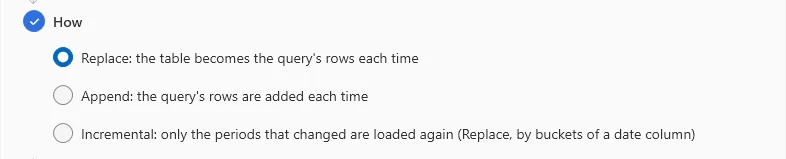
Replace: the table becomes the query’s rows each time. Append: the query’s rows are added each time. Incremental: only the periods that changed are loaded again, by buckets of a date column.

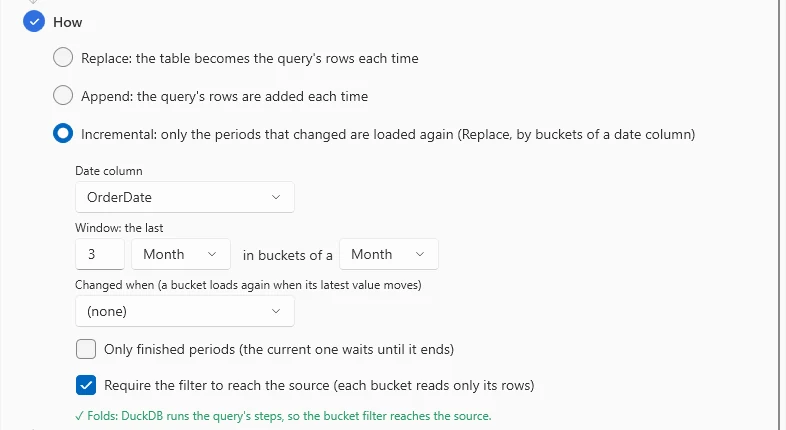
Incremental shows whether the query Folds: when DuckDB runs its steps, the bucket filter reaches the source, so each load reads only what changed.16

Step 3, How: Replace chosen, the table becomes the query's rows each time; Append, the query's rows are added each time; Incremental, only the periods that changed are loaded again.
Incremental's options: the date column OrderDate, a window of the last 3 months in buckets of a month, Changed when, Only finished periods, Require the filter to reach the source, and a green note: Folds, DuckDB runs the query's steps, so the bucket filter reaches the source.

4Columns

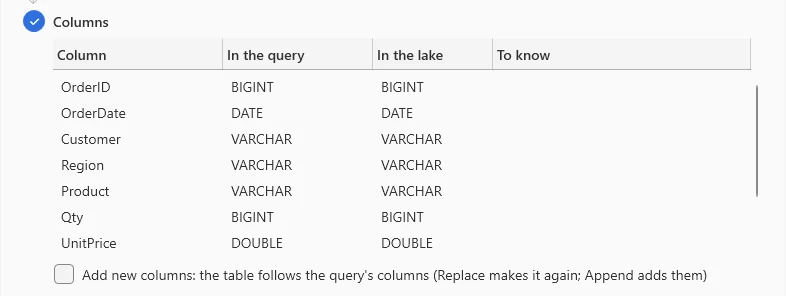
Each column, its type in the query and in the lake, and anything to know. Add new columns lets the table follow the query when it gains one.

Step 4, Columns: a table of Column, In the query, In the lake and To know: OrderID BIGINT, OrderDate DATE, Customer, Region and Product VARCHAR, Qty BIGINT, UnitPrice DOUBLE; and the option Add new columns.

5Check and save

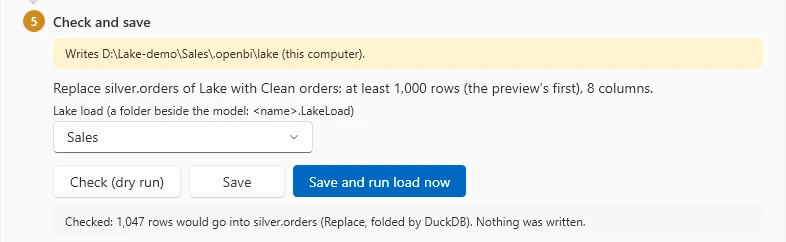
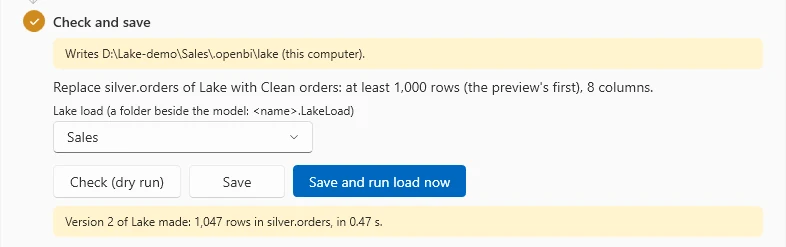
A coloured bar says where it writes: yellow on this computer, red outside it, and then the studio asks first. Check (dry run) counts the rows and writes nothing. Save and run load now writes the version.

Here: “Checked: 1,047 rows would go into silver.orders (Replace, folded by DuckDB). Nothing was written.” Then: “Version 2 of Lake made: 1,047 rows in silver.orders, in 0.47 s.”

Step 5, Check and save: a yellow bar, Writes the project's lake folder (this computer); the summary, Replace silver.orders of Lake with Clean orders; the lake load Sales; the buttons Check (dry run), Save, and Save and run load now; the result: 1,047 rows would go into silver.orders, folded by DuckDB, nothing was written.
After Save and run load now: Version 2 of Lake made, 1,047 rows in silver.orders, in 0.47 seconds.
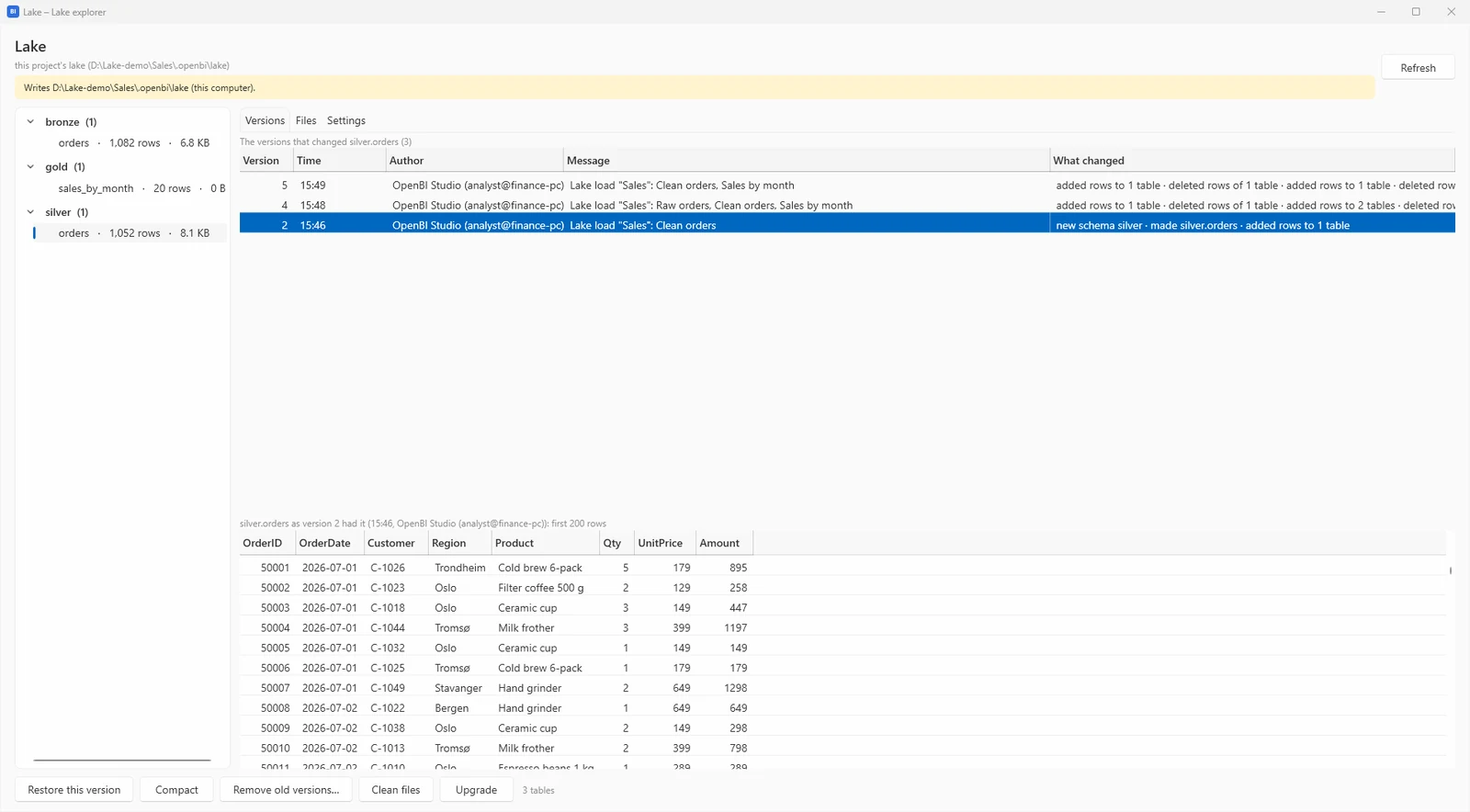
The lake explorer: the schemas bronze, gold and silver with their tables on the left; the Versions tab listing versions 5, 4 and 2 of silver.orders with their time, author, message and what changed; below, silver.orders as version 2 had it; the buttons Restore this version, Compact, Remove old versions, Clean files and Upgrade.
Go back in time. The lake explorer lists every version with its author, time and message. Double-click one to see the table as it was; Restore this version makes a new version from it.3
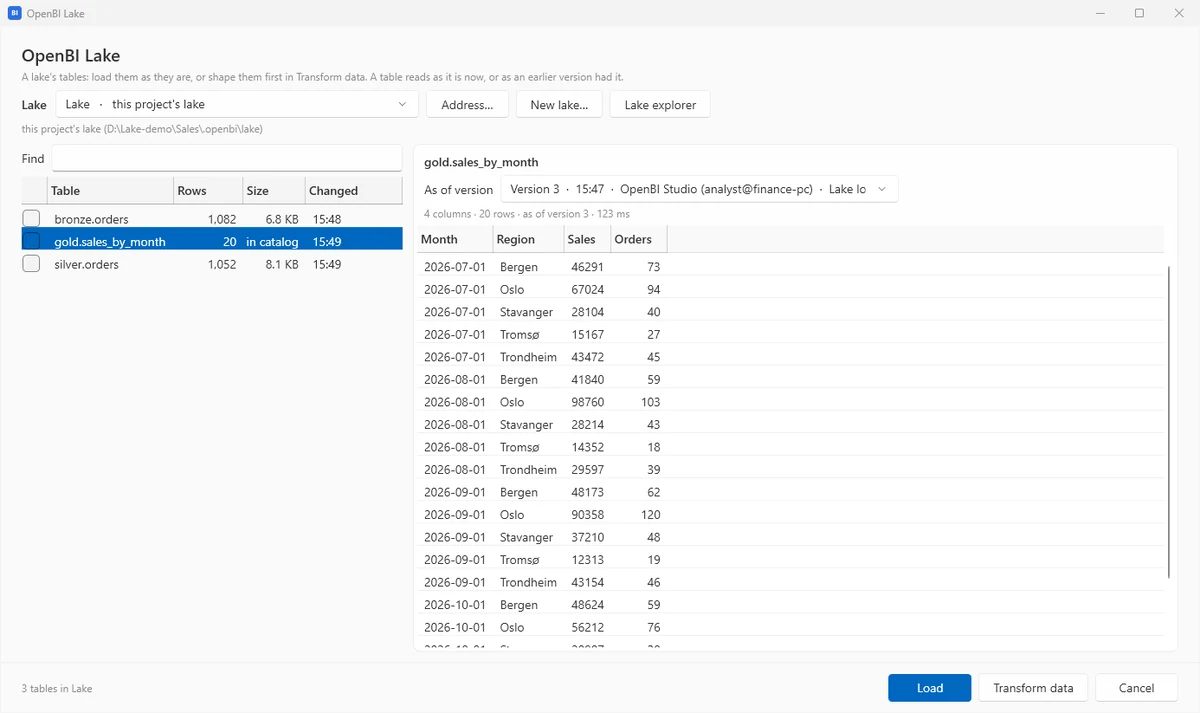
Get data, OpenBI Lake: the lake's tables bronze.orders, gold.sales_by_month and silver.orders with their rows and size, the option As of version, and a preview of the chosen table.
Read it anywhere. Get data → OpenBI Lake reads any table of a lake, as of any version it keeps.
What Save to lake writes: Sales.LakeLoad\mashup.pq, plain text in your project’s git (shortened)
[DataDestinations = {[Definition = [Kind = "Reference", QueryName = "Clean orders_DataDestination", IsNewTarget = false],
  Settings = [Kind = "Manual", AllowCreation = true, DynamicSchema = false, UpdateMethod = [Kind = "Replace"],
              TypeSettings = [Kind = "Table"]]]}]
shared #"Clean orders" = let
    Source = OpenBI.Lake("Lake"),
    bronze_orders = Source{[Schema = "bronze", Item = "orders"]}[Data],
    #"Removed blank rows" = Table.SelectRows(bronze_orders, each [OrderID] <> null and [OrderID] <> ""),
    …
    #"Added Amount" = Table.AddColumn(#"Removed duplicates", "Amount", each [Qty] * [UnitPrice], type number)
in
    #"Added Amount";

shared #"Clean orders_DataDestination" = OpenBI.Lake("Lake"){[Schema = "silver", Item = "orders"]}?[Data]?;

The destination is Dataflow Gen2’s own DataDestinations attribute, so the same text reads in both. A load runs from the studio, from the command line, or on OpenBI Server’s schedule.16

Let your agent manage your lake

Ask in plain words.
Watch every step.

Claude, or any agent that speaks MCP, runs the lake through OpenBI Studio’s own tools: it reads your queries, sets their destination, checks, loads and shows the new version. It never sees a secret: sign-ins happen in the studio.

Transcript

You can also let your agent look after the lake. Ask Claude, in plain words, to save the cleaned sales query into the silver layer. It finds the query, sets where it goes, checks it with a dry run, loads it, and shows you the new version. It never sees a password or a key. When a sign-in is needed, the studio asks you, in its own window.

You

Save the cleaned sales query into the lake's silver layer every night, and back it up to our Azure.

Claude

I'll find the cleaned query and the lake first.

query_list29 ms
[
 {
  "query": "Clean orders",
  "kind": "table",
  "language": "m",
  "load": true,
  "inRefresh": true,
  "group": null,
  "state": null
 },
 {
  "query": "Sales by month",
  "kind": "table",
  "language": "m",
  "load": true,
  "inRefresh": true,
  "group": null,
  "state": null
 },
 {
  "query": "Raw orders",
  "kind": "table",
  "language": "m",
  "load": true,
  "inRefresh": true,
  "group": null,
  "state": "New"
 }
]
query_show{"query": "Clean orders", "rows": 3}41 ms
{
 "query": "Clean orders",
 "steps": [
  "Source",
  "bronze_orders",
  "…"
 ],
 "previewAt": "Added Amount",
 "error": null,
 "columns": [
  "OrderID BIGINT",
  "OrderDate DATE",
  "…"
 ],
 "status": "8 columns, first 1 000 rows · 73 ms · folded into SQL"
}
lake_list812 ms
{
 "lakes": [
  {
   "lake": {
    "name": "Lake",
    "url": "lake://folder/${PROJECT_DIR}/.openbi/lake",
    "address": "lake://folder/D:/Lake-demo/Sales/.openbi/lake",
    "where": "this project's lake (D:\\Lake-demo\\Sales\\.openbi\\lake)",
    "known_from": "the model's data source",
    "project_lake": true
   },
   "zone": "yellow",
   "writes": "Writes D:\\Lake-demo\\Sales\\.openbi\\lake (this computer)",
   "exists": true,
   "tables": 3,
   "rows": 2154,
   "bytes": 15315,
   "last_change": "2026-10-26T14:55:04Z"
  }
 ]
}
lake_tables{"lake": "Lake"}1015 ms
{
 "version": 7,
 "tables": [
  {
   "table": "bronze.orders",
   "rows": 1082,
   "files": 1,
   "size": "6.8 KB",
   "changed": "2026-10-26T14:48:44Z"
  },
  {
   "table": "gold.sales_by_month",
   "rows": 20,
   "files": 0,
   "size": "0 B",
   "changed": "2026-10-26T14:49:37Z"
  },
  {
   "table": "silver.orders",
   "rows": 1052,
   "files": 1,
   "size": "8.1 KB",
   "changed": "2026-10-26T14:55:04Z"
  }
 ]
}
Claude

The cleaned query is Clean orders: it reads bronze.orders from the lake, trims the text, fixes the region names and types, drops blank rows, rows without a quantity and duplicates, and adds Amount. The project's lake, Lake, is on this computer (D:\Lake-demo\Sales\.openbi\lake) and already has a silver layer: silver.orders, the same 8 columns as the query. I'll make silver.orders the query's destination with Replace (each load makes the table the query's rows), then check it with a dry run.

query_destination_set{"query": "Clean orders", "lake": "Lake", "table": "silver.orders", "method": "Replace"}135 ms
{
 "ok": true,
 "query": "Clean orders",
 "destination": {
  "lake": "Lake",
  "table": "silver.orders",
  "method": "Replace",
  "dynamic_schema": false,
  "allow_creation": true
 },
 "lake_load": {
  "name": "Sales",
  "folder": "D:\\Lake-demo\\Sales\\Sales.LakeLoad"
 },
 "attribute": "[DataDestinations = {[Definition = [Kind = \"Reference\", QueryName = \"Clean orders_DataDestination\", IsNewTarget = true], Settings = [Kind = \"Manual\", …",
 "destination_query": "shared Clean orders_DataDestination = OpenBI.Lake(\"Lake\"){[Schema = \"silver\", Item = \"orders\"]}?[Data]?;",
 "zone": "yellow",
 "writes": "Writes D:\\Lake-demo\\Sales\\.openbi\\lake (this computer)",
 "next": "lake_load with dryRun: true checks it (rows, folding, errors); lake_load writes it."
}
Claude

Saved in the project's lake load Sales (Sales.LakeLoad, kept the way Fabric's Dataflow Gen2 keeps destinations). Nothing has run yet. Checking it without writing:

lake_load{"queries": ["Clean orders"], "dryRun": true}518 ms
{
 "ok": true,
 "dry": true,
 "item": "Sales",
 "queries": [
  {
   "query": "Clean orders",
   "lake": "Lake",
   "table": "silver.orders",
   "method": "Replace",
   "rows_in_query": 1052,
   "folded_by": "DuckDB"
  }
 ],
 "lakes": [],
 "summary": "Clean orders → silver.orders: 1,052 rows (Replace, folded by DuckDB) — a dry run: nothing written",
 "ms": 300
}
Claude

1,052 rows would go into silver.orders, folded by DuckDB, nothing written. I'll run it once now, so tonight starts from a known version:

lake_load{"queries": ["Clean orders"]}635 ms
{
 "ok": true,
 "item": "Sales",
 "queries": [
  {
   "query": "Clean orders",
   "lake": "Lake",
   "table": "silver.orders",
   "method": "Replace",
   "rows": 1052,
   "version": 8,
   "files": 1,
   "bytes": 8312,
   "ms": 30,
   "folded_by": "DuckDB"
  }
 ],
 "lakes": [
  {
   "name": "Lake",
   "version": 8
  }
 ],
 "summary": "Made version 8 of Lake: 1,052 rows in silver.orders (0.35 s)",
 "ms": 350,
 "next": "lake_tables and lake_snapshots show what it wrote; a model table reading the lake takes it at its next refresh (model_reload)."
}
lake_snapshots{"lake": "Lake", "table": "silver.orders", "limit": 3}439 ms
{
 "lake": "Lake",
 "table": "silver.orders",
 "count": 5,
 "versions": [
  {
   "version": 8,
   "time": "2026-10-26T14:58:14Z",
   "author": "OpenBI Studio (analyst@finance-pc)",
   "message": "Lake load \"Sales\": Clean orders",
   "changes": "added rows to 1 table · deleted rows of 1 table",
   "changes_raw": "{tables_inserted_into=[4], tables_deleted_from=[4]}",
   "extra": "{\"item\":\"Sales\",\"queries\":[\"Clean orders\"]}"
  },
  {
   "version": 7,
   "time": "2026-10-26T14:55:04Z",
   "author": "OpenBI Studio (analyst@finance-pc)",
   "message": "Lake load \"Sales\": Clean orders",
   "changes": "added rows to 1 table · deleted rows of 1 table",
   "changes_raw": "{tables_inserted_into=[4], tables_deleted_from=[4]}",
   "extra": "{\"item\":\"Sales\",\"queries\":[\"Clean orders\"]}"
  },
  {
   "version": 5,
   "time": "2026-10-26T14:49:19Z",
   "author": "OpenBI Studio (analyst@finance-pc)",
   "message": "Lake load \"Sales\": Clean orders, Sales by month",
   "changes": "added rows to 1 table · deleted rows of 1 table · added rows to 1 table · deleted rows of 1 table",
   "changes_raw": "{tables_inserted_into=[4], tables_deleted_from=[4], inlined_insert=[6], inlined_delete=[6]}",
   "extra": "{\"item\":\"Sales\",\"queries\":[\"Clean orders\",\"Sales by month\"]}"
  }
 ]
}
Claude

Done: version 8 of Lake, 1,052 rows in silver.orders in 0.35 s, signed OpenBI Studio (analyst@finance-pc). The earlier versions stay readable and can be restored. Now the nightly part: I'll look for your OpenBI Server.

server_workspaces72 ms
Name the server: its address, like https://bi.example.com (the studio has published to none yet).
Claude

Two parts of your request can't be switched on from the studio, so here is exactly where they stand.

Every night. The studio runs a load when someone asks; nightly runs are OpenBI Server's. Once this project is published to a workspace, each refresh of it runs its lake loads first (one transaction per lake), on the model's refresh schedule: on, daily or weekly, at the times you choose, a failed run e-mailed. The studio hasn't published to a server yet, so I need the server's address and the workspace. Publishing sends the project out of this computer, so I'll do it only when you say so (without its data unless you ask). Then a workspace Admin or Member turns the schedule on in the model's settings, or on the server: OpenBI.Server.exe schedule set --workspace <workspace> --item Sales --on --daily --times 02:00 On the server, Lake is the workspace's own lake on the server's storage, not this folder; the query needs no change. One thing to know: the lake load also holds Raw orders, which reads D:\Lake-demo\incoming\orders.csv. A server reads files only from the model's folder and the folders its administrators allow, so that file needs a place the server may read.

Back it up to Azure. Lake backups are OpenBI Server's today. A server administrator makes a backup key once (OpenBI.Server.exe lake backup-key new --out <file>, kept apart from the server and the backups) and sets the nightly backup: OpenBI.Server.exe lake backup-schedule --name ws_<workspace> --to "az://<container>/<folder>?account=<storage account>" --key-file <file> --time 01:00 --keep 7 --keep-days 30 The SAS is typed on the server when it asks, never on the command line and never here. In the studio, backups come with the Back up button and its agent tools (lake_backup, lake_backups, lake_backup_verify, lake_restore), which are being built. I don't have them yet, so nothing has been backed up.

Please don't paste Azure keys or SAS tokens into this chat: I never handle sign-ins. When a lake or a source needs one, the studio asks you in its own sign-in window ("An agent asked to connect. It does not see what you type here.") and keeps it in this computer's credential store.

Recorded on October 26, 2026 on the example’s fictional project: the tool calls as Claude made them, each result as the studio answered (open one to read it). Since then the backup tools have been built, in the next update: the same request now ends with lake_backup, which opens Back up… for you to choose your Azure container, sign in and keep your key, then backs up.17
The lake’s tools

lake_list · lake_create
The lakes this project and this computer know, and a new one: a folder, SQLite or PostgreSQL catalog, its files on a folder, S3 or Azure.
lake_tables · lake_preview · lake_snapshots
What a lake holds, its rows at any version, and every version with who made it.
query_destination_set · query_destination_clear
Where a query’s rows go: lake, table, Replace, Append or Incremental. It writes the attribute; it doesn’t run.
lake_load · lake_maintain
A load, with a dry run first, and the lake’s upkeep: expire, compact, clean, restore a version. Upkeep is a dry run unless the person says yes.

Its backups in the next update

lake_backup
Backs a lake up now and waits. With no backup set up, it opens Back up… for the person and waits for them.
lake_backups
Where the backups go, how they sign in, the key’s fingerprint, the schedule, and every backup.
lake_backup_verify
Reads a backup where it is: catalog decrypted, every file’s checksum, every table compared.
lake_restore
A backup as a new lake, never over one, and only with the person’s yes in the studio.

No tool takes a password or a key. When a sign-in is needed, the studio asks you in its own window: An agent asked to connect. It does not see what you type here.18

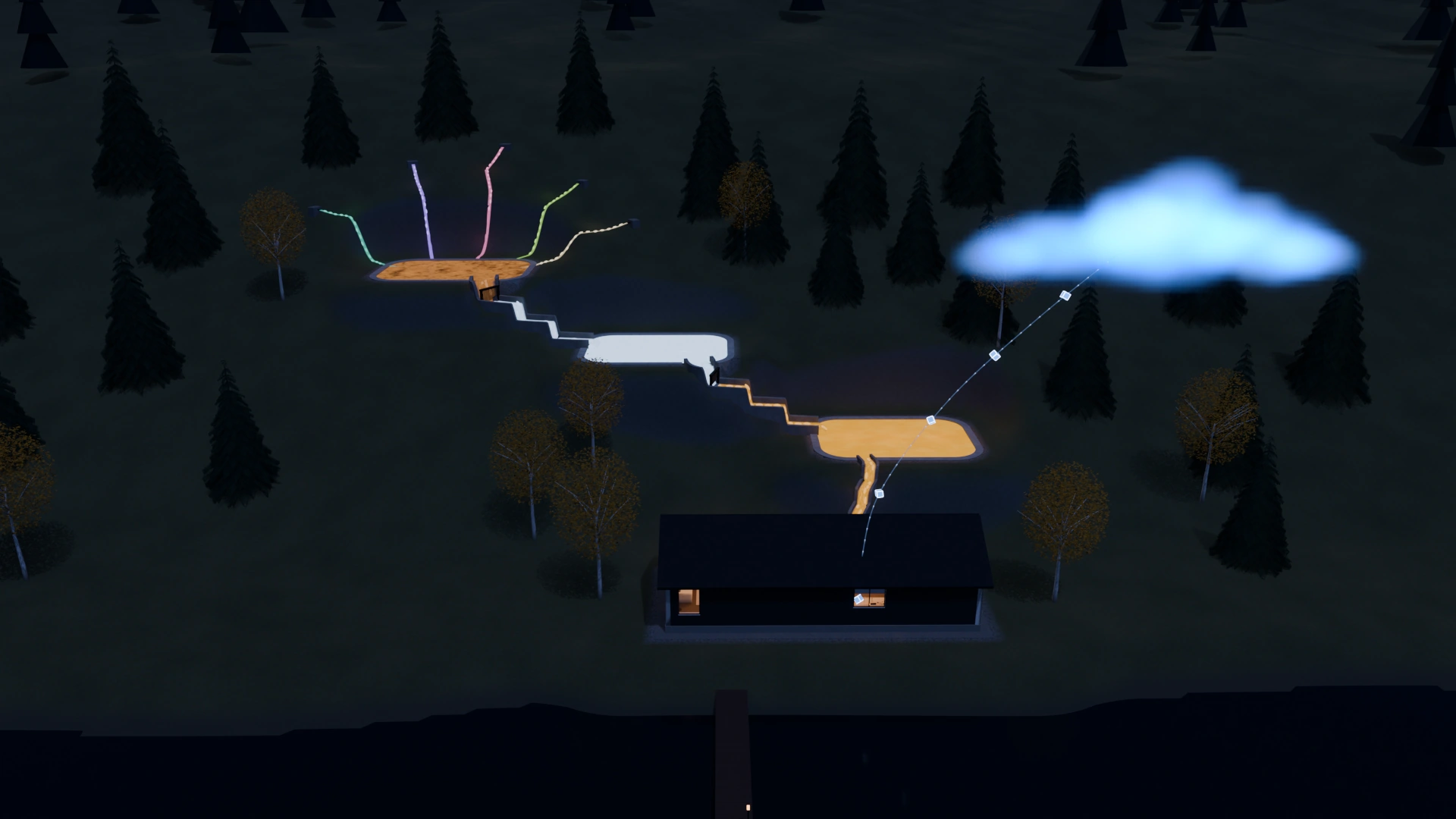
A dark timber house with warm windows on a lakeshore at dusk, seen from across the water: a thin trail of small blue lights rises from its roof to a soft cloud glowing blue above it; the glowing terraced basins on the hill behind.

Back up

Up to your own cloud.

From your machine to your storage, encrypted with your key. OpenBI never sees it.

Written once, kept apart.

With write-once storage, nobody can change or delete a backup before its time is up.19

Back up to your own cloud

Five steps once.
Then one click.

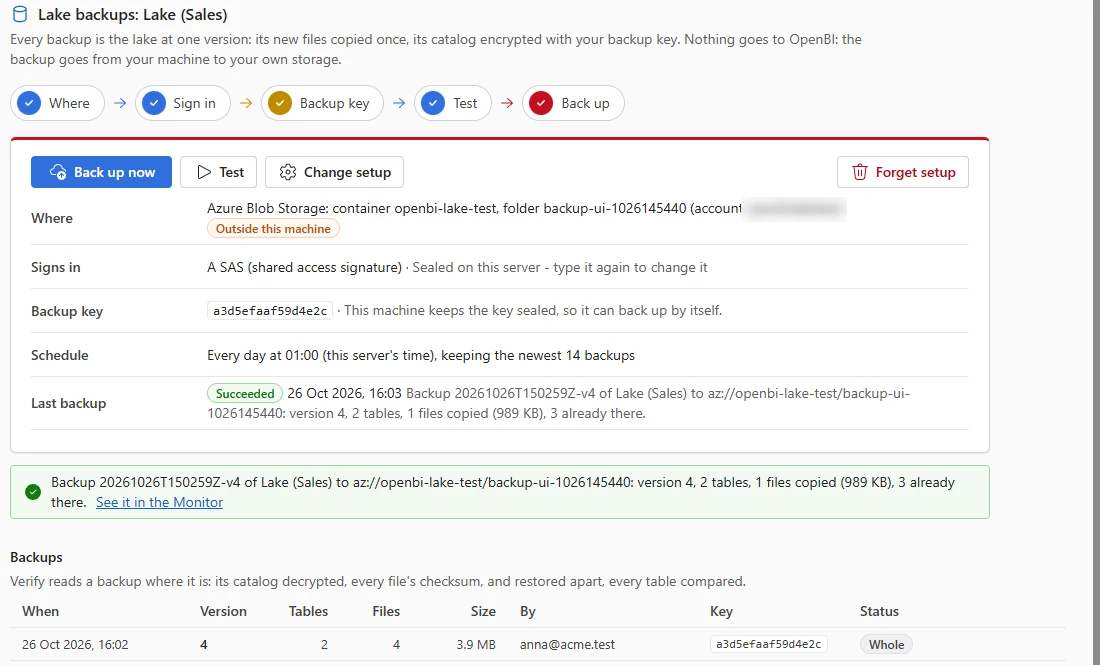
Back up… in the lake explorer, and on OpenBI Server’s lake pages: Where → Sign in → Backup key → Test → Back up. Then Back up now, or a daily schedule.

Coming in the next update: OpenBI Studio 0.3.61 and OpenBI Server 0.1.29

Transcript

Back it up to your own cloud: Azure Blob Storage, Amazon S3, Google Cloud Storage, or another NAS. You set it up once, in five guided steps: where, sign in, backup key, test, and back up. After that, it is one click, or a daily schedule. Each backup copies only the new files, and encrypts the catalog with a key that only you hold. It works with write-once storage, so nobody can change or delete a backup before its time is up. And you can verify any backup, table by table. Nothing passes through OpenBI: it goes straight from your machine to your storage.

Your lake

On your computer, your NAS or your cluster. Each backup is the lake at one version: its new files copied once, its catalog encrypted with your backup key.20

Nothing goes to OpenBI.
  • Azure Storage accounts icon

    Azure Blob Storage

    A container in your Azure Storage account. Works with immutable (WORM) containers.

  • Amazon S3 or S3-compatible

    A bucket on AWS, or on MinIO, Cloudflare R2, Wasabi, Hetzner and other S3-compatible storage. Works with Object Lock.

  • Google Cloud Storage

    A bucket in your Google Cloud project, with an HMAC key.21

  • A folder or NAS

    A disk on this machine, or a share another machine serves.

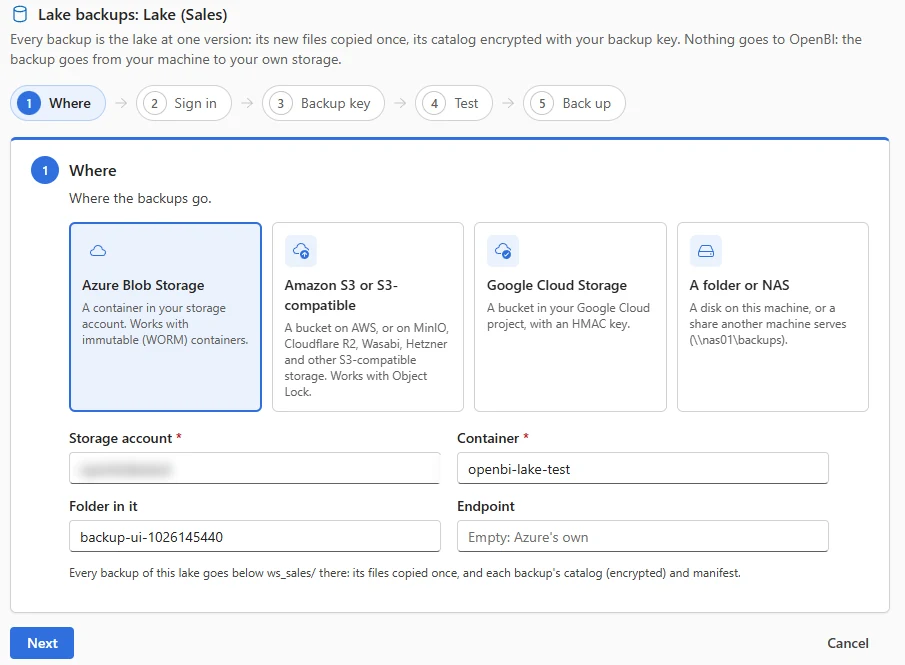
1Where

Your Azure Blob Storage container, an Amazon S3 or S3-compatible bucket, a Google Cloud Storage bucket, or a folder or NAS. Each backup of the lake goes in a folder of its own.

OpenBI Server's lake backups page, step 1, Where: four choices, Azure Blob Storage (selected), Amazon S3 or S3-compatible, Google Cloud Storage, and A folder or NAS; below, the storage account (blurred), the container openbi-lake-test and the folder in it.

2Sign in

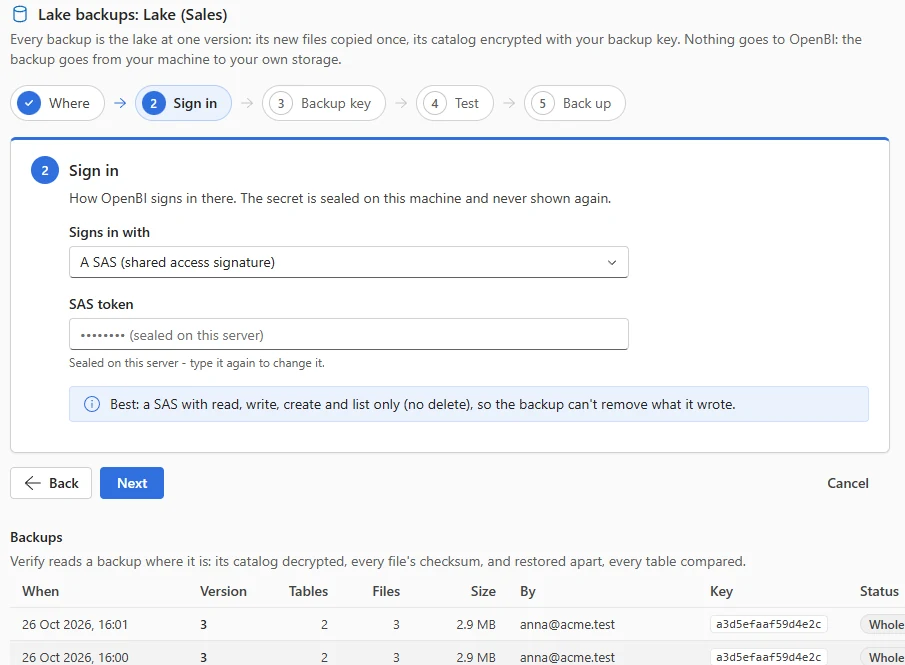
A SAS, an account key or a connection string for Azure; an access key for S3; an HMAC key for Google. It is sealed on your machine and never shown again. Best: a SAS that may read, write, create and list, but not delete.

Step 2, Sign in: Signs in with a SAS (shared access signature), the SAS token shown as dots, sealed on this server; a note: best, a SAS with read, write, create and list only, no delete, so the backup can't remove what it wrote.

3Backup key

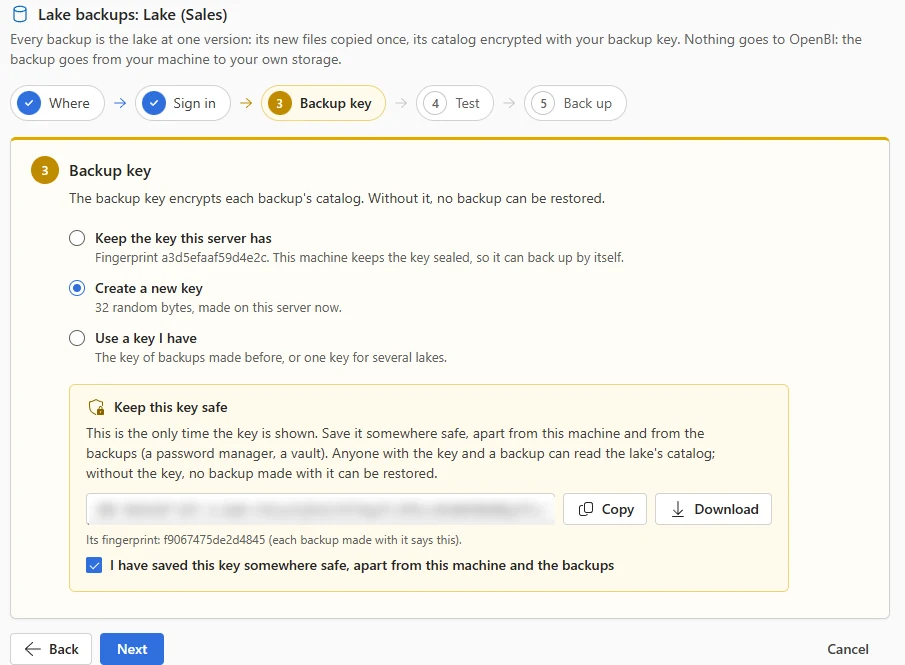
32 random bytes made on your machine and shown once: keep them somewhere safe, apart from the machine and the backups. Without the key no backup can be restored, and anyone who holds a backup without it can’t read its catalog.

Step 3, Backup key: Create a new key chosen, and a yellow box, Keep this key safe, with the key (blurred), Copy and Download, its fingerprint, and a box to tick, I have saved this key somewhere safe, apart from this machine and the backups.

4Test

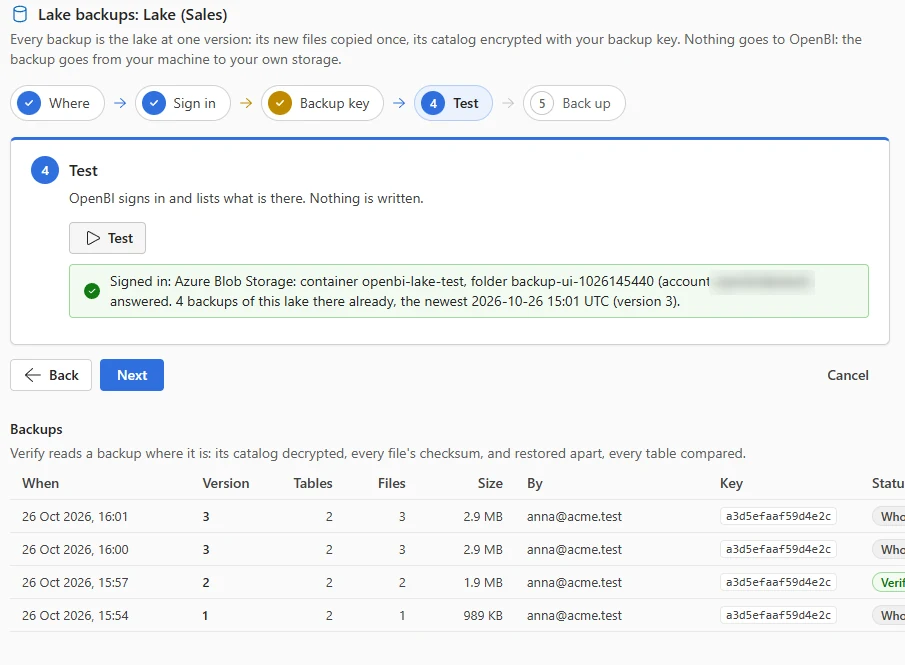
OpenBI signs in to your storage and lists what is there. Nothing is written.

Step 4, Test: a green result, signed in to Azure Blob Storage, container openbi-lake-test, which answered with 4 backups of this lake already there.

5Back up

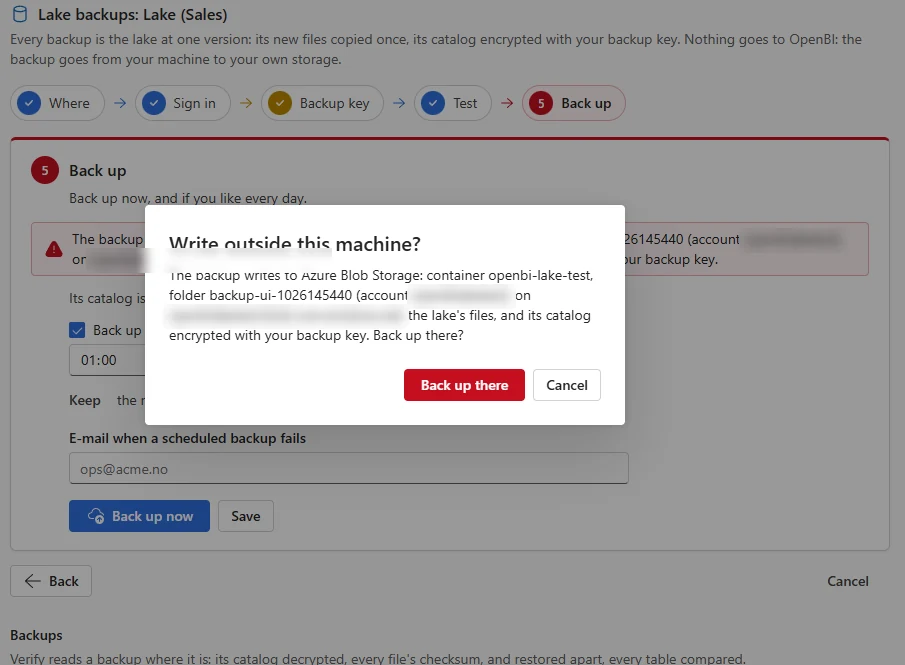
A red bar says the backup leaves this machine, and the first time OpenBI asks: Write outside this machine? Then Back up now, or every day at a time you choose, keeping the newest backups you ask for.

Verify reads a backup where it is. Restore makes a new lake from it: it never writes over a lake.

Step 5, Back up, with the question Write outside this machine?: the backup writes to Azure Blob Storage, the lake's files and its catalog encrypted with your backup key; the buttons Back up there and Cancel.
The saved setup: Back up now, Test and Change setup; where it goes, outside this machine; signs in with a SAS sealed on this server; the backup key's fingerprint; every day at 01:00 keeping the newest 14 backups; the last backup succeeded; and the list of backups with their version, tables, files, size, who and status.
  • Copied once.

    A lake’s files never change once written, so each backup copies only the new ones. A second backup with nothing new copies nothing.20

  • Encrypted with your key.

    The catalog, which holds the files’ keys, is encrypted with AES-256-GCM under your backup key before it leaves your machine.

  • Written once.

    Nothing in a backup is ever overwritten. On Azure’s immutable storage or S3 Object Lock, nobody can change or delete it during its retention.19

  • Verified.

    Verify decrypts the catalog, checks every file’s SHA-256 and restores the backup apart to compare every table’s rows and checksum.

  • Restored as a new lake.

    Any version you backed up, onto any machine, and never over a lake: the old one stays as it was.

  • Yours alone.

    The backup goes from your machine to your storage. OpenBI hosts nothing and never holds your key or your data.

1.3 sto back up a lake to a real Azure Storage account from OpenBI Studio: 1 file copied, 18 KB. Again with nothing new: 0 copied. Verified whole.22
1.6 sfrom the click to the result on OpenBI Server: a lake of 400,004 rows backed up to Azure, then restored as a new lake with both its tables checked.22

The Azure Storage accounts icon is the provider’s own, unmodified, used in this diagram as its icon terms permit; Amazon S3 and Google Cloud Storage are named in plain text.23

Your own cluster

A node killed mid-load.
Nothing lost.

On OpenBI Server’s failover cluster, scheduled lake loads run on the node that holds the cluster’s jobs. On two Mac minis we killed that node in the middle of a load, three times. The lake never kept half a load.

Transcript

The lake also runs on OpenBI Server's cluster. On two Mac minis, the node holding the cluster's jobs ran a scheduled load. Then we killed that node in the middle of a load, three times. Each time, the lake had no half-written version and no stray files, and the other Mac took over the jobs. Both Macs can even load the same lake at once.

A study at dusk: an oak desk under a window looking out over a still lake, a laptop showing a report of gold bars, a small silver computer with a soft blue light under it, a white desk lamp and a mug; a thin golden line of light arrives at the computer from the right.
Node 1 of the home cluster, with the database’s blue light, in the 3D house of /cluster/.8
  • 0half-written versions and 0 stray files after 3 kills mid-load. The other Mac held the jobs 5.3, 31.6 and 6.0 s later.24
  • 4.3 sfor both Macs loading one lake at once: both loads committed, each version signed by its node.24
  • 2.1 sfor a 2,000,000-row load on the Mac mini M2 Pro (3.8 s on the M1), the start included.24
  • 38.9 suntil a load the dead node lost ran again on the other, once, as a new version. Measured on Windows; the Macs’ retest is next.25

Two Macs as one server: the cluster at home

No capacity bill

Full lake capabilities.
No capacity to rent.

You don’t have to pay for a Microsoft Fabric F64 capacity to have a lake. OpenBI Lake needs no capacity at all: the studio is free, and OpenBI Server is $1 a user a month, on your own machines.

Transcript

In Microsoft Fabric, a lakehouse needs a capacity. The smallest costs about two hundred and sixty dollars a month. And before people without a Pro licence can read your reports, you need an F64: about eight thousand four hundred dollars a month. OpenBI Lake needs no capacity. The studio is free, and OpenBI Server is one dollar per user per month, on your own machines.

A lakehouse in Microsoft Fabric

A paid or trial capacity, from $262.80 a month.

  • A lakehouse needs a workspace backed by a trial or paid capacity; Premium Per User alone doesn’t make one.26
  • F2, the smallest: $262.80 a month pay-as-you-go in East US, $350.40 in Norway East; $156.33 and $208.33 with a year’s reservation.27
  • Below F64, everyone who reads the reports needs Pro ($14 a user a month), PPU or a trial.
  • F64, where readers need no Pro license: $8,409.60 a month in East US, $11,212.80 in Norway East; $5,002.67 and $6,666.67 reserved.

OpenBI Lake

No capacity. Studio free, Server $1 a user a month.

  • OpenBI Studio is free and needs no license key: lakes, Save to lake, versions and backups included.28
  • OpenBI Server: $1 a user a month for companies. Scheduled loads, workspace lakes, the cluster, backups. No capacity fee; extra nodes cost nothing more.
  • On your machines: you run them and pay for your own storage. OpenBI hosts nothing.
Download OpenBI Studio OpenBI Server: Download (soon)

A month, in US dollars, before tax: Microsoft’s list prices in East US, read on October 26, 2026, against OpenBI Server for 8 people. Longer is more.27

Microsoft Fabric F2, the smallest capacity, pay-as-you-go $262.80
Microsoft Fabric F64, where readers need no Pro license, pay-as-you-go $8,409.60
OpenBI Server for 8 people, on your own machines $8

The comparison is the capacity’s price alone. Fabric’s includes Microsoft’s machines; OpenBI’s runs on yours, which you already have or buy once, and your own storage. Eight people: the company of the story above had eight Power BI Pro users.7

Not yet

What OpenBI Lake
doesn’t do yet.

Six things to know before you rely on it.

  • Merge by key.

    A load replaces a table, appends to it, or reloads the periods that changed. Updating rows by a key (an upsert) is not built yet.

  • Pipelines.

    Loads aren’t chained yet. A lake load reads the lake as it was when it began, so bronze, silver and gold in one load move one layer per run. Run them as separate loads, in order.

  • A SQL endpoint.

    Other tools can’t query the lake over SQL yet; one speaking PostgreSQL’s protocol is planned. Its Parquet files and catalog are open, so DuckDB reads them today.2

  • Google Cloud, untested.

    Google Cloud Storage is reached through its S3-compatible API, the path we test with S3 and MinIO. A real Google Cloud bucket hasn’t been tested yet.21

  • Direct tables and older servers.

    The studio doesn’t yet check a server’s version before publishing a model that reads the lake directly. An older server refuses it when it opens it.

  • The backup button.

    Back up… and its agent tools come in the next update. Until then a lake is backed up from OpenBI Server’s command line, with the same code.20

No Looker. No Qlik. No Fabric. No Power BI needed.

Your lake. Your cluster.
Your cloud.

Keep your data, shape it and report on it on machines you own, back it up to the cloud account you already have, and rent no capacity to do it. OpenBI hosts nothing of yours.

Transcript

You don't need Looker, Qlik, Fabric or Power BI to own your data anymore. Your lake. Your cluster. Backed up to your own cloud. This is OpenBI Lake.

Download OpenBI Studio OpenBI Server: Download (soon) Build your own cluster