Pricing
12 kr per user per month + MVA (15 kr incl. MVA for private persons). One public price, no discounts.
Each node activates its own OpenBI Server license key.
Download for MacNew in OpenBI Server: failover cluster and load balancing
Two Mac minis serve the same reports: 48.2 pages a second together, where the faster one alone serves 30.5. When one stops, the other serves everyone, still signed in.1, 2

Every number on this page was measured on two real Mac minis on a home’s Wi-Fi.3

Node 1
On the study’s desk. It also runs PostgreSQL 17, the one database the whole cluster shares: the blue light under it.
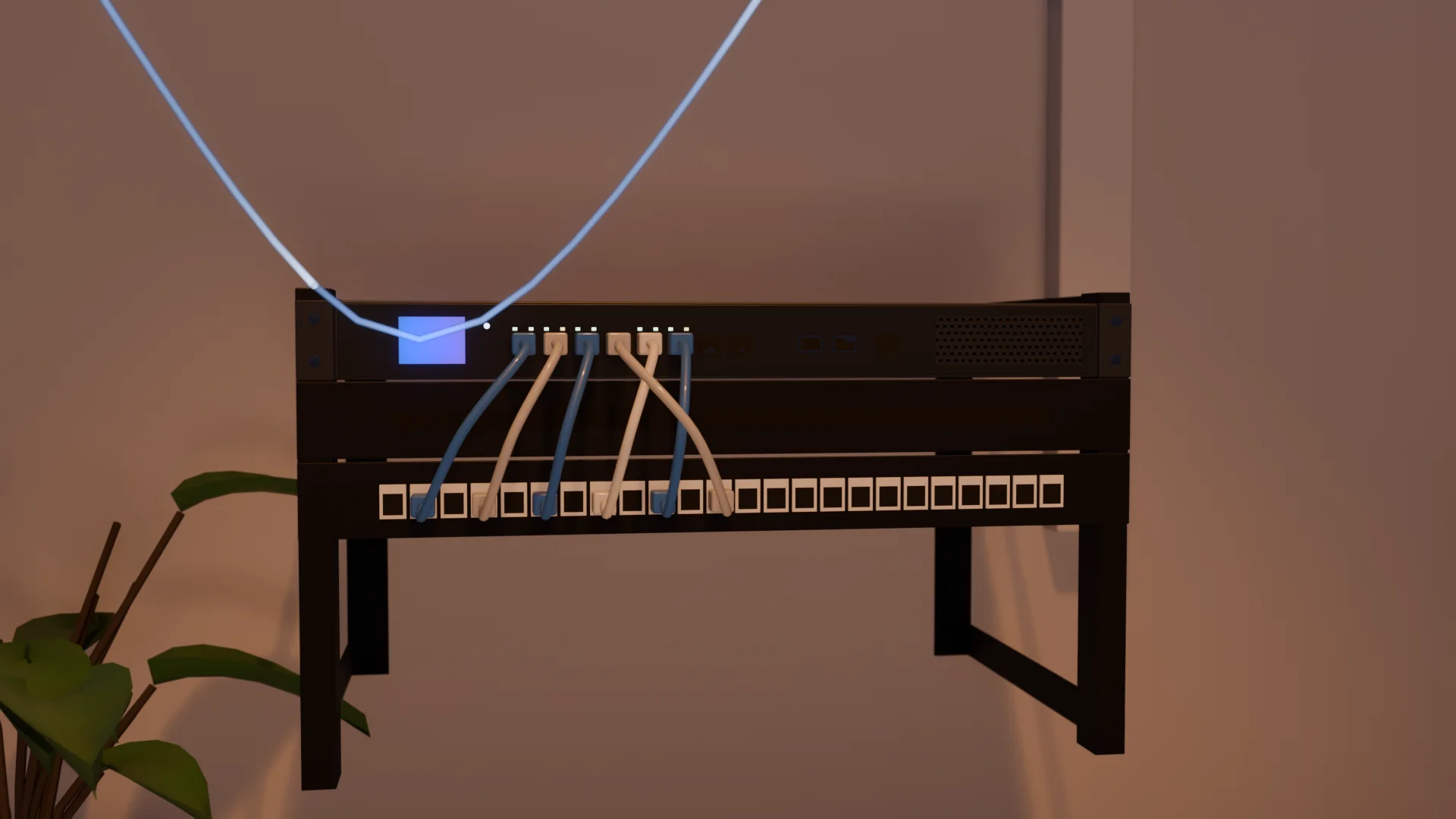
The network
Both Macs on Wi-Fi, through the access points and the router in the hall. On average 5.4 to 5.6 ms between them.4

Node 2
On the living room’s bookcase. The same OpenBI Server for the same domain, with a license of its own.
The idea
A cluster is two or more OpenBI Servers serving the same domains behind a load balancer. Any node answers any request. When one fails, the others serve everyone, signed in as they were.
Browsers and OpenBI Studio ask for bi.example.com
On a computer of its own. Each request to the node with the fewest open; every node’s /api/health/ready asked every 2 s
Mac mini M2 Pro. OpenBI Server and OpenBI Accounts; a copy of everything published
Mac mini M1. The same, with a license of its own
PostgreSQL 17 on node 1, a database for the servers and one for OpenBI Accounts: people, workspaces, sign-in keys, what is published, the jobs’ lease
The nodes share one: PostgreSQL, SQL Server or MySQL. SQLite is refused, since it is a file on one machine.
The sign-in’s keys live in that database, sealed with the cluster’s key. A node dies, and nobody signs in again.5
Each model and data snapshot is stored once in the database, in SHA-256 chunks, and cached on every node. A node that joins fills itself.
/api/health/ready answers 200 when a node is licensed, reaches the database and has its content current. The balancer asks it every few seconds.
Scheduled refreshes and alerts run under a lease in the database. When its node dies, the lease moves to another.
cluster create, join, status, drain, resume, forget and doctor. create and join are dry runs until --apply.

Here, the laptop. Each request goes to the Mac with the fewest open, blue to node 1 and violet to node 2: 48.2 pages a second together.6

HAProxy stops sending to it, most often at its first refused connection, within 0.07 s. Its stream bends back to node 1, and everyone stays signed in.7

Meanwhile
Only queries the stopped node was answering fail: 0.52 to 0.57 %. With HAProxy sending report queries again, 0.01 to 0.20 %. Report queries only read.7
macOS has it ready again in 2.2 to 4.9 s, and HAProxy sends to it again 2.8 to 5.4 s after it stopped. The pages split between both Macs again.8
Measured
Through HAProxy, the balancer we recommend. Example Brewery’s sales, repeated 400 times: 864,000 rows. Its overview and rankings pages, opened by simulated users one after another. Medians of three runs. No errors in any run.1
48.2
Pages a second with 16 users. Longer is more.
0.07 s
0.20 %
Pages a second for everyone together, as simulated users double: each Mac alone, and both through HAProxy. Longer is more.2
Half the pages within 0.17 s, 95 in 100 within 0.35 s
Half the pages within 0.32 s, 95 in 100 within 0.60 s
Half the pages within 0.66 s, 95 in 100 within 1.10 s
| Users | M2 Pro alone | M1 alone | Both, HAProxy | Median page, s | Slowest 5%, s |
|---|---|---|---|---|---|
| 8 | 31.6 | 17.9 | 45.2 | 0.17 | 0.35 |
| 16 | 30.5 | 16.8 | 48.2 | 0.32 | 0.60 |
| 32 | 29.6 | 17.5 | 47.2 | 0.66 | 1.10 |
Both Macs: medians of three runs through HAProxy. Each Mac alone: measured before, the other drained, through our own test balancer. No run had an error. Round robin through HAProxy with 16 users: 35.3.2
Round robin or least connections
Round robin gives each Mac the next request in turn, so the slower M1 gets half of every page’s queries. A page is done when its slowest query is. So the pair stalls near twice what the M1 serves alone.
Least connections sends each query to the Mac with the fewest open. The M2 Pro finishes its sooner, so it takes more: about 62 % of them. The pair then serves about what the two serve alone, added together: 37 % more than round robin.6
Pages a second with 16 users, through HAProxy. The white marks are sums of each Mac’s numbers alone.
Node 2’s OpenBI processes killed the hard way, 7 times, in the middle of a run of 32 users.7
Its node killed before the refresh’s time, and kept down.
29.9 sto take over
The other node took the jobs’ lease and ran the refresh 2.8 s after its time.10
cluster drain in the middle of a run.
4.2–7.3 sout of HAProxy
No request failed: its 57 open requests finished within 0.35 s.11
Two nodes on one PC, sharing SQL Server, behind our test balancer.
×2.0 to 2.1the pages of one node
A dead node out of the balancer in 0.3 s.12
What we learned
The cluster worked. These are the things that took us time, so they don’t take yours.
macOS’s firewall can block OpenBI Server although it is signed, when “Automatically allow downloaded signed software” is off. The Mac answers itself, and nothing from the network gets in. Allow it:13
sudo /usr/libexec/ApplicationFirewall/socketfilterfw --add "/Library/OpenBI Server/OpenBI.Server"
sudo /usr/libexec/ApplicationFirewall/socketfilterfw --unblockapp "/Library/OpenBI Server/OpenBI.Server"The balancer must pass the name asked for unchanged: each node tells bi. and accounts. apart by it. HAProxy and Caddy do; nginx needs one line. Point both names at the balancer.14
proxy_set_header Host $host;PostgreSQL’s default max_connections, 100, fits two nodes: each takes at most 30, plus 10 for sign-in. For three or more, raise it, or lower Cluster:DatabaseConnections.15
When the machines differ, round robin holds the pair near twice the slower one: 35.3 pages a second here, against 48.2 with least connections. Each Mac gives what it has. In HAProxy: balance leastconn.6
When node 2 died, node 1 answered everyone, and answered a health check late. With one failed check enough, HAProxy took it out too: in 3 of 6 kills it had no node for 1.2 to 2.0 s. Wait for two failed checks of 3 s, and take a dead node out at its first refused connection instead:16
timeout check 3s
default-server inter 2s fall 2 rise 1 observe layer4 error-limit 1 on-error mark-downOn one of the nodes, the balancer goes down with that node, and everything stops. We recommend a small Linux computer of its own, such as a Raspberry Pi or an old PC, with apt install haproxy. On a Mac, HAProxy from Homebrew runs into macOS’s Local Network privacy and firewall prompts.17
Everything here ran over Wi-Fi, so read the numbers as relative: one setup against another on the same air. For a cluster people rely on, put the nodes on cables.4
Set it up
Two Macs with Apple silicon and macOS 14 or later, OpenBI Server 0.1.25 or later, each with its own license key, and a third computer for the balancer. Every secret is read from a file, never typed on a command line.
In each Terminal window you use, set three names first: the domain your licenses are for, and the two Macs’ addresses on your network. Every command below uses them.
DOMAIN=example.com
MAC1=192.168.1.10
MAC2=192.168.1.11Download OpenBI Server 0.1.50 for Mac (184 MB). Install the package with a double-click, or in Terminal:
sudo installer -pkg ~/Downloads/OpenBI-Server-0.1.50-arm64.pkg -target /Let OpenBI Server take connections from the network, whatever the firewall’s setting for signed software:
sudo /usr/libexec/ApplicationFirewall/socketfilterfw --add "/Library/OpenBI Server/OpenBI.Server"
sudo /usr/libexec/ApplicationFirewall/socketfilterfw --unblockapp "/Library/OpenBI Server/OpenBI.Server"
Keep the clock set automatically. The cluster’s jobs run under a lease, and doctor warns when a clock is off:
sudo systemsetup -setusingnetworktime on
sudo systemsetup -getusingnetworktime
Make a folder only you can read, and put this Mac’s license key in it: copy the key from Norway Analytics’ e-mail, then paste it into the file.
mkdir -m 700 ~/.openbi-cluster
(umask 077; pbpaste > ~/.openbi-cluster/license-key)PostgreSQL 17 from Homebrew. Its tools are kept off the path, so link them:
brew install postgresql@17
brew link --force postgresql@17
brew services start postgresql@17
A random password in a file, a role named openbi made with it, and the two databases: one for the server’s records, one for OpenBI Accounts.
(umask 077; openssl rand -hex 24 > ~/.openbi-cluster/pg-password)
printf "CREATE ROLE openbi LOGIN PASSWORD '%s';\n" "$(cat ~/.openbi-cluster/pg-password)" | psql -d postgres
createdb -O openbi openbi_cluster
createdb -O openbi openbi_accounts
Let both nodes in, and only them, by password:
PG_DIR="$(brew --prefix)/var/postgresql@17"
echo "listen_addresses = '*'" >> "$PG_DIR/postgresql.conf"
echo "host all openbi $MAC1/32 scram-sha-256" >> "$PG_DIR/pg_hba.conf"
echo "host all openbi $MAC2/32 scram-sha-256" >> "$PG_DIR/pg_hba.conf"
brew services restart postgresql@17
And let PostgreSQL through this Mac’s firewall. After a brew upgrade its path changes: run these again.
PG_BIN="$(realpath "$(brew --prefix postgresql@17)/bin/postgres")"
sudo /usr/libexec/ApplicationFirewall/socketfilterfw --add "$PG_BIN"
sudo /usr/libexec/ApplicationFirewall/socketfilterfw --unblockapp "$PG_BIN"Its license, then OpenBI Accounts, which signs people in, at accounts.$DOMAIN:
sudo openbi-server domain add "$DOMAIN" < ~/.openbi-cluster/license-key
sudo openbi-server accounts setup --public-url "http://accounts.$DOMAIN" --name "Home"
Move both sets of records into PostgreSQL, the connection piped in with its password. Use node 1’s network address, not localhost: node 2 is given the same connection when it joins.
printf 'Host=%s;Database=openbi_cluster;Username=openbi;Password=%s\n' \
  "$MAC1" "$(cat ~/.openbi-cluster/pg-password)" |
  sudo openbi-server database move --provider postgres --apply
printf 'Host=%s;Database=openbi_accounts;Username=openbi;Password=%s\n' \
  "$MAC1" "$(cat ~/.openbi-cluster/pg-password)" |
  sudo openbi-server accounts database move --provider postgres --apply
Sign-in through OpenBI Accounts, yourself as administrator, and your invitation. Without e-mail set up, the last command prints the invitation’s link: keep it for step 5.
sudo openbi-server signin use-accounts --server-url "http://bi.$DOMAIN"
sudo openbi-server admin add --email you@example.com
sudo openbi-server accounts user invite --email you@example.com --name "Your Name"
Make the cluster: first the dry run, which says what it would do, then --apply. It shows the cluster’s key once. Copy it, save it in a file only you can read, and keep a copy where you keep passwords: every node that joins needs it.
sudo openbi-server cluster create --name home --node mac1
sudo openbi-server cluster create --name home --node mac1 --apply(umask 077; pbpaste > ~/.openbi-cluster/cluster-key)Restart both services and ask the node if it is ready. It answers 200 once it is.
sudo openbi-server service restart
sudo openbi-server accounts service restart
curl -i "http://$MAC1/api/health/ready"Copy the cluster’s key from where you keep it, and put it in a file on node 2:
(umask 077; pbpaste > ~/.openbi-cluster/cluster-key)Join through node 1, the cluster’s key and this Mac’s own license key piped in. Dry run first, then --apply. Node 2 is given the database, OpenBI Accounts and the sign-in from the cluster.
awk 1 ~/.openbi-cluster/cluster-key ~/.openbi-cluster/license-key |
  sudo openbi-server cluster join "http://$MAC1" --node mac2
awk 1 ~/.openbi-cluster/cluster-key ~/.openbi-cluster/license-key |
  sudo openbi-server cluster join "http://$MAC1" --node mac2 --apply
Restart, delete this copy of the key, and look at both nodes:
sudo openbi-server service restart
sudo openbi-server accounts service restart
rm ~/.openbi-cluster/cluster-key
curl -i "http://$MAC2/api/health/ready"
sudo openbi-server cluster statusOn a computer of its own: we recommend a small Linux computer, such as a Raspberry Pi or an old PC. On a Mac, HAProxy from Homebrew runs into macOS’s Local Network privacy and firewall prompts.17
This is the configuration we measured. HAProxy in http mode passes the Host as asked. Each request goes to the node with the fewest open. Every node’s readiness is checked every 2 s; a node is out after two failed checks of 3 s, or at once at its first refused connection, and back at its first good check. A request a node refuses goes to the other node, and a report query a node drops unanswered is sent again: it only reads, and nothing else is ever sent twice. A query may take up to 30 minutes. Put your nodes’ addresses in the server lines and your domain in the check’s Host.
# OpenBI Server cluster: HAProxy in front of two nodes. Each node's own front door (port 80) serves both names,
# bi. and accounts., by the Host header, which HAProxy passes on unchanged in http mode.

global
    log stdout format iso local0 info
    maxconn 4096
    stats socket /run/haproxy/admin.sock mode 660 level admin

defaults
    mode http
    log global
    option httplog
    option dontlog-normal          # (only what failed, or was tried again, is logged)
    option log-health-checks
    timeout connect 3s
    timeout client 30m             # a report's query may run long: as OpenBI's own IIS setup (30 minutes)
    timeout server 30m
    timeout http-request 10s
    timeout http-keep-alive 10s
    timeout queue 30s
    # a node answering everyone once the other died answered a check in more than 2 s, and once in more than 3 s: one
    # late check must not take it out (fall 2) - with fall 1 HAProxy was left with no node in 3 kills of 6. A node that
    # died is out at its first refused connection instead (observe layer4), and every second try goes to the other
    # node at once (redispatch 1: no second try on the dead one a second later)
    timeout check 3s
    retries 2
    option redispatch 1
    default-server inter 2s fall 2 rise 1 observe layer4 error-limit 1 on-error mark-down

frontend openbi
    bind :80
    default_backend nodes

backend nodes
    balance leastconn
    option httpchk
    http-check send meth GET uri /api/health/ready ver HTTP/1.1 hdr Host bi.example.com
    http-check expect status 200
    # a request a node dropped after it was sent (empty-response) is sent again only if it is a report's query:
    # a DAX query reads, so asking it twice changes nothing; sign-ins, publishing and the rest are never sent twice.
    # (conn-failure, the default, is always safe: nothing reached the node)
    acl report_query path_reg ^/w/[^/]+/[^/]+/e/[^/]+/api/query$
    http-request disable-l7-retry unless METH_POST report_query
    retry-on conn-failure empty-response
    server mac1 192.168.1.10:80 check
    server mac2 192.168.1.11:80 check

listen stats
    bind 127.0.0.1:8404
    stats enable
    stats uri /stats
On the Linux computer, install HAProxy, put that file in /etc/haproxy/haproxy.cfg in place of the one the package installs, check it and start it:
sudo apt install haproxy
sudoedit /etc/haproxy/haproxy.cfg
sudo haproxy -c -f /etc/haproxy/haproxy.cfg
sudo systemctl restart haproxy
Don’t add on-marked-down shutdown-sessions: it would cut off what a draining node is still answering.
Then point both names at the balancer, here 192.168.1.20: in your router’s local DNS, or in the hosts file of each computer that uses the cluster (/etc/hosts on a Mac or Linux, C:\Windows\System32\drivers\etc\hosts on Windows).
192.168.1.20 bi.example.com accounts.example.comOpen http://bi.example.com, accept your invitation from step 3, and publish from OpenBI Studio to http://bi.example.com. Your reports now come from both Macs.
To update or restart a node, drain it first: its readiness answers 503, the balancer sends it no one new, and what it is answering finishes. Update it, then resume it. Nodes of two versions read each other’s sign-in keys, so update one at a time. doctor checks every node, its version, its clock and the jobs.11
sudo openbi-server cluster drain mac2
sudo openbi-server cluster status
sudo openbi-server cluster resume mac2
sudo openbi-server doctorNot yet
Four things to know before you rely on one.
A node trusts forwarded headers only from its own machine, so behind a balancer it sees every visitor as the balancer’s address. Plain http inside your own network works, as here. HTTPS behind a balancer needs TLS passed straight through to the nodes, or a change in OpenBI Server: trusted-proxy settings are planned. Until then, don’t open the cluster to the internet.18
A node can get its own certificate when it stands alone. Behind a balancer, that isn’t handled yet.
A draft stays on the node it began on. Viewing works on any node; for editing, the balancer must keep each editor on one node, by cookie affinity.
Every node needs the one database. Here it runs on node 1, so switching node 1 off stops both. The failovers above killed OpenBI’s processes, not the database. For a cluster people rely on, give the database its own: PostgreSQL replication, SQL Server Always On.
Pricing and sizing
12 kr per user per month + MVA (15 kr incl. MVA for private persons). One public price, no discounts.
Each node activates its own OpenBI Server license key.
Download for MacOne Mac Studio with M5 Ultra: about 55 to 62 pages a second.
Two in a cluster: about 110 to 124. Plan on one node’s capacity, though: when one fails, the other still serves its 55 to 62. Pages of the heavier SalesVP report from /performance/.19
SQLBI, Marco Russo
For more people at once, more cores on one server may not help: queries on the same tables contend for its shared memory. The article’s better way to serve more users is more servers behind a load balancer.20
Microsoft Learn
Microsoft’s sizing guide gives no figure for how many people a server serves. It says that to truly understand the impact of a large number of requests, you will need to load test your solution
.20
openbi.no
One server, measured: OpenBI and Microsoft’s Analysis Services on the same 16-core server, with the same reports, and OpenBI on a Mac mini and a mobile workstation.
Load-test your own reports on your own machines. Both references say so, and a cluster makes it easy: drain one node and you measure one; resume it and you measure both.