OpenBI

OpenBI SDK 0.3.74

Give your agent new hands.

Plug-ins for OpenBI Studio: new tools for your agent, new tabs in the studio, your model’s data at hand. Built in .NET, on Windows, macOS or Linux. The first two are free.

Transcript
  1. In OpenBI Studio, an agent works beside you: it builds models, writes measures and designs reports, through the studio's own tools.
  2. The OpenBI SDK lets you give that agent new hands.
  3. A plug-in is a small .NET library. It adds tools the agent can call and tabs in the studio, and it reads your model's data.
  4. You build it on Windows, macOS or Linux, and it runs inside OpenBI Studio.
  5. The first two plug-ins are free. Customer Service answers e-mail with your data, and you always press Send.
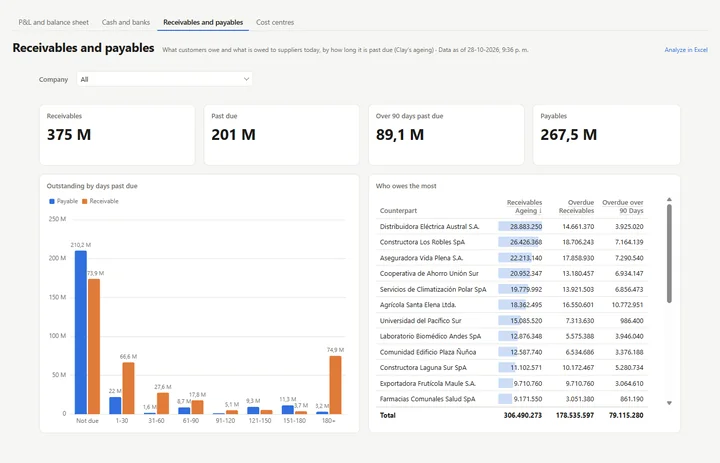
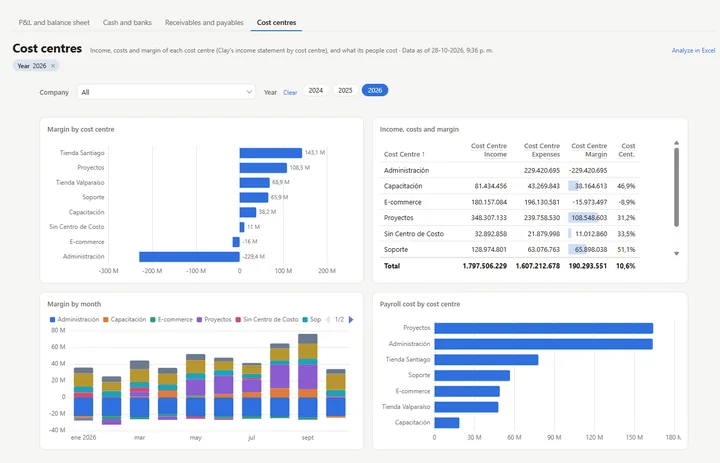
  6. Clay ERP brings your books from Clay into a model, with statement, cash, ageing and margin pages.
  7. Download the SDK, build Hello World, and turn it on in the studio.

Free · .NET 10 · the SDK and Hello World in 0.4 MB · each plug-in a download of its own

A dark graphite plate on black with four rectangular sockets: two metal modules sit in the first two with a thin blue line of light around their base, a third module hovers above the third socket, which glows blue, and the fourth socket is empty and dark.
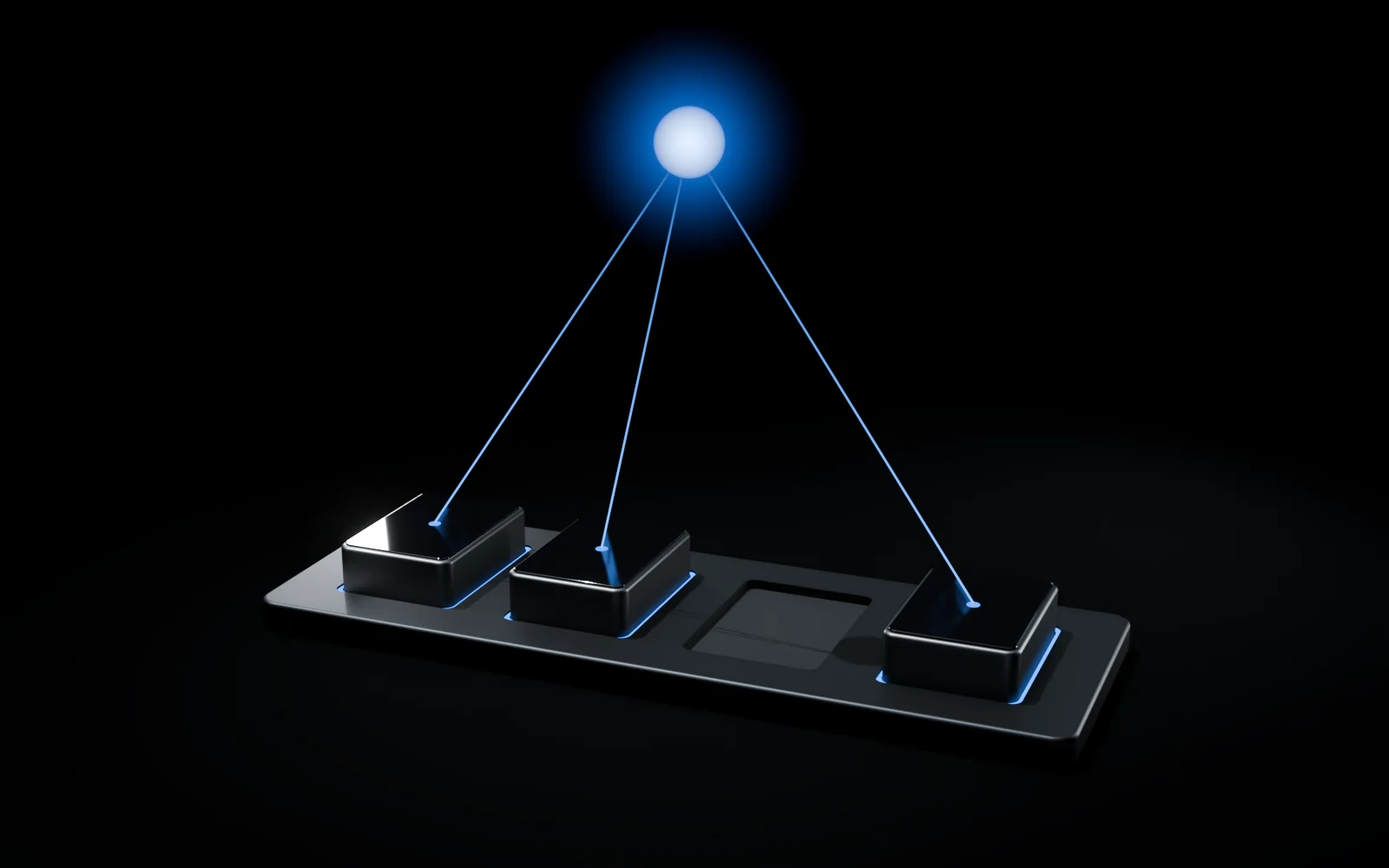
The graphite plate with three seated modules and one empty socket; from the top of each module a thin blue line of light rises to a single softly glowing blue orb floating above the plate.

Why an SDK

OpenBI’s edge is the agent. Plug-ins give it new hands.

OpenBI Studio has an agent endpoint (MCP9). Connect Claude Code, the Claude app or any MCP client, and your agent builds models, writes OAX (compatible with DAX) and designs report pages with the studio’s own tools. A plug-in adds tools of its own: the agent finds them beside the studio’s, with what the plug-in tells it about them.1

  • New tools for the agent.
  • New tabs in the studio.
  • Your model’s data, by OAX.

2

free plug-ins, each a download of its own: Customer Service and Clay ERP.

3

systems to build on: Windows, macOS and Linux, with the .NET 10 SDK.2

0.4 MB

the SDK: the package, its documentation and Hello World, in one zip.

What a plug-in can do

Six ways into the studio.

One small contract: your plug-in implements IStudioPlugin, and the studio hands it IStudioHost.1

  • Agent tools

    Classes of MCP tools. While the plug-in is on, they join the studio’s agent endpoint, with your instructions for the agent.

  • Tabs in the studio

    Views under Specialty in the navigation. A tab keeps its state, and can move to a window of its own on another screen.

  • The model and OAX

    The open model’s tables, columns and measures, any OAX query on it (compatible with DAX), and the OAX tab to show what ran.

  • Settings and secrets

    Kept on the user’s computer, never in a project. Secrets are encrypted: for the Windows user, or with the Mac’s login keychain.

  • Microsoft sign-in

    Access tokens for Microsoft Graph and other Microsoft services, with the user’s consent, through the studio’s sign-in.

  • Privacy

    The studio’s pseudonymizer: personal data turned into tokens before an agent sees it, and put back afterwards.

What would you build? A connector for the system your company keeps its books in, as Clay ERP is. A queue for an operations team. A month-end close with checks your agent runs. The SDK’s README walks through every member of the contract, and so does the OpenBI SDK’s guide in the OpenBI Docs.

Private stays private

The agent sees tokens.
Your computer keeps the names.

Customer Service hands an agent your customers’ e-mail. With privacy on, the personal data in it becomes numbered tokens first, and the real values go back into the reply on your computer.4

Transcript
  1. Customer Service lets an agent help answer your customers' e-mail. But the agent doesn't need to know who your customers are.
  2. With privacy turned on, OpenBI finds the personal data in each message before the agent sees it: names, e-mail addresses, phone numbers, national identity numbers, account and card numbers.
  3. Each one becomes a numbered token, like <PERSON_1>. The same name or number gets the same token, so the agent can still follow the conversation.
  4. The agent writes its reply with the tokens. The real values go back in here, on your computer, and the table of tokens never leaves it.
  5. For the data in your models, Power Query can anonymize it while it loads, so it never enters the model at all.
  6. No detector is perfect: a name OpenBI has never seen can slip through. Microsoft Presidio, running on your own server, finds more.
  7. One thing OpenBI cannot filter: what you type yourself into your agent's chat goes straight to its provider.
  8. Private stays private, unless you type it.
The graphite plate with three seated modules and a glowing blue orb above them; halfway up, a thin frosted glass pane floats level, and the three blue lines from the modules run solid up to the pane, then continue above it to the orb as rows of short separated dashes of light.

1The e-mail, on your computer

From: Kari Nordmann<PERSON_1> <kari.nordmann@example.com<EMAIL_1>>
Subject: Charged twice

Hi,
I was charged twice for order 20417. My card is 4111 1111 1111 1111<CARD_1>. Please refund one of the payments to NO93 8601 1117 947<IBAN_1>.
Call me on +47 400 00 000<PHONE_1> if anything is unclear.

Kari Nordmann<PERSON_1>

2What the agent sees

From: Kari Nordmann<PERSON_1> <kari.nordmann@example.com<EMAIL_1>>
Subject: Charged twice

Hi,
I was charged twice for order 20417. My card is 4111 1111 1111 1111<CARD_1>. Please refund one of the payments to NO93 8601 1117 947<IBAN_1>.
Call me on +47 400 00 000<PHONE_1> if anything is unclear.

Kari Nordmann<PERSON_1>

3The agent’s draft, back on your computer

Hi Kari Nordmann<PERSON_1>,

Sorry about the double charge on order 20417. We have refunded one of the payments to NO93 8601 1117 947<IBAN_1>.
We will call you on +47 400 00 000<PHONE_1> if we need anything else.
Made-up data, and OpenBI’s real output: this e-mail run through the studio’s pseudonymizer gives exactly these tokens, and the draft gets exactly these values back. The order number stays: it is not personal.5
What stays on your computer, and what goes to your agent's provider On your computer: your mailbox and model hold the real data; OpenBI Studio finds the personal data and sends the agent's provider tokens only; the provider's AI model sees tokens and returns a draft with tokens; the studio puts the real values back from its token table, kept in memory, and you read the reply and press Send. Separately, what you type into your agent's own chat goes to the provider as typed, not filtered. Your computer Your agent’s provider Your mailbox and your model the real names and numbers OpenBI Studio finds the personal data, swaps in numbered tokens The reply you send real values back in; you press Send The token table in the studio’s memory only <PERSON_1>Kari Nordmann <IBAN_1>NO93 8601 1117 947 You, in your agent’s chat Claude app, Claude Code … The AI model sees <PERSON_1>, <IBAN_1> … never the values tokens only the draft, with tokens as typed: not filtered
  1. Your computerYour mailbox and your modelthe real names and numbers
  2. Your computerOpenBI Studiofinds the personal data and swaps in numbered tokens; the table of tokens stays in its memorytokens only ↓
  3. Your agent’s providerThe AI modelsees <PERSON_1>, <IBAN_1> … never the valuesthe draft, with tokens ↓
  4. Your computerOpenBI Studioputs the real values back into the draft; you read it and press Send
  5. Your agent’s chatWhat you type yourselfgoes to the provider as typed: OpenBI doesn’t filter it
What stays on your computer, and what goes to your agent’s provider.
  • FoundE-mail addresses, phone numbers, Norwegian national identity numbers and D-numbers, account numbers, IBANs and card numbers (each checked by its check digits), IP addresses, and names.4
  • Same value, same tokenThe same name or number gets the same token wherever it is found: in the mail, in your instructions to the agent, in the model’s rows. The agent can still tell people apart.
  • Back on your computerThe agent’s drafts and the arguments of its tool calls get the real values back here. The table of tokens lives only in the studio’s memory.
  • Presidio, optionalMicrosoft Presidio’s analyzer, running at your own address, adds names and places in many languages.6 If it doesn’t answer, OpenBI’s own detection is used, and the Activity log says so.

Unless you type it.

What you type into your agent’s own chat, in the Claude app or Claude Code, goes straight to its provider. OpenBI can’t filter that, and doesn’t. Private information reaches the agent only when you deliberately type it there.

In your models: anonymized as it loads.

Power Query M’s Privacy.Anonymize (Transform data, Anonymize) treats personal data while the table loads, so it never enters the model. Then every tool that reads the model, an agent’s included, only ever sees the anonymized values.7

// free text: names, e-mails, numbers replaced
Privacy.Anonymize(Source, {"Comment"}, [Operator = "replace"])
// a whole column, hashed: joins still work
Privacy.Anonymize(Source, {"Email"}, [Whole = true, Operator = "hash", Salt = "..."])
Privacy.Anonymize's operators
OperatorWhat it does“Kari Nordmann”
replaceThe kind of data, in its place<PERSON>
redactRemoved(nothing)
maskLetters and digits as *, the last two kept**** ******nn
hashSalted SHA-256: the same value gives the same hash64 hexadecimal digits

If Presidio is asked for and doesn’t answer, the load fails: nothing personal goes through un-anonymized.

Off until you turn it on. Or until IT does.

Privacy is a setting of the studio, off by default (for your own mail). To turn it on: Customer Service’s setup, step 4, Privacy: choose Company – anonymize personal data, or Company – with Microsoft Presidio and its address.

Your IT department can make it the rule, by Windows policy or, on a Mac, a configuration profile:8

  • RequirePrivacy = 1: at least OpenBI’s own detection, always.
  • PresidioUrl: Presidio’s analyzer, always, at your address.

On Windows under HKLM or HKCU\SOFTWARE\Policies\NorwayAnalytics\OpenBI; on a Mac, the same names in a profile for no.norwayanalytics.openbi.studio. Then privacy can’t be turned off, and Customer Service’s setup says your organization has set it.

The plug-ins

The first two. Free.

Ready to use, from Norway Analytics. Each is a zip of its own: download it, and install it from OpenBI Studio.

Customer Service Free

Norway Analytics · version 1.1.3 · for OpenBI Studio 0.3.73 and later on Windows; on a Mac, its agent tools

Answer customer e-mail with your data and an agent beside you. A shared mailbox (support@) or your own: Microsoft 365, Outlook.com, Gmail, iCloud, Yahoo or any IMAP account. The agent reads each message, looks the customer up in your model, notes what it found and drafts the reply. You always press Send: the agent has no tool to send mail.3

Download Customer Service

OpenBI-Plugin-CustomerService-1.1.3.zip

3.6 MB (3,604,906 bytes) · version 1.1.3 · 10 files · signed by Norway Analytics · for OpenBI Studio 0.3.73 and later

SHA-256

8c33047d3e087c1e86f51a241475053e4c5b538ab232436323f48910e1cd3f0c
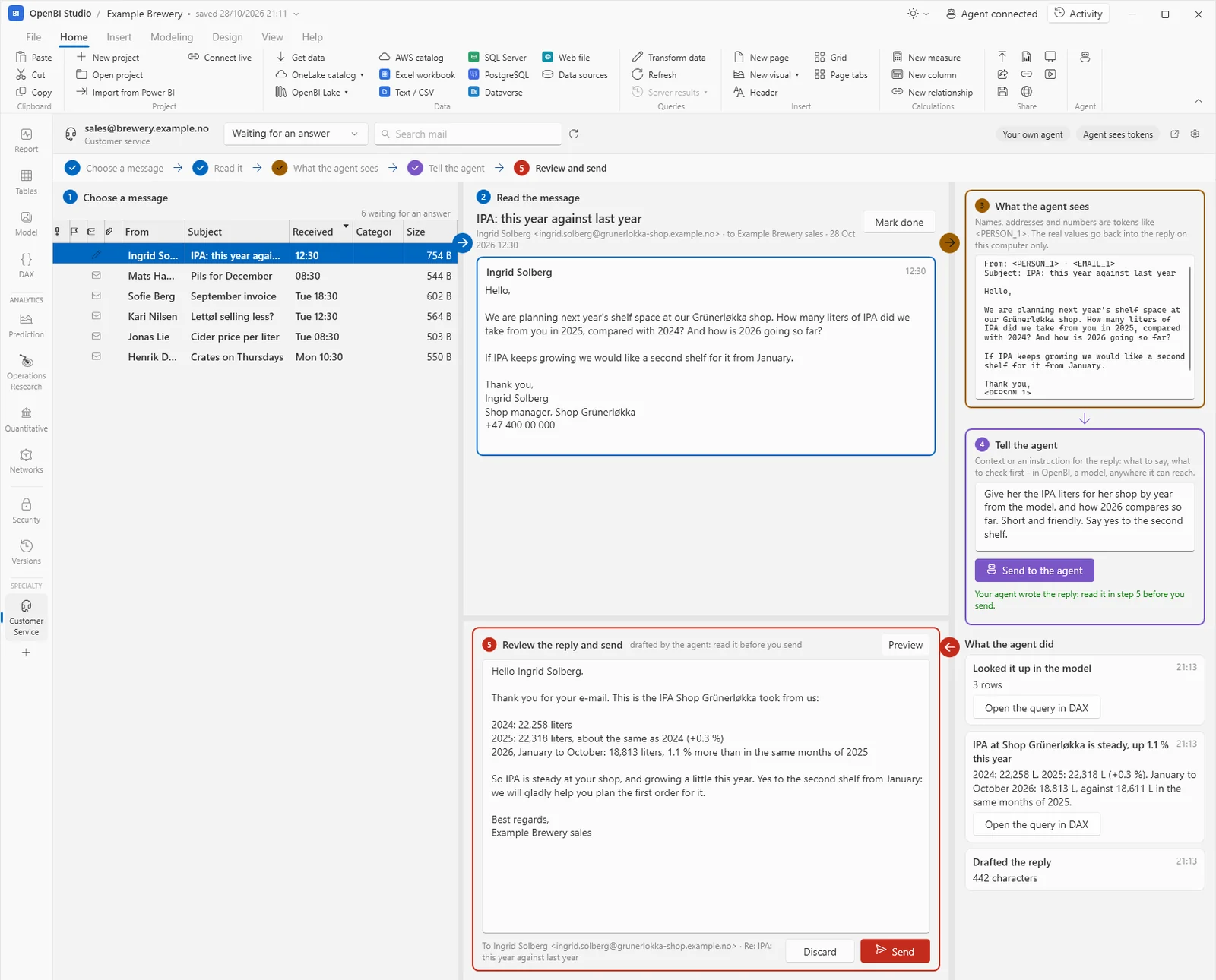
OpenBI Studio's Customer Service tab on a shared mailbox, sales@brewery.example.no. On the left, a queue of six customer e-mails with the first one selected. In the middle, the e-mail 'IPA: this year against last year' from Ingrid Solberg, and below it a drafted reply listing IPA liters for 2024, 2025 and January to October 2026. On the right: what the agent sees, with names as tokens like <PERSON_1>; the operator's instruction to the agent; and what the agent did: a lookup in the model, a note with the numbers, the drafted reply.
Customer Service 1.1.0 in a development build of OpenBI Studio 0.3.67 (October 28, 2026), the Example Brewery model and a demo mailbox of made-up e-mails. The lookups are real queries on the model. On this tab, 1.1.3 differs only in its button’s words: Open the query in OAX, as the studio’s DAX tab is now its OAX tab. In 1.1.3 a mailbox opens only after its privacy protection is ready, and Presidio’s error replies are no longer written to the activity log.3

Who drafts

OpenBI’s built-in agent, with an Anthropic API key of yours (Anthropic bills the key), or your own agent, Claude Code or the Claude app, over the studio’s MCP endpoint.

The agent’s tools

  • mail_queue
  • mail_read
  • mail_lookup
  • mail_note
  • mail_draft_reply
  • mail_mark
  • mail_next_request

Install it

  1. Download its zip, above.
  2. In OpenBI Studio 0.3.73 or later, under SPECIALTY in the navigation, click +: the Specialty modules window.
  3. Click Install a plug-in… and choose the zip. No need to unzip it.
  4. Open Customer Service under Specialty and set it up in four steps: what it is for, the mailbox, who drafts, privacy.

The studio checks the zip first: its signature (on Windows and on a Mac), each file’s SHA-256, the version of OpenBI Studio it needs and the SDK contract it was built against. Then it installs it for you, or, as an administrator, for everyone on the computer, and turns it on. A newer zip, chosen the same way, updates it; Remove on its card removes it.

Had it on in OpenBI Studio 0.3.66? It came with that studio; from 0.3.67 on it is a download of its own. On its first start after the upgrade, OpenBI Studio says so, with an Install button. Its settings and sign-ins are kept.

Clay ERP Free

Norway Analytics · version 1.0.3 · for Clay’s customers in Chile

For companies that keep their books in Clay, the Chilean accounting service.11 It reads your companies’ books through Clay’s API, with your Clay token: the ledger, electronic tax documents (DTE), banks, customers and suppliers with what they owe, cost centres, payroll and fixed assets. They arrive as Power Query tables in the open project, with a starter model and report pages you can change. Then your agent can answer questions about the books in plain language.

Download Clay ERP

OpenBI-Plugin-ClayERP-1.0.3.zip

106 KB (105,741 bytes) · version 1.0.3 · 7 files · signed by Norway Analytics · for OpenBI Studio 0.3.73 and later

SHA-256

0de40cd90cbad2f9d3d5951c71e41371373750fc22f36d7d606c28c239993242
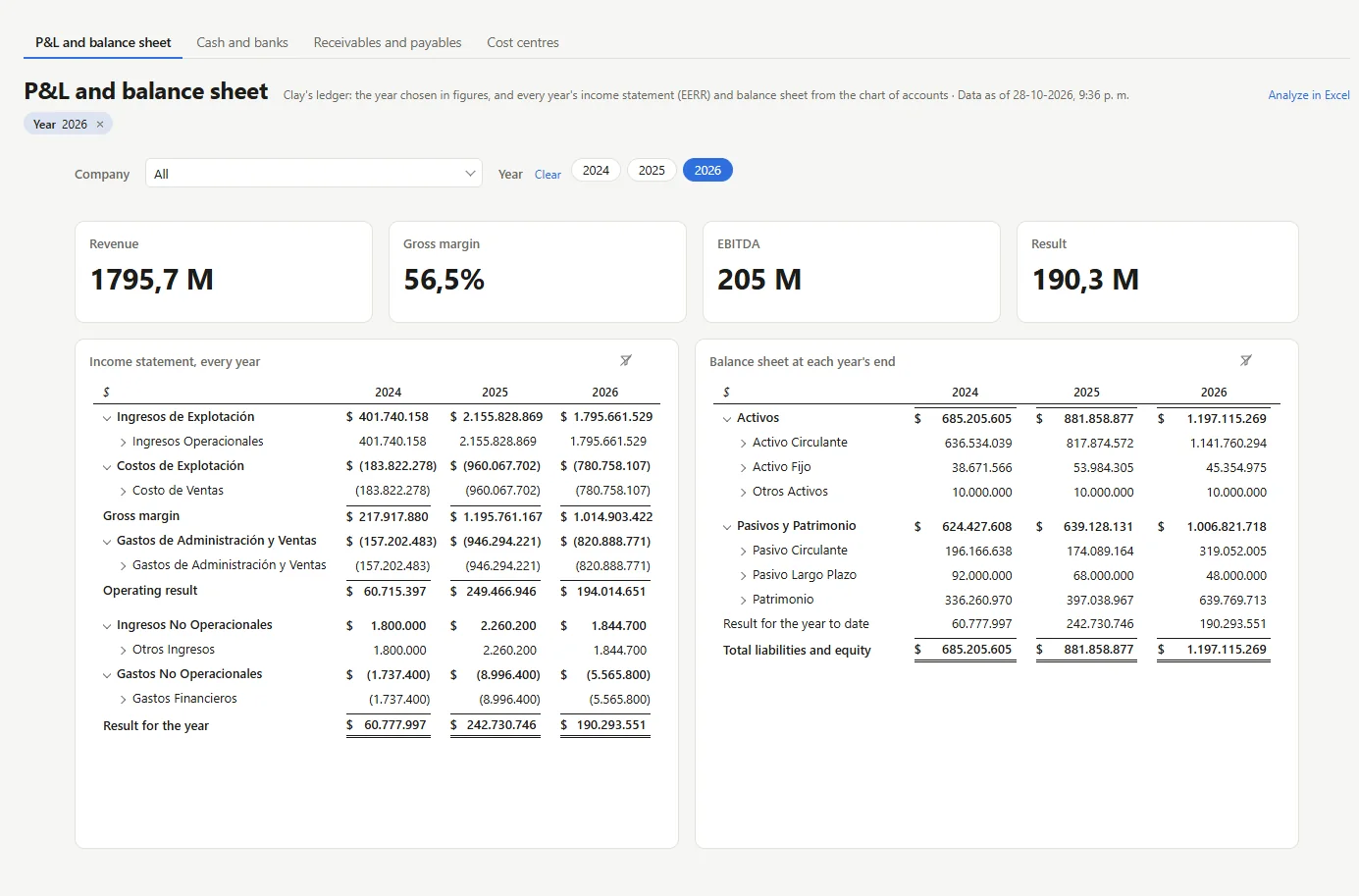
Clay ERP's P&L and balance sheet page: tabs for its four pages; a Company slicer and Year buttons with 2026 chosen; cards for revenue, gross margin, EBITDA and the result; the income statement for 2024, 2025 and 2026 from Ingresos de Explotación down to the result for the year; and the balance sheet at each year's end, from Activos to total liabilities and equity.
Its pages: Clay ERP 1.0.0 in a development build of OpenBI Studio 0.3.67 (October 28, 2026), loaded from a mock of Clay’s API with two made-up companies. 1.0.3 is the same plug-in, built for SDK contract 1.2.13

What it writes into your project

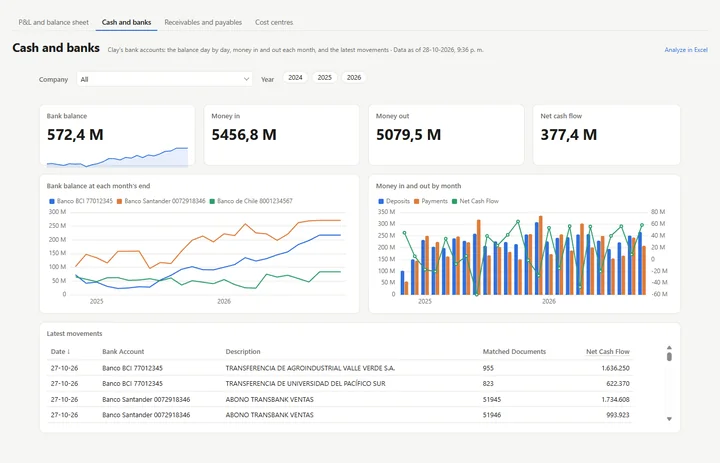
15 tables as Power Query queries (two more if you choose them: Bank matches and Balance de 8 columnas), their relationships, 51 measures in nine folders (Ledger, Income statement, Balance sheet, Tax documents, Ageing, Banks, Cost centres, Payroll and Honorarios), and four report pages: P&L and balance sheet, cash and banks, receivables and payables, and cost centres. Loading again updates what it wrote; pages you changed are kept.

The agent’s tools

  • clay_status
  • clay_companies
  • clay_load

Ask your agent which companies your token reaches, or to load one, and it does. The token is never the agent’s: no tool takes it, shows it or changes it.

Your Clay token, sealed

You enter it in the plug-in’s tab. It is kept sealed for your user, in this computer’s credential store, and the model’s refresh takes it from there: never in the model, the project, its history or the logs. Closed months are kept on your computer, so a refresh reads only the open ones.

Install it

  1. Download its zip, above.
  2. In OpenBI Studio 0.3.73 or later, under SPECIALTY in the navigation, click +: the Specialty modules window.
  3. Click Install a plug-in… and choose the zip. No need to unzip it.
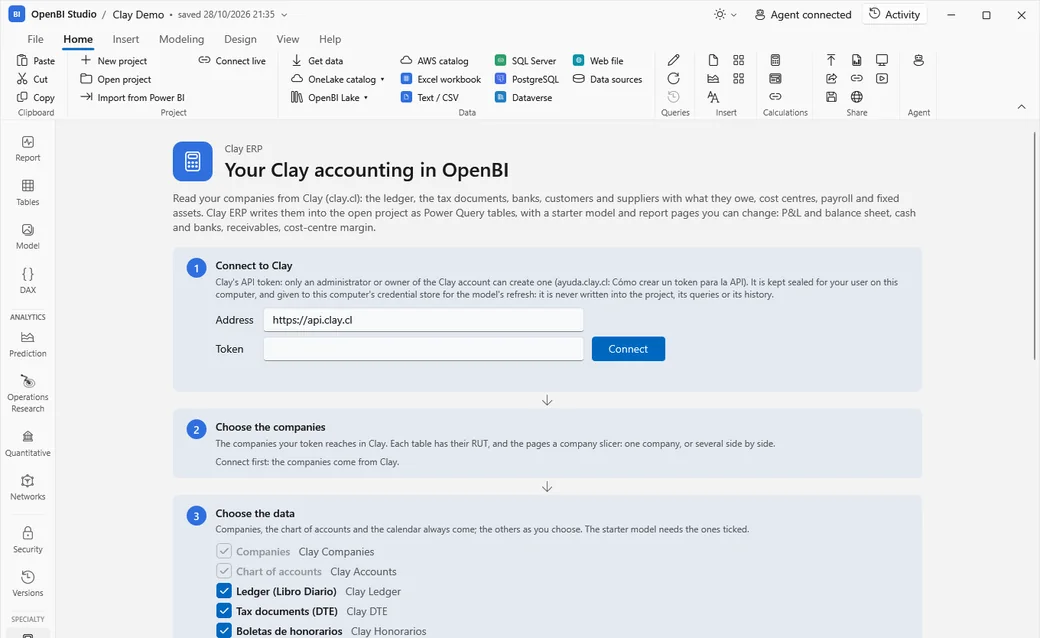
  4. Open Clay ERP under Specialty: connect with your Clay API token (an administrator or owner of the Clay account creates it), choose the companies and the data, and load.
OpenBI Studio with the Clay ERP tab open: 'Your Clay accounting in OpenBI', and its steps: 1, Connect to Clay, with Clay's address and a box for the API token; 2, Choose the companies; 3, Choose the data, with the tables ticked.

The studio checks the zip first: its signature (on Windows and on a Mac), each file’s SHA-256, the version of OpenBI Studio it needs and the SDK contract it was built against. Then it installs it for you, or, as an administrator, for everyone on the computer, and turns it on. A newer zip, chosen the same way, updates it; Remove on its card removes it.

Tested against a mock of Clay’s API, built from Clay’s published API description. Its first test with a real Clay token will be with a customer.13

Kept when the studio is upgraded.

Plug-ins are installed apart from OpenBI Studio, so they stay installed, and keep working, when the studio is upgraded. Their settings and secrets stay too: a plug-in removed and installed again finds them.1

Built for an older SDK?

A plug-in built for an older major version of the SDK’s contract is not loaded: the studio says to build it again with its SDK, or to download the plug-in’s new version. A new minor version only adds, so what was built before it still runs: Customer Service 1.1.0 and Clay ERP 1.0.0, built for contract 1.1, run in OpenBI Studio 0.3.74 too. Install the new zip over them to update.

Download

The OpenBI SDK.

Free. One zip for Windows, macOS and Linux. Its version is OpenBI Studio’s.

OpenBI SDK 0.3.74 · for OpenBI Studio 0.3.74 and later

OpenBI-SDK-0.3.74.zip

0.4 MB (376,612 bytes) · 10 files

Download the SDK

SHA-256

27d5c9d392ab99ba4307ba8ab555ca4d1eb97b6cc808e3fa19b1f8f5c98721c3

Check it: Get-FileHash OpenBI-SDK-0.3.74.zip in PowerShell, or shasum -a 256 OpenBI-SDK-0.3.74.zip on a Mac or Linux.

Inside

  • packages/ the SDK as a NuGet package, OpenBI.Studio.Sdk 0.3.74
  • lib/ the same assemblies, with their XML documentation
  • samples/HelloWorld/ the example, as source: a plug-in with two agent tools
  • README.md “Build your first plug-in”: the contract, plugin.json, installing for testing
  • nuget.config, SHA256SUMS.txt

You need the .NET 10 SDK10 to build, and OpenBI Studio 0.3.74 or later, on Windows or a Mac, to run a plug-in. The plug-ins are not in this zip: each is a download of its own, below. The README’s guide is also in the OpenBI Docs.

The free plug-ins · each a zip of its own, installed from OpenBI Studio

As binaries, without their source code. Each plug-in’s card, above, has its SHA-256 and how to install it.

New since OpenBI SDK 0.3.67 · SDK contract 1.2, from OpenBI Studio 0.3.73

  • The agent’s key stays yours.A plug-in no longer receives the studio’s agent key. One that calls the agent endpoint itself says so in plugin.json (agentAccess: why, and which tools), and asks you once: you allow it or not, and can withdraw it in Specialty modules. It then gets a key of its own, for those tools only.1
  • Signatures on a Mac too.OpenBI Studio on a Mac now runs only plug-ins signed by Norway Analytics or by a publisher your IT allows, as on Windows. IT sets its rules with a configuration profile.8
  • OAX.OpenBI’s formula and query language is called OAX, Open Analytical Expressions, compatible with DAX. The SDK’s documentation, Hello World and Customer Service say so; the formulas are written as before.

Built with SDK 0.3.67 (contract 1.1)? It still runs: 1.2 only adds. Only a plug-in that read IStudioHost.Agent.Key must change: it gets an empty key now, and asks with RequestAgentAccessAsync.

Quick start

Hello World,
in four steps.

  1. Unzip and build.

    cd OpenBI-SDK-0.3.74/samples/HelloWorld
    dotnet build -c Release

    The plug-in is the output folder, bin/Release/net10.0/: HelloWorld.dll and its plugin.json.

  2. Put it where the studio looks.

    $dest = "$env:LOCALAPPDATA\OpenBI\Plugins\hello-world"
    New-Item -ItemType Directory -Force $dest | Out-Null
    Copy-Item bin\Release\net10.0\* $dest
  3. Turn it on.

    In OpenBI Studio, under SPECIALTY in the navigation, click +, turn Hello World on and close the window. The studio’s agent endpoint restarts with its tools.

    The installed studio, on Windows and on a Mac, runs signed plug-ins only. To try your own, an administrator allows unsigned ones on a test computer (the README has the one command for Windows and the profile for a Mac), or you sign it.

  4. Ask your agent.

    “Use hello_model to say hello.”

    // hello_model, on the Example Brewery model (OpenBI Studio 0.3.67, October 28, 2026)
    Hello, world! Greeting number 2, from OpenBI Studio 0.3.67.
    The project Example Brewery has these tables:
    - Products: 4 rows, 3 columns, 0 measures
    - Plants: 3 rows, 4 columns, 0 measures
    - Production: 12 rows, 4 columns, 0 measures
    - Demand: 4 rows, 2 columns, 0 measures
    - Places: 16 rows, 6 columns, 1 measures
    - Distances: 240 rows, 4 columns, 0 measures
    - Sales: 2,160 rows, 4 columns, 9 measures
    // ... and 10 more tables
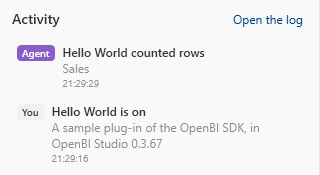
OpenBI Studio's Activity panel: 'Hello World is on, a sample plug-in of the OpenBI SDK, in OpenBI Studio 0.3.67', and above it, marked Agent, 'Hello World counted rows: Sales'.
Seen working with SDK 0.3.67 (October 28, 2026): the zip unzipped into an empty folder, built, and Hello World turned on in a development build of OpenBI Studio 0.3.67; the Activity panel shows it, and the agent’s call. SDK 0.3.74’s Hello World builds the same way, on Windows and on a Mac.2
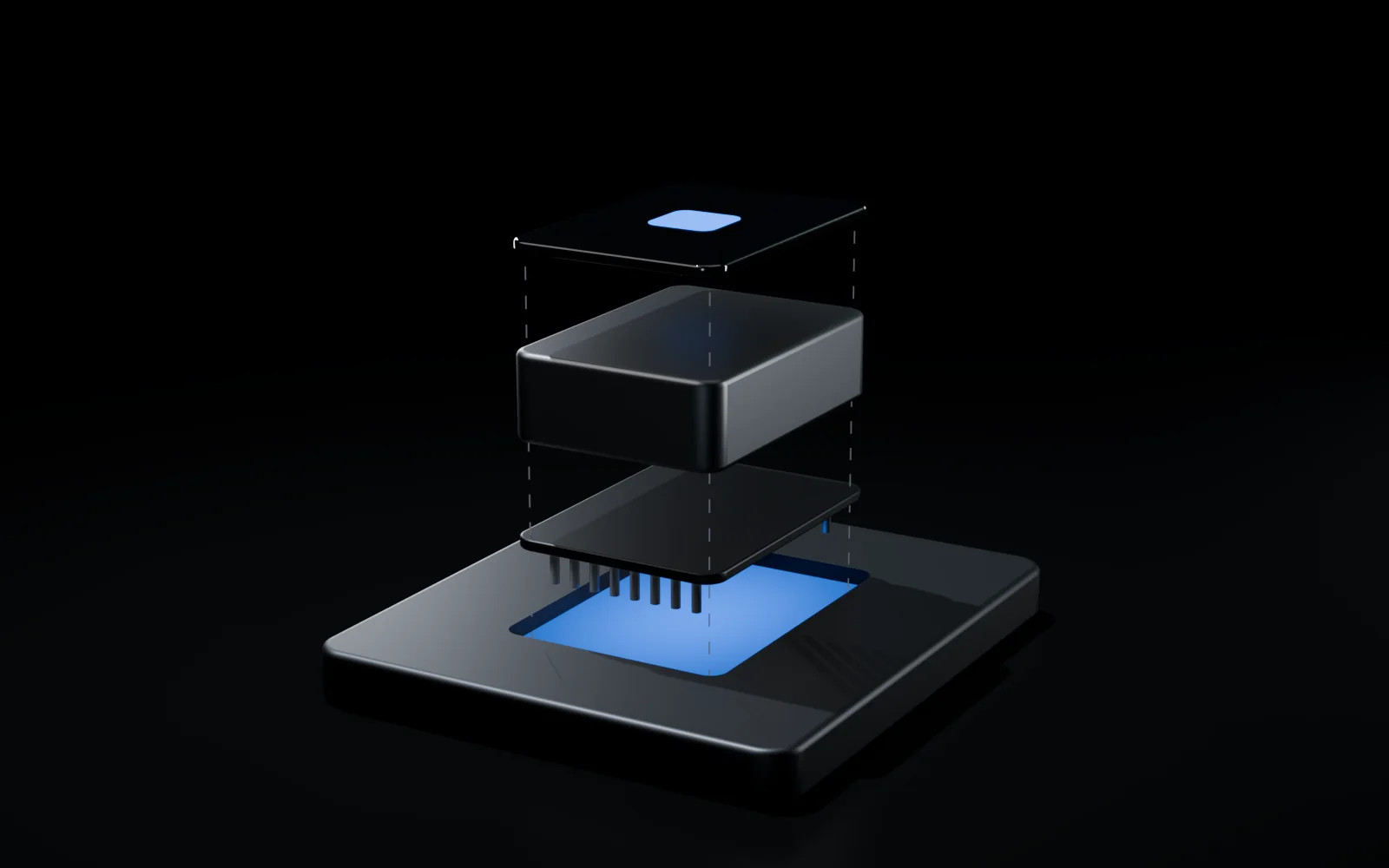
An exploded view of one module above a small graphite tile with a blue-lit socket: at the bottom a thin connector plate with a row of pins underneath, above it a solid metal block, and at the top a black glass lid with a small glowing blue square, linked by faint dashed guide lines.

Build your own

Three parts. One folder.

  1. plugin.json Who it is: its id, name, version, publisher, its assembly and entry class, the oldest studio it runs in, and, only if it calls the agent endpoint itself, why and which tools.
  2. IStudioPlugin Its logic and its agent tools: plain net10.0, built and tested on any system.
  3. PluginView Its tabs, if it has any: WPF in the Windows studio, Avalonia in the Mac studio.
using System.ComponentModel;
using System.Text;
using ModelContextProtocol.Server;
using OpenBI.Studio.Core.Engine;
using OpenBI.Studio.Sdk;

namespace HelloWorld;

public sealed class HelloPlugin : IStudioPlugin
{
    public const string Id = "sample.hello-world";

    public void Initialize(IStudioHost host) =>
        host.Log("Hello World is on", $"A sample plug-in of the OpenBI SDK, in OpenBI Studio {host.StudioVersion}");

    public IReadOnlyList<PluginView> Views => [];

    public IReadOnlyList<Type> AgentTools => [typeof(HelloTools)];

    public string? AgentInstructions =>
        "Hello World (a sample plug-in): hello_model greets and describes the open model; hello_rows counts a table's rows with OAX.";
}

[McpServerToolType]
public sealed class HelloTools(IStudioHost host)
{
    [McpServerTool(Name = "hello_model", ReadOnly = true)]
    [Description("Says hello and describes the model open in OpenBI Studio: each visible table with its rows, columns and measures.")]
    public string HelloModel([Description("Who to greet")] string name = "world")
    {
        // what a plug-in keeps on this computer: its settings beside the studio's, never in a project
        var storage = host.Storage(HelloPlugin.Id);
        var counter = storage.Load<Counter>("counter");
        counter.Greetings++;
        storage.Save("counter", counter);

        var text = new StringBuilder($"Hello, {name}! Greeting number {counter.Greetings}, from OpenBI Studio {host.StudioVersion}.\n");
        if (!host.HasProject) return text.Append("No project is open.").ToString();
        text.Append($"The project {host.ProjectName} has these tables:\n");
        foreach (var t in host.Tables.Where(t => !t.Hidden))
            text.Append($"- {t.Name}: {t.RowsText}, {t.Columns.Count} columns, {t.Measures.Count} measures\n");
        return text.ToString();
    }

    [McpServerTool(Name = "hello_rows", ReadOnly = true)]
    [Description("Counts a table's rows with an OAX query on the model open in OpenBI Studio.")]
    public async Task<string> HelloRows([Description("The table's name")] string table, CancellationToken ct = default)
    {
        var dax = $"EVALUATE ROW(\"Rows\", COUNTROWS('{table.Replace("'", "''")}'))";
        var result = await host.DaxAsync(dax, ct);
        host.Log("Hello World counted rows", table, byAgent: true);
        return $"{table} has {QueryResult.Text(result.Rows[0][0])} rows.";
    }
}

Where it runs.

Platform support
WindowsMacLinux
Build and test a plug-inYesYesYes
OpenBI Studio to run it inYes, x64Yes, Apple silicon2No studio
Agent toolsYesYes–
TabsWPF viewsAvalonia views–
Plug-in signaturesSigned only, unless IT allowsSigned only, unless IT allows (from 0.3.73)–
IT’s policyRegistry: Group Policy, IntuneConfiguration profile: an MDM8–
A plug-in’s key to the agent endpointIts own, if you allow itIts own, if you allow it–
Customer ServiceIts tab and its agent toolsAgent tools only: its tab, where it is set up, is made for Windows–
Clay ERPIts tab and its agent toolsAgent tools only: its tab, where it is set up, is made for Windows–

The words, in plain language.

Agent
An AI assistant that does work for you with tools: it reads, looks things up, writes. Here, an agent connected to OpenBI Studio, such as Claude.
Plug-in
An add-on that gives OpenBI Studio something new: tools for the agent, tabs in the studio, or both. You turn it on and off.
SDK
Software development kit: what a programmer needs to build plug-ins. The rules a plug-in follows, an example and a guide.
MCP
Model Context Protocol: the common way AI agents connect to programs and use their tools. OpenBI Studio speaks it.
Tool
One thing an agent can ask the studio to do, such as “read this e-mail” or “count the rows of this table”.
Model
Your business data, organized for analysis: tables, how they relate, and the calculations on them.
OAX
Open Analytical Expressions: OpenBI’s formula and query language, used to ask a model questions. Compatible with DAX: the same formulas work.
DAX
Power BI’s formula and query language.
.NET
Microsoft’s free programming platform, for Windows, macOS and Linux. Plug-ins are written in it, usually in C#.
NuGet package
The standard way to share a .NET library. The SDK comes as one.
Token
A placeholder such as <PERSON_1> that stands in for a real name or number, so an agent can work without seeing it.
Pseudonymize
Replace personal data with tokens that can be turned back into the real values, by whoever holds the table of tokens: here, only your computer.
Anonymize
Remove or disguise personal data for good: replaced, removed, masked or hashed.
Hash
A fixed-length fingerprint of a value: the same value always gives the same fingerprint, and the value can’t be read back from it.
Presidio
Free software, started at Microsoft, that finds personal data in text with language models. Your IT runs it on your own servers.
Signed
Stamped by its maker with a certificate, so OpenBI Studio can check who made it and that nobody changed it, on Windows and on a Mac.
Agent key
The secret an agent sends with each call to OpenBI Studio, so the studio knows the call is allowed. Yours stays yours: a plug-in that needs one asks you for a key of its own.