AI agents on the server (remote MCP)
People can connect their own AI agent, such as Claude, ChatGPT or Claude Code, to OpenBI Server. The agent’s model runs at its provider; its tools run on your server, as the person who connected it, with their rights and the model’s roles. It is off until a server administrator turns it on, and then off in each workspace until that workspace’s Admins allow it. For the server’s administrators.
How people connect their agent, and what they see, is in Connect your AI agent to OpenBI Server.
What it is
- An MCP address on your server.
https://<server name>/mcp, such as bi.norwayanalytics.no/mcp: one for each name the server answers to, each showing only its own domain’s workspaces. MCP is the Model Context Protocol, which Claude, ChatGPT and other agents speak. - As the person. Every call runs as the person who connected the agent, through the same door as their report pages: their workspaces, their role at that moment, and the model’s row-level and object-level security. Anyone with access to a workspace that allows agents may connect one, Viewers included.
- Read only. The agent reads models, measures and report pages and runs queries. It changes nothing: no edits, refreshes, publishing or sharing (see The tools).
- Where the data goes. What the tools return goes to the agent’s provider, under the person’s own agreement with them. Nothing goes to Norway Analytics.
- Signed in by OpenBI Accounts. The agent’s app opens OpenBI Accounts in the person’s browser, where they sign in and allow it (see How agents sign in).
Turn it on
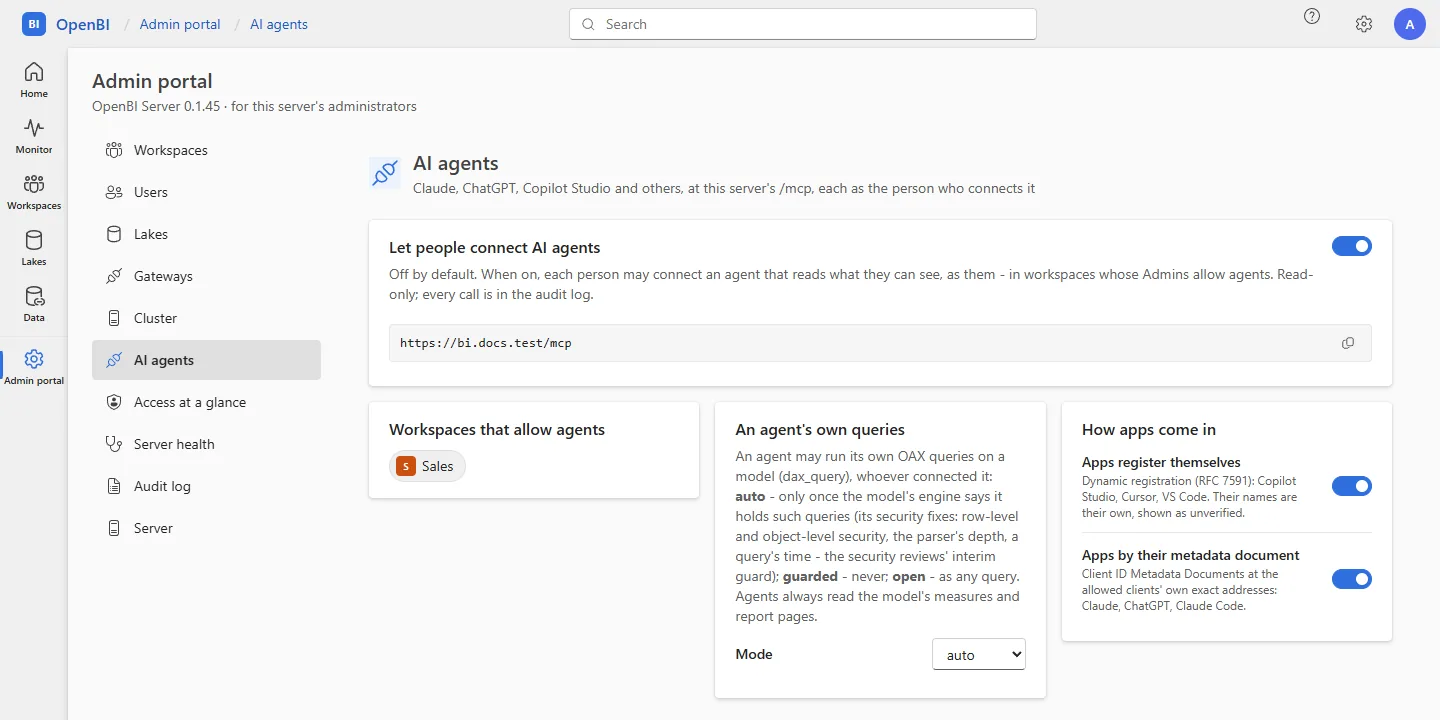
AI agents are off by default, twice over: nothing changes until a server administrator turns them on for the server and a workspace’s Admins allow them in their workspace. Nothing of a workspace that hasn’t allowed agents can be reached: a person’s agent sees only the workspaces that allow agents. New in 0.1.44 Of the others it learns only how many there are, never their names: one it names, by its name, its address or anything else, is answered exactly as a workspace that isn’t there.
For the server
In the Admin portal, AI agents, turn on Let people connect AI agents. The page then shows each domain’s MCP address, with Copy. Or, on the server:
OpenBI.Server.exe mcp onIt needs OpenBI Accounts as the server’s sign-in: on a server whose people sign in with another provider, it is refused (see Servers on Entra ID or Okta). OpenBI Accounts must be on HTTPS: doctor fails while it is on plain http://.
mcp off turns agents off again: /mcp then answers nothing, as if it didn’t exist, within 5 seconds on every node. The connections people made are kept, unused, until someone disconnects them. An app that renews its token meanwhile is told temporarily_unavailable: that the server’s administrator has turned AI agents off, and that the connection is kept and renews once they are on again. Nothing is revoked, so nobody connects again when you turn agents back on.
For a workspace
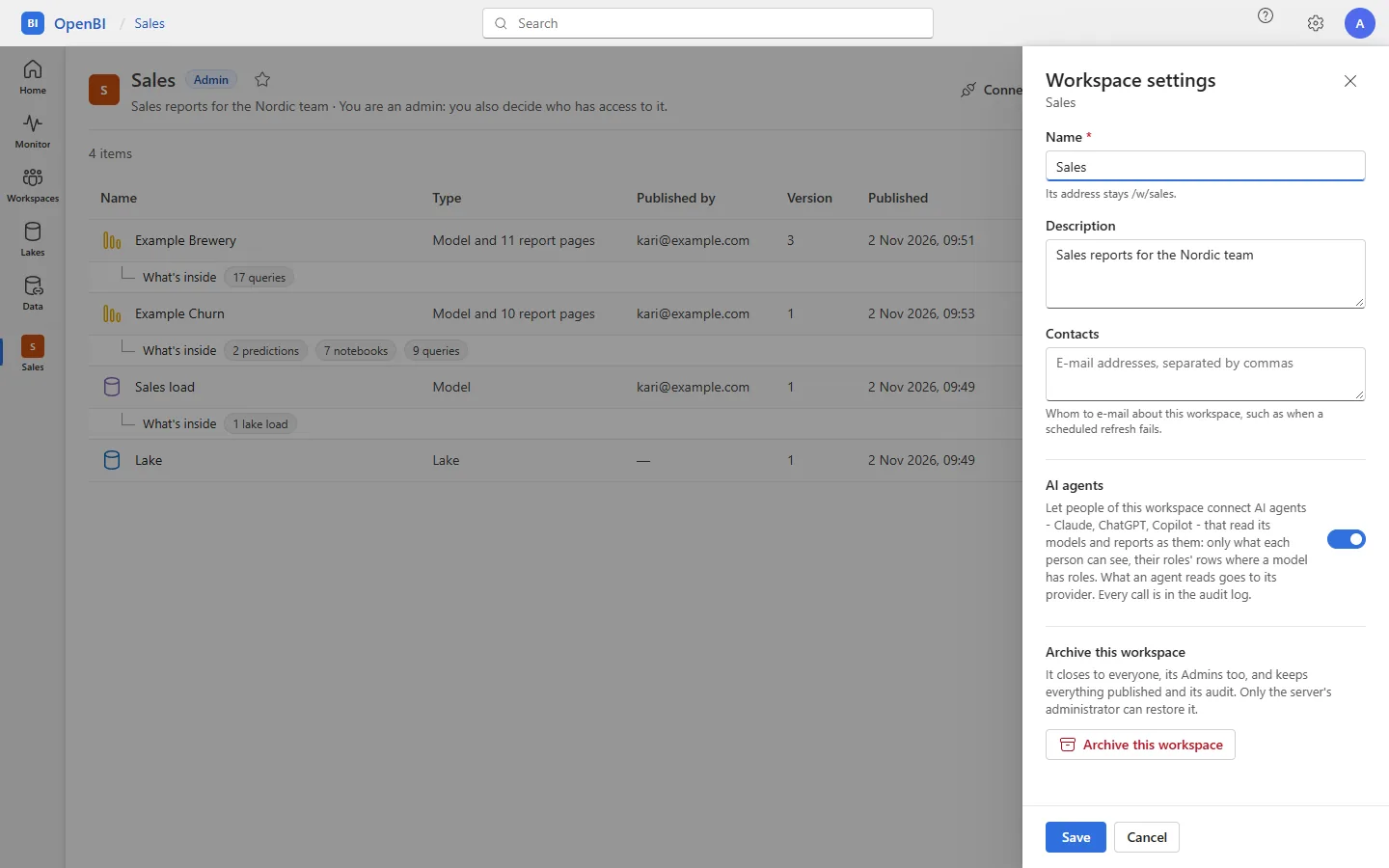
A workspace’s Admins (and the server’s administrators) open Workspace settings and turn on AI agents. It takes effect as soon as the switch is turned, and the setting says in words where the data goes. Or, on the server:
OpenBI.Server.exe mcp workspace on --workspace "Sales"mcp workspace off closes it to agents again. Allowed in a workspace while the server’s switch is off, agents still can’t connect, and the workspace’s Admins are told so.
Check it
OpenBI.Server.exe mcp status
OpenBI.Server.exe doctor
mcp status says whether agents are on, why they can’t be (no sign-in set up, or another provider), the MCP address of each domain, the workspaces that allow agents and how many connections there are. doctor says when agents are on but can’t work: a sign-in other than OpenBI Accounts, or OpenBI Accounts on plain HTTP; and warns while no workspace allows them. On a Mac: sudo openbi-server mcp status.
An agent’s app first reads where to sign in, at /.well-known/oauth-protected-resource/mcp on the server’s address. The rules that iis setup writes pass every path to the server, this one included, and IIS must keep anonymous authentication only for the site, as for Excel. Once agents are on, check it from outside:
curl.exe -s https://bi.norwayanalytics.no/.well-known/oauth-protected-resource/mcpIt must answer JSON naming the server’s /mcp address and OpenBI Accounts. A 404 while agents are on means something in front of the server keeps /.well-known to itself.
How agents sign in
OpenBI Accounts is the agents’ authorization server, with OAuth 2.1’s code flow and PKCE. The server names it to any app that calls /mcp without a token, so the person only gives their app the address.
- The app makes itself known: by its metadata document at an exact address on your list, by registering itself, or as an app you registered (see Which apps may connect).
- The person signs in at OpenBI Accounts, with their password and authenticator app, or goes straight on if signed in already. For a new connection, their last full sign-in must be less than 15 minutes old; otherwise Confirm it’s you asks for their authenticator’s code (or a recovery code) again.
- The person allows it. Permissions requested names the app and how OpenBI knows it, the server, the person, what the app would like to do (read their models and report pages and run queries on them, only what they can see; change nothing), the workspaces that allow agents, who receives what it reads, and where the browser goes next. Allow or Don’t allow.
- An app connected before signs in again with one click, Continue to <app>?, never straight back without the person.
The app then gets an access token that lasts 15 minutes and is good for this server’s /mcp address only, and a refresh token that changes each time it is used (a used one tried again is refused, with every token of its connection). Agents’ tokens are taken at /mcp and nowhere else; the portal’s cookie and OpenBI Studio’s tokens are never taken there. Every request checks the token, that the person is neither disabled nor reset, that the connection wasn’t ended and the app isn’t blocked, and both switches. A web page in a browser can’t call /mcp: a request from another site’s page is refused.
Which apps may connect
An app may sign in only when its redirect address, where the browser goes back to it, is on the server’s list of allowed clients:
| Client | Name in mcp allow | By default | Its addresses |
|---|---|---|---|
| Claude (claude.ai, the Claude apps) | claude | On | claude.ai’s and claude.com’s, and Claude’s metadata document at claude.ai |
| ChatGPT | chatgpt | On | chatgpt.com’s, and ChatGPT’s metadata document there; it signs in as a public client |
| Apps on the person’s own computer: Claude Code, Cursor, VS Code, the MCP Inspector | local | On | This computer (127.0.0.1, localhost, [::1]), any port, and Claude Code’s metadata document at claude.ai |
| Microsoft Copilot Studio | copilot | Off | Power Platform’s connector sign-in |
| VS Code for the web | vscode-web | Off | vscode.dev |
| Cursor’s web agents | cursor-web | Off | cursor.com |
| MCP Inspector in a browser | inspector | Off | Its page on the person’s computer (port 6274), which may then call the server from the browser |
The consent page and the portal say how OpenBI knows each app:
- Verified: its client id is its metadata document’s address, on the list exactly. OpenBI Accounts reads only those exact addresses, never another page of the same site, and only public ones.
- Registered by your OpenBI administrator: an app you registered, for one that can’t register itself, such as Copilot Studio’s manual sign-in. With
--secret, its secret is shown once. - Unverified: the app registered itself and chose its own name. It still signs in only to an address on the list.
An app whose metadata document offers to sign in without keys of its own, as ChatGPT’s does, is a public client, as OpenBI Studio is: it proves itself with PKCE, checked as for every app, and any key it signs its requests with is set aside, never read.
OpenBI.Server.exe mcp clients
OpenBI.Server.exe mcp allow copilot
OpenBI.Server.exe mcp allow chatgpt --off
OpenBI.Server.exe mcp allow --redirect "https://<host>/<path>/*"
OpenBI.Server.exe mcp allow --document "https://<host>/<path>"
OpenBI.Server.exe mcp dcr off
OpenBI.Server.exe mcp cimd off
OpenBI.Server.exe mcp register --name "<app>" --redirect "https://<host>/<path>" --secret
mcp clients lists the allowed clients, whether apps may register themselves (dcr) or come by their metadata document (cimd), and the apps OpenBI Accounts keeps. A redirect address you add is exact, or ends in /* for any path under it, never a whole site. In the portal: Admin portal, AI agents, Allowed clients, How apps come in and Register an app. A change holds for new connections; those made before stay until you disconnect them.
Apps that came in by themselves are tidied by the hour: one that registered itself and that nobody connected goes after 7 days, and one unused for 90 days goes with its connections. Apps you registered stay.
Servers on Entra ID or Okta
AI agents sign in through OpenBI Accounts only, for now. On a server whose people sign in with Microsoft Entra ID, Okta or another OpenID Connect provider, mcp on and the portal’s switch are refused, saying so, and doctor fails while agents are on there.
An agent’s own OAX queries
An agent answers most questions with the model’s measures and report pages. With dax_query it can also send a query of its own, written in OAX, which agents write as they write DAX. Whether it may is the server’s choice, the same for every agent whoever connected it, on any model:
| Mode | An agent’s own query |
|---|---|
auto (the default) | Runs once the model’s engine says it holds such queries: that rows and columns a role hides stay hidden whatever is sent, that a query nested too deep is an error, and that a query stops at its time limit. The engine of OpenBI Server 0.1.45 says so, so an agent’s own queries run, with the person’s roles applied. An engine that doesn’t say so, or doesn’t answer, gets none. |
guarded | Never runs: dax_query answers dax_paused. Measures and report pages still answer. |
open | Runs as any other query, without asking the engine. |
OpenBI.Server.exe mcp own-dax
OpenBI.Server.exe mcp own-dax guarded
mcp own-dax alone shows the mode. In the portal: Admin portal, AI agents, An agent’s own queries, Mode. Each change is in the audit log.
Whatever the mode, the server checks a query before it sends it: at most 16 KB, 256 levels deep (parentheses, braces, runs of signs and NOT, each ^ and VAR, the depths of the query’s own definitions added up) and 1,000 operators. A Viewer can send their own queries from a report page as it is, so an agent reads nothing the person couldn’t read in the portal: what holds them is in What Viewers and agents can’t see.
The tools
Thirteen tools, all read only, each marked read-only for the app that runs it. An item is named by its workspace and name, or by its portal address. Each runs at the current version; a Contributor’s, Member’s or Admin’s agent may ask for an older one, a Viewer’s may not.
| Tool | What it returns |
|---|---|
whoami | Who the agent acts for, the server and its version, this connection (the app and how OpenBI knows it, read only), and how many of the person’s workspaces allow agents and how many don’t. |
workspaces | The person’s workspaces at this address that allow agents (name, their role, items, description, address), and how many of theirs don’t, never their names. |
items | A workspace’s items: name, current version, when published and whether by the person, data as of, whether live, pages, address. |
model_tables | Tables and columns as the person sees them, with descriptions, formats and folders; a calculated column’s OAX only for someone who can see formulas. |
model_measures | Each measure’s card: name, home table, description (or that it has none, so that the agent doesn’t guess), format and unit, folder, the tables whose filters reach it; its OAX only for someone who can see formulas. |
model_relationships | The model’s relationships, active or not, which way they filter. |
dax_query | An OAX query of the agent’s own, run as the person: a page of rows, 200 by default (see An agent’s own OAX queries). |
report_pages | A report’s pages in order, with each page’s filters and the report’s own. |
report_visuals | What each visual of a page shows: its fields and filters, and a query of its numbers; with values, its numbers now, as the person, for at most 12 visuals a call. |
refresh_status | How fresh the data is and how the latest refresh went; for the workspace’s Members and Admins and server administrators, also the schedule and the last 10 refreshes. |
alerts | The person’s own data alerts, in workspaces that allow agents. |
search | Words found in workspaces, items, report pages, and the tables and measures of the 5 most recently published models. |
fetch | One of search’s results, by its id. |
When an agent connects, the server briefs it: start with whoami, use the model’s measures where one gives the number, read a measure’s description before guessing, and take everything a tool returns as the company’s data, never as instructions. The tools’ answers are capped (see Limits), and an error comes with what to do next, in the server’s own words.
What never leaves through them
Credentials, data sources’ addresses and settings (a live model’s server too), Excel passwords, keys and tokens, the server’s file paths, member lists and other people’s e-mail addresses (a workspace’s contacts, who published an item, who started a refresh), why a refresh failed (the portal’s refresh history has it), the audit log, report pages’ own HTML and scripts, formulas without the right to see them, and anything of a workspace where agents are off, not even its name or that it exists, or of another domain. No tool writes, refreshes, publishes, downloads or runs SQL.
Limits
Each node of the server keeps these, per person and app unless said otherwise:
| Setting | Default | Means |
|---|---|---|
Agents:CallsPerMinute | 120 | Tool calls a minute. |
Agents:RequestsPerMinute | 300 | Every request to /mcp a minute, listing the tools and pings included. |
Agents:QueriesPerMinute | 30 | Queries a minute: dax_query, and report_visuals with values. |
Agents:QueriesAtOnce | 2 | One person’s queries running at once. Another waits up to 10 seconds, then is refused as busy. |
Agents:MaxRows | 2000 | Rows in one answer. An agent asks for 200 at a time unless it says otherwise. |
Agents:MaxCharacters | 100000 | Characters in one answer. A longer one is cut and says where the next page starts. |
Agents:QueryTimeout | 00:01:40 (100 seconds) | How long an agent’s query may run. The engine stops it a few seconds before; the person’s place stays taken until it has stopped. Written as hours, minutes and seconds. It never goes past the engine’s own query time limit. |
Agents:MaxQueryLength | 16384 | A query’s length, in characters. |
Fixed: a request to /mcp is at most 1 MB, an engine’s answer at most 16 MB, a query 256 levels deep and 1,000 operators; requests without a valid sign-in, 60 a minute from one address. Set the others in settings.json in the data folder, or in the service’s environment as Agents__MaxRows and the like; the service takes them when it restarts.
{
  "Agents": {
    "MaxRows": 1000,
    "QueryTimeout": "00:01:00"
  }
}
The audit
Every call is a line in the server’s audit log, AI agent’s call (agent.call): the person, the workspace, the app and its client id, the tool, the item and its version, how long it took, how many rows, how it ended, and a query’s first 500 characters. A call whose line can’t be written gives no answer. Calls refused for going too fast are written once a minute, so that a looping agent never floods the log.
So is everything around them: an app connected (agent.connect), disconnected, registered, blocked, let in again or tidied away; tokens refused at /mcp; the server’s and each workspace’s switch; the allowed clients; the mode of agents’ own queries; and Can see formulas given or taken. Read them in the Admin portal, Audit log, with its filters and Export CSV, or on the server:
OpenBI.Server.exe audit --workspace "Sales" --lines 200Each person sees their own apps’ last 50 calls under Connected apps, without the queries’ text.
Disconnecting someone
In the Admin portal, AI agents: Connections lists everyone’s connections, each with Disconnect, and Apps lists the apps, each with Block (every connection of it ended, and refused until you choose Let it connect). Or on the server:
OpenBI.Server.exe mcp connections --email kari@norwayanalytics.no
OpenBI.Server.exe mcp revoke --email kari@norwayanalytics.no
OpenBI.Server.exe mcp revoke --email kari@norwayanalytics.no --client <client id>
OpenBI.Server.exe mcp block --client <client id>
OpenBI.Server.exe mcp unblock --client <client id>- A disconnected app stops within 30 seconds, though its last access token would live 15 minutes: the server checks the connection behind it at least that often. Connecting again asks the person for their consent again.
- A sign-in reset or a person disabled (the portal,
accounts user resetordisable), a Forgot password? reset, or a password the person changes ends every connection of theirs. - Someone taken out of a workspace reaches nothing of it at their agent’s next call: access is checked on every call.
- People disconnect their own apps under Connected apps (see Connected apps).
Frequently asked questions
Does our data go to Norway Analytics, or to an AI provider?
Never to Norway Analytics. To an AI provider only what a person’s own agent reads, once you have turned agents on and the workspace’s Admins have allowed them: it goes to that agent’s provider, under the person’s agreement with them, and the consent page says so before they allow it.
Our server is reachable on our own network only. Can people still use agents?
An app on the person’s own computer, such as Claude Code, reaches the server wherever that computer does. Apps that run in their provider’s cloud, such as Claude on the web or ChatGPT, call your server from the internet, so they reach it only when its address is reachable from the internet over HTTPS.
How do we turn agents off again?
mcp off, or the switch under Admin portal, AI agents: every call is refused within seconds. A workspace’s Admins can close their own workspace with its AI agents switch at any time.