Prediction
The Prediction view learns from the model’s own data to answer business questions: who will leave, who will buy, how much each customer will bring, how much you will sell. Each prediction is a notebook, judged honestly against a simple rule, and scores in the model only once a person approves it.
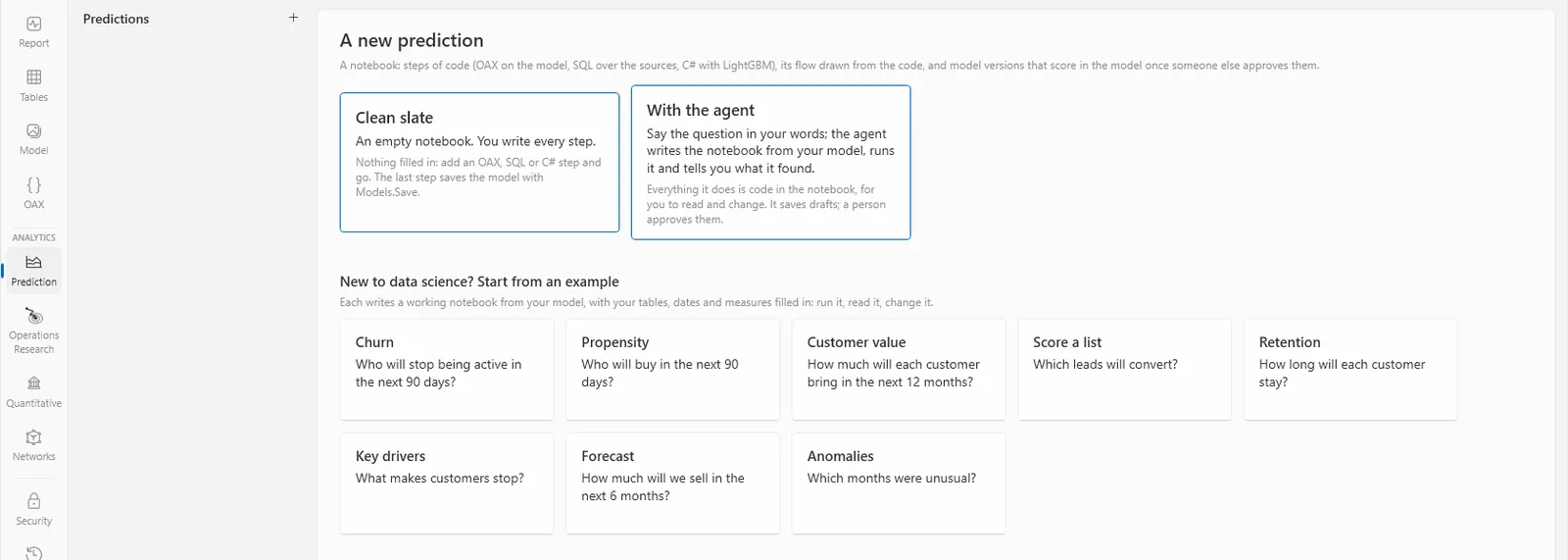
Start a prediction
Choose Prediction on the left (or Modeling › New prediction), then +. Under New to data science? Start from an example, choose the question closest to yours:
| Pattern | The question |
|---|---|
| Churn | Who will stop being active in the next 90 days? |
| Propensity | Who will buy in the next 90 days? |
| Customer value | How much will each customer bring in the next 12 months? |
| Score a list | Which leads will convert? |
| Retention | How long will each customer stay? |
| Key drivers | What makes customers stop? (It explains; it scores no one.) |
| Forecast | How much will we sell in the next 6 months? |
| Anomalies | Which months were unusual? |
The studio asks only a name, which names its folder, its versions and PREDICT("name"). It then finds the customers, dates and measures in your model, tries them on the data, and writes a working notebook. Anything it couldn’t fill in is marked in the steps for you to fill.
To describe the question in your own words instead, choose With the agent: it opens the agent window, and an agent connected to the studio writes and runs the notebook from your model, asking you only what you alone know (what counts as churn for you, how far ahead). Clean slate is an empty notebook for data scientists. See Notebooks, and Learning for the code a prediction runs.
Learn, and judge it
Choose Run all. The notebook learns with LightGBM and its last step saves a draft version. It keeps itself honest on its own:
- As-of dates: it learns what was known about each one at a date, and what happened after, never the future.
- Three sets in time order: it learns on the earliest rows, stops early on the next, and measures on the latest, a held-out test neither of the others saw.
- A simple rule to beat, and checks for leakage: a column that gives the answer away.
The step that evaluates it gives a verdict, strong, useful, weak or no better, in a sentence against the simple rule, with any warnings. A prediction no better than the rule says so: use the rule, or add measures that tell more.
Versions and approval
The notebook’s Versions tab lists what it saved (what a version keeps, and how it is checked: Versions and approval). A version goes from draft to approved, to in use, to retired:
- A draft
- Approve and put in use, Approve only, or Not approved… (with why, kept with the version). Someone other than its author approves it, unless the project lets authors approve their own.
- Approved
- Put in use: the model scores with it from now on, and the one in use before is retired. Or Retire.
- In use, retired
- Retire: nothing scores with it after this. Put in use again brings a retired one back.
Each version shows its evidence (its metrics on the held-out rows, charts, warnings), what is kept with it and the fingerprints that prove it unchanged, and Export for a review…, a zip for whoever checks it. An agent never approves, puts in use or retires a version: a person does.
Scores in the model
Once a version is in use, Use in the model adds a table, <name> scores (for a forecast, <name> forecast), and a report page that shows it. The table scores again at every refresh, and is related to whom it scores by the model’s key, so a measure over your customers can use the score at once.
In OAX, PREDICT("name") scores with the version in use, and PREDICT("name", 3) with version 3. The version’s Call it section lists every way to use it, from SQL in Get data to Python.
Import a model
A data scientist’s LightGBM model can come in as a draft version: Import a model… at the top of a prediction notebook takes a model.txt, a pickle or a joblib file. The file is read, never run, and the draft says what didn’t come along with it. It is then approved like any other version.