Get data
Get data loads a table into the model from a file, a database, an online service or a lakehouse. OpenBI reads it with DuckDB, and the query that reads it is saved in the model, so the project can load it again.
Open Get data
- On the Home tab, in the Data group: Get data for every source, or a shortcut straight to one: Excel workbook, Text / CSV, SQL Server, PostgreSQL, Dataverse, Web file.
- The same group has OneLake catalog (Fabric’s items: semantic models, lakehouses, warehouses, SQL and KQL databases), OpenBI Lake (see OpenBI Lake) and AWS catalog.
- In the Tables view, Get data under the list of tables; in Transform data, Get data on its Home tab.
A project connected live to a server has no Get data: its tables are the server’s (see Live connections).
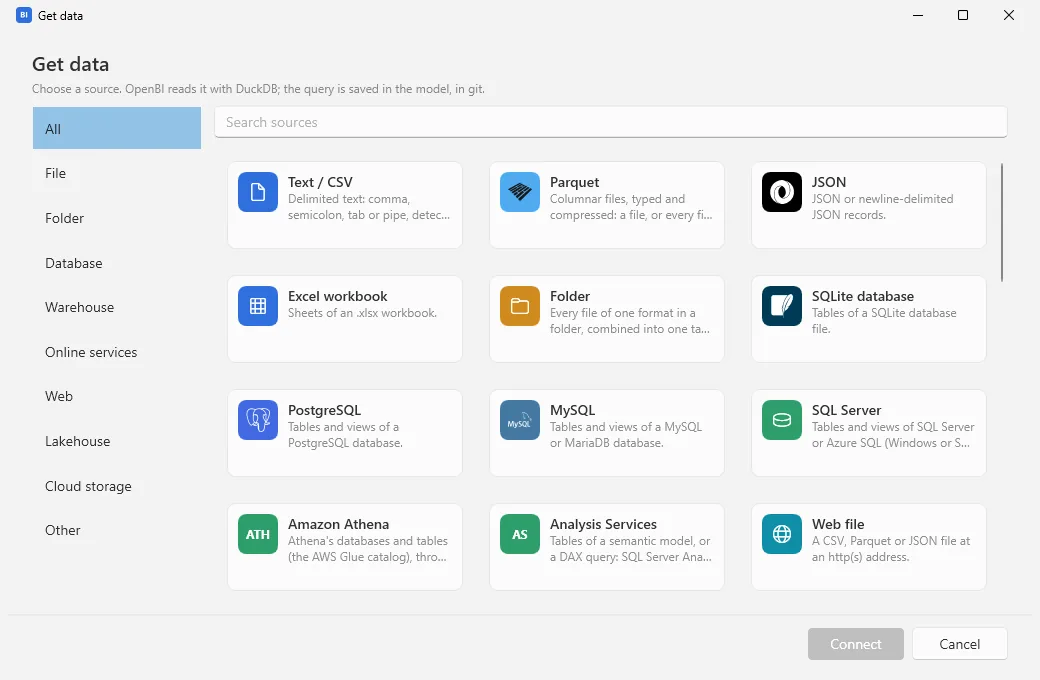
Choose, connect, load
- Get data: choose a source and Connect (or double-click it).
- Connect: say where the data is: a file (Browse…), a server and database, an address. Fields marked (optional) can stay empty. If the model already has sources of that kind, Data sources of this model fills the fields from one. Choose Next.
- Navigator: tick the tables, sheets or files to load. The one selected is previewed (its first 200 rows). Load writes the tables into the model and loads them; Transform data opens the first one ticked in the Transform data window first, to shape it with steps (see Transform data).
If the source needs a sign-in this computer doesn’t have yet, the studio asks for it between Connect and the Navigator: see Signing in to a source.
Every source
| Source | Category | What you give it |
|---|---|---|
| Text / CSV | File | A file: comma, semicolon, tab or pipe, found by itself. |
| Parquet | File | A file, or a folder: every .parquet in it and its subfolders as one table, with Hive folders (year=2024/month=03) as columns. |
| JSON | File | A .json, .jsonl or .ndjson file. |
| Excel workbook | File | An .xlsx file; the Navigator lists its sheets. |
| Folder | Folder | A folder and a file format (csv, parquet or json): all its files combined into one table, or one file. |
| SQLite database | Database | A database file. |
| PostgreSQL | Database | Server (host or host:port), database, and optionally Encryption (sslmode). |
| MySQL | Database | Server and database (MySQL or MariaDB). |
| SQL Server | Database | Server (host, host,port or host\instance) and database, SQL Server or Azure SQL; Encrypt the connection and Trust the server’s certificate. |
| Amazon Athena | Database | An Athena ODBC data source name, or the region, query results location and workgroup. |
| Analysis Services | Database | Server and model (SQL Server Analysis Services, Azure Analysis Services, a Power BI or Fabric semantic model), and optionally a DAX query. To use a model where it is instead of importing it, see Live connections. |
| Snowflake, Google BigQuery, Databricks, Trino, Amazon Redshift, Dremio / Flight SQL, ADBC driver | Warehouse | The warehouse’s account, host or project, through its ADBC driver. The Connect page says whether the driver is on the computer, and the command to install it if not. |
| SharePoint Online list, Exchange Online, Dataverse | Online services | A site, a mailbox (empty: your own), an environment; signed in with your Microsoft work account. |
| Salesforce objects, Salesforce reports | Online services | The login address (a sandbox’s, or My Domain); signed in in your browser. Reports give their detail rows, at most 2,000 each. |
| Google Analytics | Online services | A GA4 property, dimensions, metrics and dates; signed in with your own Google Cloud project’s OAuth client, or a service account’s key. |
| Azure Data Explorer (Kusto) | Online services | Cluster, database, and optionally a KQL query. |
| OneLake catalog, AWS catalog | Online services | Open their own window to browse what your account can read. |
| Web file | Web | The address of a CSV, Parquet or JSON file. |
| Web API | Web | An address, and optionally headers (a key goes in the sign-in, not here). |
| OData feed | Web | The service’s or an entity set’s address. |
| Hugging Face | Web | A dataset, as owner/name or its page’s address. |
| OpenBI Lake, Delta table, Iceberg table | Lakehouse | A lake’s tables (its own window), or a Delta or Iceberg table’s folder. |
| Amazon S3 | Cloud storage | An s3:// path, a file or a pattern; optionally the region and an endpoint for S3-compatible storage (MinIO, R2…). |
| Azure Storage | Cloud storage | The storage account and an az:// path. |
| Python script, R script | Other | Legacy sources, kept so that Power BI projects open: a script the computer’s Python (with pandas and pyarrow) or R runs. Each project asks once before its scripts run. For analysis, use a notebook (see Why no Python or R). |
| Active Directory | Other | A domain (empty: this computer’s), signed in with Windows. |
| Bloomberg | Other | A BQL query; needs the Bloomberg Terminal running and signed in, and Python with blpapi and pandas. |
| ODBC | Other | A data source name (DSN), or a connection string without a user or password. |
| DuckDB SQL | Other | A DuckDB query: read_csv, read_parquet, joins and functions. |
SQL Server is read through an ODBC driver for SQL Server on the computer, Microsoft ODBC Driver 18 for SQL Server first. If there is none, the error says so and where to get it.
How the query is saved
- In M, Open Query’s language, as Power Query writes it: a CSV file becomes
Csv.Document(File.Contents(…))with the steps Promoted Headers and Changed Type, a SQL Server tableSql.Database(…). What M has no function for is read with the same DuckDB SQL inside M. - Files in the project’s folder are named by the project (
${PROJECT_DIR}/…), so the query still works when the project moves or is shared. Files elsewhere keep their full path. - Databases and storage become data sources of the model: it keeps each one’s address, never a password or a key.
Signing in to a source
A database, a warehouse, cloud storage or an online service asks for a sign-in the first time this computer reads it. The window Sign in to a data source names the source and its address; choose how under Sign in with, then Connect. The studio tries it at once.
| Source | Sign in with |
|---|---|
| SQL Server | Windows (your account), SQL Server user, or Microsoft Entra ID (work account); Azure SQL and Fabric start with Entra ID. |
| Analysis Services, Power BI, Fabric | Microsoft Entra ID (work account) for the cloud, Windows for your own server, or User and password (an HTTPS server, or a service principal). |
| PostgreSQL, MySQL | Database user: a user name and password. |
| Amazon S3 | Access key, AWS credential chain, or Public bucket (no sign-in). |
| Azure Storage | New in 0.3.75 As Power BI Desktop offers it: Anonymous, Organizational account (Microsoft Entra ID), Account key or Shared access signature (SAS), kept for the level you choose: the storage account, a container or a folder. Data Lake Storage Gen2 has no Anonymous. An organizational account also needs a data role on the storage, such as Storage Blob Data Reader. The same goes for M’s AzureStorage.Blobs, AzureStorage.DataLake and AzureStorage.DataLakeContents. |
| Web API, web files | Anonymous, Web API key (a header and its key), or Basic (user name and password). |
| Warehouses | Each its own: Snowflake’s user and password, key pair, access token or browser sign-in; BigQuery’s Google sign-in or a service account key; Databricks’ access token or service principal. |
- Use for every database on <server>, ticked to start with, keeps one sign-in for every database on that server (SQL Server, PostgreSQL, MySQL).
- If SQL Server’s certificate isn’t trusted, the error offers Trust this server’s certificate and connect: the connection stays encrypted, and the server’s own certificate is accepted. Do it only for a server you know.
- Where it is kept: on this computer only, for you. On Windows, encrypted for your Windows account; on a Mac, with a key in your login keychain. Never in the project, never in git.
The Data sources window
Data sources (on the Home and Modeling tabs, and in Transform data) lists where the model’s tables come from and whether this computer can sign in to each: “No credentials on this computer”, “Windows sign-in”, “Signed in as …”. For each, Sign in or Change sign-in, and Forget to remove the credentials from this computer. Files read with DuckDB need none and aren’t listed.
Refresh
Refresh (on Home and Modeling) reads every table from its source again. The Refresh window shows each table as it goes (“Waiting for other queries…”, “12,400 rows loaded…”, “Unchanged · 4 rows”) and closes by itself when all went well.
- A table that fails keeps the data it had. Its error shows with Edit query, which opens its query in Transform data; Copy details copies every failed table’s error, to send to a colleague or an agent.
- A query whose Include in report refresh is off (Transform data, the query’s menu) keeps its data when you refresh.
- If a sign-in is missing, the studio asks for it during the refresh, and the refresh goes on.
On a Mac, the Tables view has Get data, Refresh and Data sources under its list.