Install OpenBI Studio
OpenBI Studio is the desktop app where you build models, reports and analyses. It runs on 64-bit Windows and on Macs with Apple silicon, and carries everything it needs: the engine, .NET and the example projects.
Requirements
- Windows: 64-bit Windows 10 or 11, and the Microsoft Edge WebView2 Runtime, which is part of Windows 11. The installer checks both and stops with a message if one is missing.
- Mac: a Mac with Apple silicon and macOS 14 or later.
- Nothing else to install. The studio carries its own .NET, the OpenBI engine and the Visual C++ runtime. Versions of your projects are kept with git, built into the studio, so you don’t need git either.
- No licence key and no account. Install it and start. You sign in only when you publish to OpenBI Server, and to data sources that ask for it.
On Windows
Download OpenBI-Studio-0.3.74-x64.msi from www.openbi.no. Before you run it, check its signature. The status must be Valid, the signer Norway Analytics and the thumbprint 48D6BE98B89BE0766F85A2BC9136C85409B569D7:
Get-AuthenticodeSignature .\OpenBI-Studio-0.3.74-x64.msi | Format-List Status, SignerCertificateThen double-click it. The wizard asks only for the folder (C:\Program Files\OpenBI to start with), and Windows asks an administrator’s consent, because the studio is installed for every user of the computer. On the last page, Launch OpenBI Studio starts it.
To install it without questions, for example from a software distribution tool, run this as administrator. DESKTOPSHORTCUT=0 leaves out the desktop shortcut:
msiexec /i OpenBI-Studio-0.3.74-x64.msi /qn DESKTOPSHORTCUT=0| What | Where, and how |
|---|---|
| The program | C:\Program Files\OpenBI\: the studio, the engine in engine\, the example projects in examples\, THIRD-PARTY-NOTICES.txt and the bill of materials. Every OpenBI program and library in it is signed too. |
| Shortcuts | OpenBI Studio in the Start menu and on the desktop. Right-click the taskbar icon for your recent projects. |
| File Explorer | Double-click a project’s .openbi file to open the project, or a .openbimodel file a colleague sent you. Right-click a folder or a report page’s .html file for Open in OpenBI Studio. A studio that already has that project open takes it, instead of a second one starting. |
| Registry | HKLM\SOFTWARE\Norway Analytics\OpenBI Studio: InstallPath and Version. |
A newer MSI replaces the version installed. An older one is refused: “A newer version of OpenBI Studio is already installed.”
On a Mac
Download OpenBI-Studio-0.3.74-arm64.pkg and check it first. pkgutil must name the Developer ID with Team ID 896HW73HL8, and spctl must answer accepted, source=Notarized Developer ID:
pkgutil --check-signature OpenBI-Studio-0.3.74-arm64.pkg
spctl -a -vvv -t install OpenBI-Studio-0.3.74-arm64.pkg
Then open it, or install it from Terminal:
sudo installer -pkg OpenBI-Studio-0.3.74-arm64.pkg -target /It installs OpenBI Studio in /Applications, with the engine, the examples, the notices and the bill of materials inside the app. Finder opens .openbi and .openbimodel files with it, and offers it for a Power BI project’s .pbip under Open With. The app is notarized, so it opens offline once installed.
The first time the studio opens a project in Documents, Desktop or Downloads, on a drive you connect, or on a network drive, macOS asks whether OpenBI Studio may. Allow it for the places you keep projects and data.
The first start
With no project open, the studio shows its start page: New project, Open project, Import from Power BI, Open a shared model, Connect live, and your recent projects.
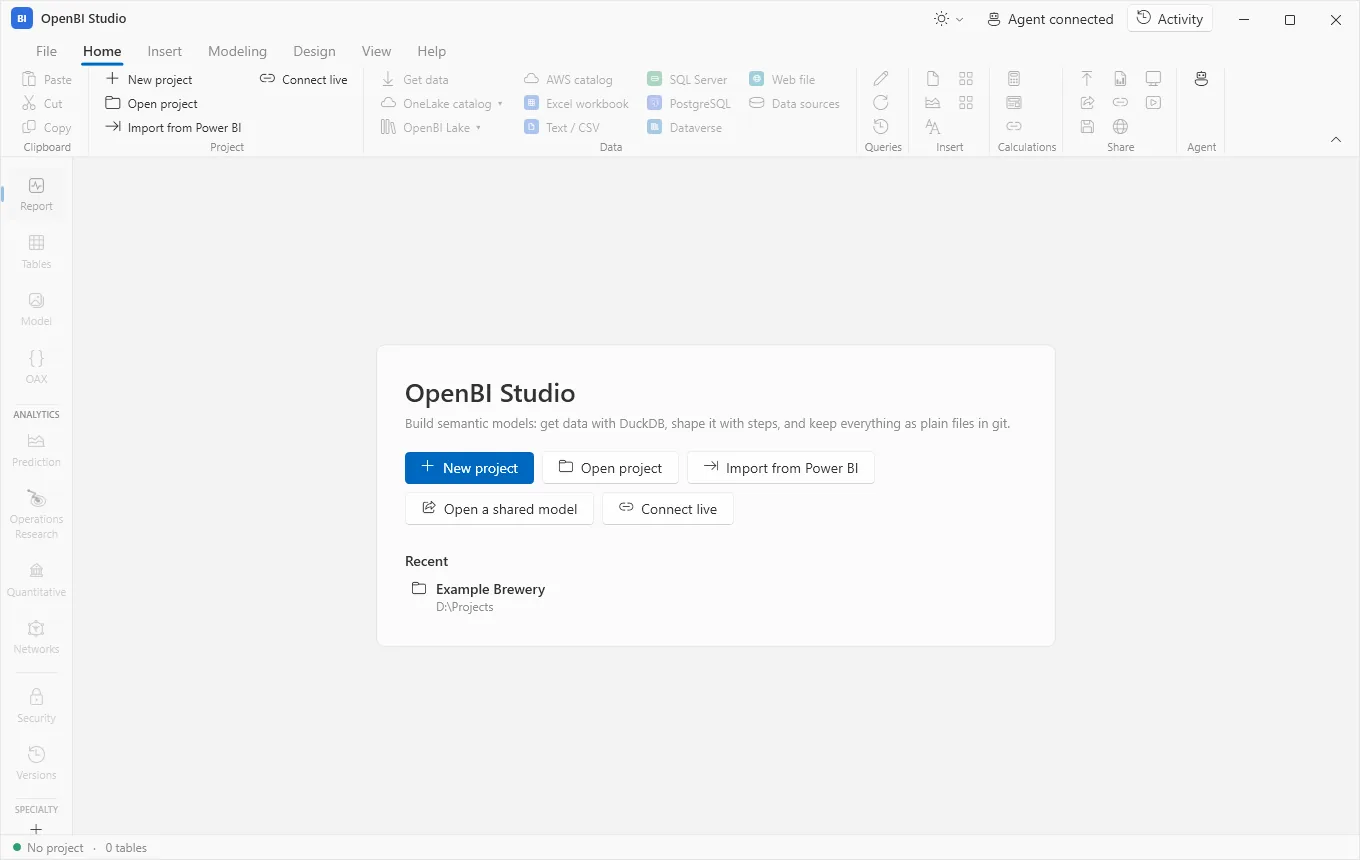
To look around first, open an example: File › Open the example project opens Example Brewery, a brewery’s plants, products, shops and two years of sales, with report pages of every kind. Open the churn example opens Example Churn. Each is copied once to Documents\OpenBI as a project of your own, so you can change it freely. Your first model walks you through Example Brewery.
Updates
Once a day, when it starts, the studio reads www.openbi.no/studio/latest.json to see whether a newer version is out. The request carries the studio’s version and nothing else. Offline, or behind a proxy that refuses it, the studio says nothing.
When there is a newer version, a bar under the ribbon says so, never a dialog. By default the installer downloads in the background, is checked, and the bar then offers Restart to update: the studio closes, installs the new version and starts again, with your projects as you left them.
- On Windows the installer must be signed by the same publisher as the studio you run, and Windows asks an administrator’s consent. If you close the studio instead, the update installs then.
- On a Mac the package must be signed with the same Team ID and notarized, and your Mac asks for an administrator’s password. Only Restart to update installs it; closing the studio doesn’t.
- What’s new on the bar lists the release’s changes. Skip this version stops the notices until a later one is out.
- To look now: Help › Check for updates. On a Mac it is also in the menu bar, under OpenBI Studio.
When a release is past the oldest version still supported, the bar turns amber and has no Skip: update soon.
Turn updates off
On the Help tab, in the Updates group, Check automatically turns the daily check off, and Update automatically stops the downloads: the bar then links to the download page instead. Setting the environment variable OPENBI_UPDATE_CHECK=0 also turns the check off.
On Windows, IT can turn them off for the whole computer through Group Policy or Intune, with a DWORD in HKLM (or HKCU) \SOFTWARE\Policies\NorwayAnalytics\OpenBI; on a Mac, with the same names as booleans in a configuration profile for no.norwayanalytics.openbi.studio. DisableUpdateCheck turns off checking, by hand too; DisableAutoUpdate only the downloads. The studio then shows “Turned off by your organisation” on those buttons.
reg add "HKLM\SOFTWARE\Policies\NorwayAnalytics\OpenBI" /v DisableAutoUpdate /t REG_DWORD /d 1 /fBill of materials
Every component that ships with the studio, its licence and its known vulnerabilities are listed in a CycloneDX bill of materials, sbom.cdx.json, with a readable sbom.html beside it that loads nothing from the internet. They are in the install folder on Windows, and in OpenBI Studio.app/Contents/Resources on a Mac. Open it with Help › Bill of materials; Third-party notices is next to it.
Uninstall
- Windows: Settings › Apps › Installed apps › OpenBI Studio › Uninstall. Or, as administrator, with the MSI you installed:
msiexec /x OpenBI-Studio-0.3.74-x64.msi /qn - Mac: quit the studio and move OpenBI Studio from Applications to the Trash.
What stays on the computer
Uninstalling removes the program only. Your projects stay where you keep them, and so do your own settings and sign-ins. Delete these too if you want nothing left:
| What | Windows | Mac |
|---|---|---|
| Settings, the agent’s key, OpenBI Server sign-ins | %APPDATA%\OpenBI\Studio\ | ~/Library/Application Support/OpenBI/Studio/ |
| Data source credentials | %APPDATA%\OpenBI\credentials.json, each secret encrypted for your Windows account | ~/.config/openbi/credentials.json, sealed with a key in your login keychain |
| Activity logs, downloaded updates | %LOCALAPPDATA%\OpenBI\ | ~/Library/Application Support/OpenBI/ |
| Crash log | %LOCALAPPDATA%\OpenBI\Logs\studio-crash.log | ~/Library/Logs/OpenBI/studio-crash.log |
| Example copies, imports, shared models | Documents\OpenBI (on a Mac, Documents/OpenBI): these are your projects, so look before you delete. | |