Packaging and distribution
A plug-in ships as a zip of its own, never inside OpenBI Studio’s installers. People install it from the studio, for themselves or for everyone on the computer, and it stays installed when the studio is upgraded.
A download of its own
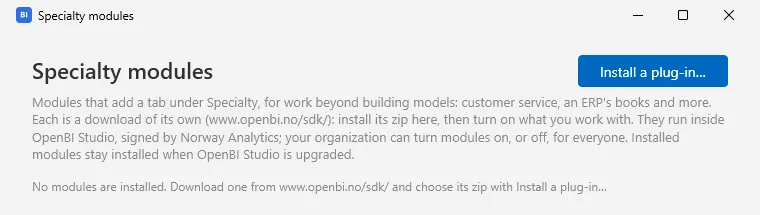
OpenBI Studio’s installers, for Windows and Mac, carry no plug-in. Each plug-in is a zip: Norway Analytics’ free ones from www.openbi.no/sdk/, yours from wherever you publish them. In the studio, under SPECIALTY in the navigation, + opens Specialty modules, where Install a plug-in… takes the zip as it was downloaded.
The zip
One folder, named as the plug-in should be installed, with:
model-summary/
  plugin.json
  ModelSummary.dll
  ModelSummary.deps.json
  (the libraries your plug-in ships, with their notices)
SHA256SUMS.txtSHA256SUMS.txtlists every other file’s SHA-256, a line each assha256sumwrites it (<sha256> <file>). The studio refuses a zip whose files don’t match it, or that has a file it doesn’t list; without one, it installs with a warning that nothing was checked.- Leave out what the studio has: the SDK, ModelContextProtocol, WPF.
- One plug-in a zip, its
plugin.jsonat the top or one folder down, and no file outside that folder. - At most 256 MB zipped, 512 MB unzipped and 4,000 files.
plugin.json
| Field | Required | Meaning |
|---|---|---|
id | Yes | The plug-in’s unique id, with a prefix of your own (yourcompany.something). The studio remembers by it whether the plug-in is on, your organization’s policy names it, and its settings are kept under it. |
assembly | Yes | Its main assembly’s file name, beside plugin.json. |
entry | Yes | The full name of its class that implements IStudioPlugin, with a constructor without parameters. |
name | Its name in Specialty modules (its id when left out). | |
version | Its version, 1.0.0. When it is in several places, the newest that can run is used. | |
publisher, description | Who makes it, and what it does in a sentence or two. | |
minStudio | The oldest OpenBI Studio it runs in: the SDK version you build with, never older than the studio its contract came with (0.3.73 for contract 1.2). An older studio lists it with “it needs OpenBI Studio … or later”. | |
sdk | The SDK contract it was built against. Not needed when you build with the SDK’s package, which writes it into the assembly (see Versioning). | |
glyph | A Segoe Fluent Icons character for its card in the Windows studio. | |
agentAccess | { "reason": "…", "tools": ["studio_status", "dax_query"] }: the plug-in calls the studio’s agent endpoint itself, with a key of its own (contract 1.2, see Calling the agent endpoint). reason is what the person reads before they allow it; tools the tools it may call. Without it, the plug-in gets no access. | |
license | { "product": "…", "required": false }: reserved for paid plug-ins. Today every plug-in is free, and the studio checks no key. |
Signing
A plug-in runs inside OpenBI Studio with the user’s rights, so the studio checks who signed it, on Windows and on a Mac alike, before it installs it and again before it runs it:
- The installed studio runs plug-ins signed by Norway Analytics, or by a publisher your organization allows (
PluginPublishers, below). - Unsigned plug-ins run only where your organization allows them (
AllowUnsignedPlugins), on a test computer for instance. Otherwise one is listed as not signed, with what IT can do. - It checks the plug-in’s own assemblies, its main one and the projects its
deps.jsonnames; the libraries it ships are their authors’.
The signature is Authenticode, inside each assembly: the Windows studio checks it with Windows, the Mac studio with its own check of the same signature, so one signed zip serves both. To ship a plug-in, sign its assemblies with your own code-signing certificate (signtool on Windows, or osslsigncode elsewhere, with a timestamp), and have your customers’ IT add your publisher to PluginPublishers. The Mac studio trusts the main public code-signing roots Windows trusts and the roots the Mac itself trusts, an organization’s own CA that its MDM installed included.
Installing
Install a plug-in… walks four steps:
- Choose the plug-in’s zip: the file, its size and its SHA-256, to compare with the download page.
- Check it: its
plugin.json, its files againstSHA256SUMS.txt, its signature, the studio version it needs, the SDK contract it was built against, your organization’s policy, and the copy already installed. - Choose where: For you (recommended), or For everyone on this computer, for which Windows asks for an administrator.
- Install and turn on.
| Where | Windows | Mac |
|---|---|---|
| For you | %LOCALAPPDATA%\OpenBI\Plugins\<folder> | ~/Library/Application Support/OpenBI/Plugins/<folder> |
| For everyone on the computer | %ProgramData%\OpenBI\Plugins\<folder> | None: macOS protects the folder .NET would use |
The studio still reads a plugins folder beside its own program, where OpenBI Studio 0.3.66 and older shipped Customer Service; nothing ships there now. An agent can start an install too: it opens the same window on the zip it names, and the developer chooses Install and turn on or Close.
Updates and removal
- A newer zip, installed the same way, updates the plug-in; the same version installed again repairs it. An older one is refused: remove the newer first.
- A plug-in that runs keeps its files in use until the studio closes. Its update waits beside it and replaces it when the studio starts again; Specialty modules says so.
- Remove on its card removes it (files in use go at the next start). Its settings and sign-ins stay on the computer: installed again, it finds them.
- Upgrading OpenBI Studio leaves installed plug-ins alone, and they keep working. The studio speaks up only when one must be built again for a newer SDK (see Versioning).
Your organization’s policy
On Windows, IT sets these under HKLM or HKCU\SOFTWARE\Policies\NorwayAnalytics\OpenBI (Group Policy, Intune). On a Mac, the same names come from a configuration profile an MDM pushes (Jamf, Intune, Kandji and others), a custom settings payload for the preference domain no.norwayanalytics.openbi.studio: arrays of strings for lists, booleans for flags. The Mac studio reads only what a profile manages; a person’s own defaults write is ignored.
ForcedPlugins(multi-string)- Plug-in ids turned on for everyone.
BlockedPlugins(multi-string)- Plug-in ids that never run (“your organization has blocked it”).
PluginPublishers(multi-string)- Publishers whose signed plug-ins run: a plug-in runs when its signer’s certificate subject contains one of the names.
AllowUnsignedPlugins(DWORD 1)- Unsigned plug-ins run too: for test computers.
DisablePluginAgentAccess(DWORD 1)- No plug-in gets a key of its own to the agent endpoint (see Calling the agent endpoint).
reg add HKLM\SOFTWARE\Policies\NorwayAnalytics\OpenBI /v PluginPublishers /t REG_MULTI_SZ /d "Your Company AS" /f