Connect your agent
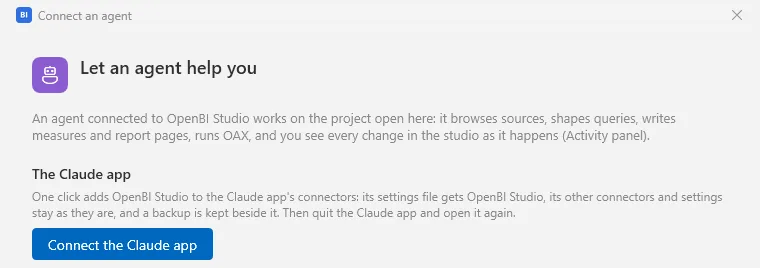
Connect your AI agent to OpenBI Studio on your computer, or to your company’s OpenBI Server. For the studio, click Agent in its title bar to open Connect an agent. One click connects the Claude app, Claude Code, Cursor, or ChatGPT’s desktop app and Codex; any other MCP client takes the settings the window shows.
OpenBI Studio or OpenBI Server
Your agent can connect to OpenBI in two places:
OpenBI Studio, on your computer
The agent works on the project you have open: it reads the model, writes measures and builds report pages while you watch. Claude app, Claude Code, Cursor, ChatGPT’s desktop app and Codex, in one click.
This page, belowOpenBI Server, your company’s
The agent reads the published reports and models as you, only what you can see, and changes nothing. Claude (claude.ai), ChatGPT and Claude Code.
Connect your AI agent to OpenBI ServerHow the buttons connect
Each button adds a server named openbi-studio to the app’s own settings file. Its other servers and settings stay as they are, and a backup of the file is kept beside it. The server it adds is the studio itself, started as OpenBI.Studio.exe --mcp: a small connector that finds the studio open on this computer and its key by itself (see The connector). So the app’s settings hold no key and no port, and keep working when either changes.
New in 0.3.75 As it starts, the studio also puts right an app that was connected the old way, with the endpoint’s address and key written into its settings: each such openbi-studio entry in Claude Code’s, the Claude app’s, Cursor’s, VS Code’s, Windsurf’s, or ChatGPT’s and Codex’s settings is changed to start the connector instead. Nothing else in the file changes, a backup is kept beside it, and the Activity panel names each app and file it changed (never the key).
A button is off when the app has not run for your account on this computer: the window says where it looked. Once connected, it reads Connect again.
The Claude app
Click Connect the Claude app, then quit the Claude app and open it again. OpenBI Studio is among its connectors. The button writes the app’s claude_desktop_config.json: on Windows the one in %APPDATA%\Claude and, for the Microsoft Store’s Claude, the one in its package’s folder; on a Mac the one in ~/Library/Application Support/Claude.
Claude Code
Click Connect Claude Code. The studio runs Claude Code’s own command, which adds OpenBI Studio for every project of your account. When the studio can’t find Claude Code the button is off: run the command the window shows, once, in a terminal. With the studio installed where its installer puts it:
claude mcp add --scope user openbi-studio -- "C:\Program Files\OpenBI\OpenBI.Studio.exe" --mcpclaude mcp add --scope user openbi-studio -- "/Applications/OpenBI Studio.app/Contents/MacOS/OpenBI.Studio" --mcpThen start Claude Code again (or type /mcp in it) to see its tools.
Cursor
Click Connect Cursor. The studio adds itself to ~/.cursor/mcp.json, Cursor’s settings for every project of your account, on Windows and Mac alike. Cursor’s Settings › MCP then lists openbi-studio.
ChatGPT and Codex
Click Connect ChatGPT. ChatGPT’s desktop app, the Codex command line and Codex’s editor extension share one settings file, config.toml in Codex’s folder (~/.codex, or the folder CODEX_HOME names), so one click connects them all. The studio adds its own table to the file and leaves every other line as it was. If the file can’t be changed safely, the studio says why and leaves it alone: paste the lines the window shows instead.
[mcp_servers.openbi-studio]
command = 'C:\Program Files\OpenBI\OpenBI.Studio.exe'
args = ["--mcp"]
startup_timeout_sec = 60
The 60 seconds give the connector time to start the studio when it isn’t open.
VS Code and other MCP clients
Any other MCP client connects one of two ways: as a command, which keeps working whatever the studio’s port and key, or over HTTP, which works only until either changes.
As a command
Most clients can start a server as a command: VS Code, Windsurf, Zed and many more. Other MCP clients in the window shows the connector’s settings, with Copy. Nothing in them changes when the studio starts again:
{
  "mcpServers": {
    "openbi-studio": {
      "command": "C:\\Program Files\\OpenBI\\OpenBI.Studio.exe",
      "args": [
        "--mcp"
      ]
    }
  }
}
Put the command and its argument where your client keeps its MCP servers, in the shape its own documentation gives. VS Code, for example, keeps them in its mcp.json.
Over HTTP
Only for a client that can’t start a program. New in 0.3.75 The endpoint itself is under Advanced: the endpoint over HTTP… in the window: its address (http://127.0.0.1:5739/mcp unless the port was taken), to use with the header Authorization: Bearer and the studio’s key. Copy HTTP settings (this session’s) copies a client’s settings with the key in that header, without showing the key:
{
  "mcpServers": {
    "openbi-studio": {
      "type": "http",
      "url": "http://127.0.0.1:5739/mcp",
      "headers": { "Authorization": "Bearer <the key>" }
    }
  }
}Both can change: the port when another program has it as the studio starts, the key when you change it. A client set up over HTTP then stops working until you give it the new ones. The connector never does: use it wherever you can.
The key
The key is the endpoint’s password. Under Advanced the window shows it masked, obs_•••• and its last four characters, so a screenshot gives nothing away:
- Show shows it (and Hide masks it again); Copy copies it without showing it.
- Change key… makes a new key, in use at once; the old one is refused from then on. Before it changes anything, the studio names the clients on this computer whose settings still hold the key in use: the Claude app, Claude Code, Cursor, ChatGPT and Codex, VS Code, Windsurf. Afterwards an Update button gives those it can the connector instead, and it says which ones you change by hand. A client on another computer can’t be known: change its settings yourself.
Clients connected with the buttons need nothing: the connector reads the new key from the studio’s settings by itself.
Plug-ins never receive this key. One that calls the endpoint itself asks you once, with its reason and the tools it needs, for a key of its own that works for those tools only; you withdraw it in Specialty modules (see Calling the agent endpoint).
The connector: OpenBI.Studio.exe --mcp
Started with --mcp, OpenBI Studio’s program is an MCP server on its standard input and output, the way agent apps start their servers. It doesn’t open a second studio:
- It attaches to the studio open on this computer: its endpoint’s address and key are found by themselves, nothing to copy.
- When no studio is open, it starts one when the agent uses one of its tools, as its own app and not as a part of the agent’s app, without taking your keyboard, and waits for it. New in 0.3.79 Nothing less starts it: the session’s setup, its list of tools and its checks are answered by the connector itself, so an app that starts the connector with each of its sessions, as Claude Code does, opens no studio. A studio you closed stays closed until the agent’s next tool.
- When the studio closes and opens again, it attaches again by itself; when the key changes, it takes the new one.
"C:\Program Files\OpenBI\OpenBI.Studio.exe" --mcp"/Applications/OpenBI Studio.app/Contents/MacOS/OpenBI.Studio" --mcpOn a Mac
The Mac studio has the same Agent button and the same window, with the same buttons for the Claude app, Claude Code, Cursor and ChatGPT. The connector is the program inside the app, /Applications/OpenBI Studio.app/Contents/MacOS/OpenBI.Studio, started with --mcp.
When it doesn’t connect
- The title bar says Agent off
- The endpoint isn’t listening: the window’s first line says The endpoint is off. When it could not start, the Activity panel says why (“The agent endpoint could not start”). Otherwise the first line says Ready, or Connected and how many calls agents have made.
- The agent doesn’t list OpenBI Studio
- Most apps read their servers when they start: quit the Claude app and open it again; start Claude Code again, or type
/mcpin it. - A client gets 403
- It sends no key, or an old one, or it was set up with an address and key that have changed since. Connect it with its button, or set it up with the connector,
OpenBI.Studio.exe --mcp, which finds the studio and its key by itself. - A client gets 401: “This is OpenBI Studio’s engine, not the agent endpoint”
- It was given the engine’s port, the one in the status bar’s “Engine ready · port N”. That port belongs to the engine of the open project, not to agents. Use the connector.
- A button is off
- The app hasn’t run for your account on this computer yet: open it once, then open Connect an agent again.