Agents and notebooks
An AI agent connected to OpenBI Studio does notebook work the way a data scientist does: it writes a step, runs it, reads what it showed and puts it right, in the notebook open in front of you. Everything it does is code you can read and change. It saves drafts; a person approves them.
The tools
The studio’s agent endpoint (see How agents work with OpenBI) has eleven notebook tools, and analytics_catalog beside them:
| Tool | What it does |
|---|---|
notebook_list | The project’s notebooks of each kind, with their versions: which is in use, which wait for approval. |
notebook_create | A new notebook of a kind (prediction, operations research, quantitative, network), from steps given, a short start, or a catalog recipe. |
notebook_from_prediction | A prediction made from a pattern, written out as its notebook for a data scientist to read and change. |
notebook_read | The steps in order: each one’s code, state (not run, ran, changed since it ran), what it uses and makes, and what it showed; the kernel’s variables. |
notebook_step_add | Adds a step (C#, OAX, SQL, TikZ or text), at the end or after a step named. |
notebook_step_edit | Changes a step’s code, name or parameters, and says which later steps are now out of date. |
notebook_step_remove | Removes a step; the project’s earlier versions keep it. |
notebook_run | Runs one step, a range or all, stopping at the first that fails: each step’s result, its error with the line, its time and what it showed. |
notebook_interrupt | Stops the running step. |
notebook_restart | Starts the kernel afresh, with every variable gone. |
notebook_pdf | Typesets the notebook as a paper, checks it, and gives the agent its pages to look at. |
analytics_catalog | What the library has for a goal, with recipes that run, and the library’s reference for any type or member. |
Around them, model_versions, model_version_compare and model_reproduce show and check what a notebook saved, explain puts a plan, a valuation or a network in words, and examples lists the example notebooks. Every tool is on MCP tools.
You see each call as it happens: the notebook opens in the studio, its steps appear as the agent adds them, and each run shows under its step, marked as the agent’s, with a line in the Activity panel.
A session, call by call
Here an agent answers “how much of each product should each plant bottle next month?” on the Example Brewery project. Every call below was sent to OpenBI Studio 0.3.78, and every answer is the one it gave (the project’s folder shortened, long answers cut where they say so).
1. Ask the catalog first
Before serious analytics, the agent asks the catalog what the library has for the goal:
{
  "goal": "a production plan: liters per product and plant, most margin, limited bottling hours and demand"
}
{
"goal": "a production plan: liters per product and plant, most margin, limited bottling hours and demand",
"recipes": [
{
"id": "stochastic-plan",
"topic": "optimization",
"goal": "A stochastic plan over scenarios (two stages: decide now, adjust when the demand is known)",
"also": "[… 8]",
"api": [
"plan.Decide(name, min, max, integer) (first stage)",
"plan.Decide(name, scenarios) (one per scenario: recourse)",
"decisions.Sum(r => probability × cost)",
"…"
],
"caveats": "[… 3]",
"runs": "as it is (made-up data, no model needed)",
"steps": "[… 1]"
},
{
"id": "graph-similar-customers",
"topic": "networks",
"goal": "Customers (or products) alike by what they share, for recommendations and look-alikes"
},
{
"id": "rollup-bill-of-materials",
"topic": "networks",
"goal": "Bill of materials: explode the forecast into every part it needs (material requirements), roll costs or CO2 up into products, and see which product drives each part"
}
],
"note": "the first in full; id: \"<id>\" gives another's steps"
}The nearest recipes are a plan over scenarios, customers or products alike by what they share, and a bill of materials exploded into the parts a forecast needs. None of them is this question, a plain plan, so the agent writes the steps itself.
2. Create the notebook
A plan is an operations research notebook. The first step says the question, so whoever reads the notebook, or its paper, knows what it answers:
{
  "name": "Production plan",
  "kind": "operations-research",
  "steps": [
    {
      "language": "markdown",
      "code": "# Production plan\n\nHow many liters of each product should each plant bottle next month, for the most margin? Each plant has so many bottling hours, and no product sells more than its demand."
    }
  ]
}
{
"name": "Production plan",
"kind": "operations-research",
"folder": "operations-research/Production plan",
"steps": [{"id": "92779d5e60c7", "language": "markdown"}]
}3. Add the steps
Three OAX steps read the model; each one’s step_name is the variable it makes. The first:
{
  "name": "Production plan",
  "language": "dax",
  "step_name": "rows",
  "code": "EVALUATE\nSELECTCOLUMNS (\n    Production,\n    \"Product\", Production[Product],\n    \"Plant\", Production[Plant],\n    \"Margin\", Production[Margin per liter],\n    \"Hours\", Production[Hours per liter]\n)"
}
Then plants and demand the same way, and a C# step that decides the liters, maximizes the margin and holds each plant to its hours and each product to its demand:
{
  "name": "Production plan",
  "language": "csharp",
  "step_name": "model",
  "code": "var hoursOf = plants.Rows.ToDictionary(r => r.Text(\"Plant\")!, r => r.Number(\"Hours\"));\nvar demandOf = demand.Rows.ToDictionary(r => r.Text(\"Product\")!, r => r.Number(\"Liters\"));\nvar plan = Optimize.Maximize(\"Margin\");\nvar liters = plan.Decide(\"Liters\", rows, describe: \"Liters of each product bottled at each plant\");\nplan.Objective(liters.Sum(\"Margin\"), \"margin per liter × liters\");\nforeach (var (plant, x) in liters.By(\"Plant\"))\n    plan.Constrain(\"Bottling hours\", x.Sum(\"Hours\") <= plan.Parameter($\"{plant} hours\", hoursOf[plant]), per: plant);\nforeach (var (product, x) in liters.By(\"Product\"))\n    plan.Constrain(\"Demand\", x.Sum() <= plan.Parameter($\"{product} demand\", demandOf[product]), per: product);\nvar solution = plan.Solve();\nsolution"
}
And a last step that saves the plan as a draft version:
{
  "name": "Production plan",
  "language": "csharp",
  "step_name": "save",
  "code": "Results.Save(\"Production plan\", solution, note: \"liters per product and plant for next month\")"
}
4. Run it
Without step, from or to, notebook_run runs every step in order. Its answer has each step’s outputs as the agent can read them: a table’s columns and first rows, a solution’s status and what limits it, a save’s version:
{
  "results": [
    {
      "step": "58617dc99d42",
      "title": "rows",
      "ok": true,
      "ms": 1616,
      "outputs": [
        {
          "type": "table",
          "rows": 12,
          "caption": "12 rows × 4 columns",
          "columns": [
            "Product (text)",
            "Plant (text)",
            "Margin (number)",
            "Hours (number)"
          ],
          "first": [
            "[\"Pils\",\"Bergen\",12,0.01]",
            "[\"Pils\",\"Oslo\",11,0.012]",
            "…"
          ]
        }
      ]
    },
    {
      "step": "f8ca74b07d3f",
      "title": "plants",
      "ok": true,
      "ms": 61,
      "outputs": [
        {
          "type": "table",
          "rows": 3,
          "caption": "3 rows × 2 columns",
          "columns": ["Plant (text)", "Hours (number)"],
          "first": ["[\"Bergen\",1600]", "[\"Oslo\",2000]", "…"]
        }
      ]
    },
    {
      "step": "0ea084c4b834",
      "title": "demand",
      "ok": true,
      "ms": 58,
      "outputs": [
        {
          "type": "table",
          "rows": 4,
          "caption": "4 rows × 2 columns",
          "columns": ["Product (text)", "Liters (number)"],
          "first": ["[\"Pils\",150000]", "[\"IPA\",60000]", "…"]
        }
      ]
    },
    {
      "step": "0c0fec9231a5",
      "title": "model",
      "ok": true,
      "ms": 889,
      "outputs": [
        {
          "type": "solution",
          "status": "optimal",
          "text": "Optimal: the best Margin there is, 4,068,409",
          "objective": 4068409,
          "explain": [
            "Bottling hours · Bergen is at its limit (1,600): one more adds 75 to Margin",
            "Bottling hours · Trondheim is at its limit (900): one more adds 45.45 to Margin",
            "Demand · IPA is at its limit (60,000): one more adds 19.5 to Margin",
            "Demand · Cider is at its limit (50,000): one more adds 15 to Margin",
            "Demand · Pils is at its limit (150,000): one more adds 11.25 to Margin"
          ],
          "conflicts": [],
          "planRows": 12,
          "note": "the plan, what limits it and the model in words show under the step and in the Model tab"
        }
      ]
    },
    {
      "step": "dff801d812d0",
      "title": "save",
      "ok": true,
      "ms": 542,
      "outputs": [
        {
          "type": "text",
          "text": "Production plan v1 (draft), saved 2026-11-06 19:06 by Kari Nordmann, fingerprint cda04dbdcf7c"
        }
      ]
    }
  ],
  "variables": [
    "rows (Table): a table of 12 rows × 4 columns",
    "plants (Table): a table of 3 rows × 2 columns",
    "demand (Table): a table of 4 rows × 2 columns",
    "hoursOf (Dictionary<string, double>): System.Collections.Generic.Dictionary`2[System.String,System.Double]",
    "demandOf (Dictionary<string, double>): System.Collections.Generic.Dictionary`2[System.String,System.Double]",
    "plan (OptimizationModel): DECIDE\r",
    "liters (Decisions): [Liters (Pils, Bergen), Liters (Pils, Oslo), Liters (Pils, Trondheim), Liters (IPA, Bergen), Liters (IPA, Oslo), Liters…",
    "solution (Solution): Optimal: the best Margin there is, 4,068,409"
  ]
}
Had a step failed, the run would have stopped there, with the error and its line. A compile error about a name of the library comes with the nearest names and where to look them up, so the agent fixes the step and runs from it again (see Errors and hints).
5. Read it back
notebook_read gives the notebook as it now is: each step’s code and state, what it uses and makes, and what it last showed. Two of its six steps:
{
  "name": "Production plan",
  "steps": [
    {
      "id": "58617dc99d42",
      "language": "dax",
      "name": "rows",
      "title": "rows",
      "code": "EVALUATE\nSELECTCOLUMNS (\n    Production,\n    \"Product\", Production[Product],\n    \"Plant\", Production[Plant],\n    \"Margin\", Production[Margin per liter],\n    \"Hours\", Production[Hours per liter]\n)",
      "editedBy": "agent",
      "state": "ran",
      "uses": [],
      "makes": ["rows"],
      "outputs": [
        {
          "type": "table",
          "rows": 12,
          "caption": "12 rows × 4 columns",
          "columns": [
            "Product (text)",
            "Plant (text)",
            "Margin (number)",
            "Hours (number)"
          ],
          "first": [
            "[\"Pils\",\"Bergen\",12,0.01]",
            "[\"Pils\",\"Oslo\",11,0.012]",
            "…"
          ]
        }
      ]
    },
    {
      "id": "0c0fec9231a5",
      "language": "csharp",
      "name": "model",
      "title": "model",
      "code": "var hoursOf = plants.Rows.ToDictionary(r => r.Text(\"Plant\")!, r => r.Number(\"Hours\"));\nvar demandOf = demand.Rows.ToDictionary(r => r.Text(\"Product\")!, r => r.Number(\"Liters\"));\nvar plan = Optimize.Maximize(\"Margin\");\nvar liters = plan.Decide(\"Liters\", rows, describe: \"Liters of each product bottled at each plant\");\nplan.Objective(liters.Sum(\"Margin\"), \"margin per liter × liters\");\nforeach (var (plant, x) in liters.By(\"Plant\"))\n    plan.Constrain(\"Bottling hours\", x.Sum(\"Hours\") <= plan.Parameter($\"{plant} hours\", hoursOf[plant]), per: plant);\nforeach (var (product, x) in liters.By(\"Product\"))\n    plan.Constrain(\"Demand\", x.Sum() <= plan.Parameter($\"{product} demand\", demandOf[product]), per: product);\nvar solution = plan.Solve();\nsolution",
      "editedBy": "agent",
      "state": "ran",
      "uses": ["plants", "demand", "rows"],
      "makes": ["hoursOf", "demandOf", "plan", "liters", "solution"],
      "outputs": [
        {
          "type": "solution",
          "status": "optimal",
          "text": "Optimal: the best Margin there is, 4,068,409",
          "objective": 4068409,
          "explain": [
            "Bottling hours · Bergen is at its limit (1,600): one more adds 75 to Margin",
            "Bottling hours · Trondheim is at its limit (900): one more adds 45.45 to Margin",
            "Demand · IPA is at its limit (60,000): one more adds 19.5 to Margin",
            "Demand · Cider is at its limit (50,000): one more adds 15 to Margin",
            "Demand · Pils is at its limit (150,000): one more adds 11.25 to Margin"
          ],
          "conflicts": [],
          "planRows": 12,
          "note": "the plan, what limits it and the model in words show under the step and in the Model tab"
        }
      ]
    },
    "… 4 more steps"
  ],
  "variables": [
    "rows (Table): a table of 12 rows × 4 columns",
    "plants (Table): a table of 3 rows × 2 columns",
    "demand (Table): a table of 4 rows × 2 columns",
    "hoursOf (Dictionary<string, double>): System.Collections.Generic.Dictionary`2[System.String,System.Double]",
    "demandOf (Dictionary<string, double>): System.Collections.Generic.Dictionary`2[System.String,System.Double]",
    "plan (OptimizationModel): DECIDE\r",
    "liters (Decisions): [Liters (Pils, Bergen), Liters (Pils, Oslo), Liters (Pils, Trondheim), Liters (IPA, Bergen), Liters (IPA, Oslo), Liters…",
    "solution (Solution): Optimal: the best Margin there is, 4,068,409"
  ],
  "kernel": "ready"
}
6. The paper
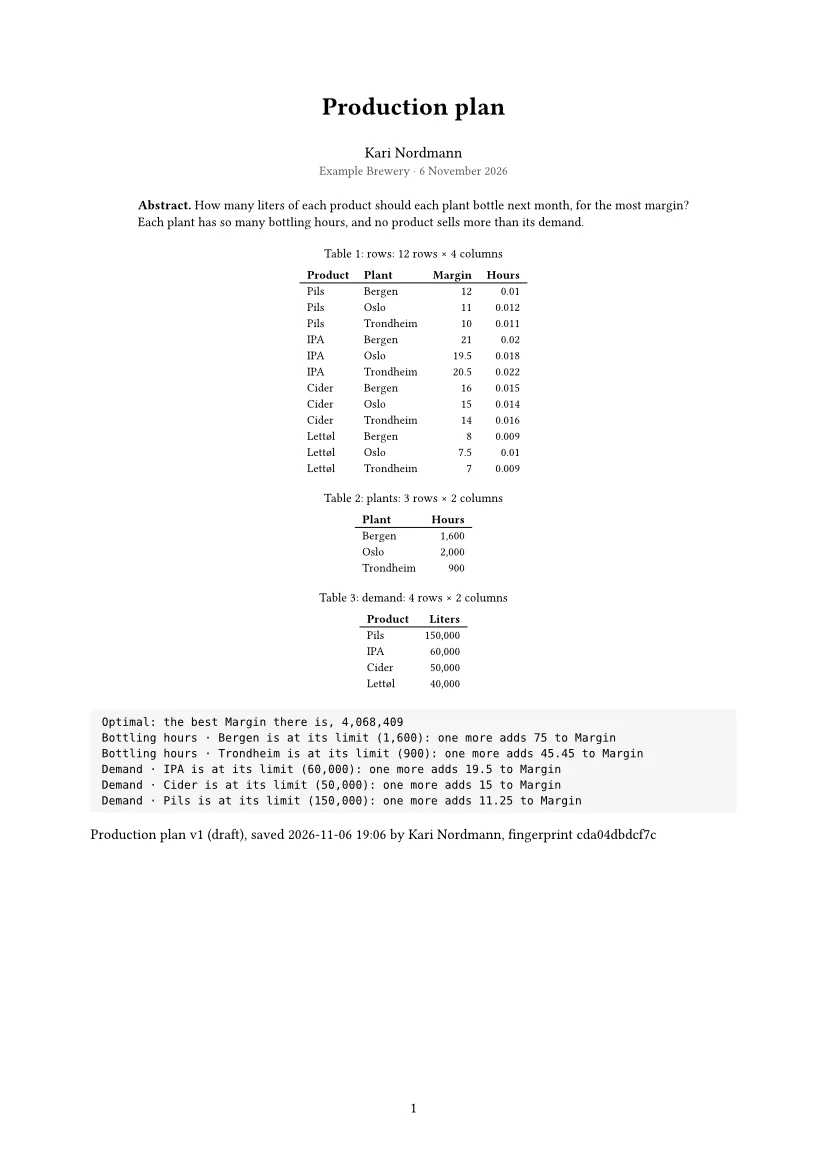
notebook_pdf typesets the notebook and checks the PDF. Its answer says what the check found, and comes with pictures of the pages, which the agent looks at before it calls the work done:
{"name": "Production plan", "pages": [1]}{
"file": "D:\\Projects\\Example Brewery\\output\\Production plan.pdf",
"bytes": 62117,
"figures": 0,
"tables": 3,
"checked": {
"pages": 2,
"size": "A4 portrait",
"clean": true,
"summary": "2 pages, A4 portrait: checked, nothing wrong",
"pictures": "the sheet of all its pages (a flagged page outlined in red), then page 1 at 100 ppi",
"yourTurn": "Look at the pages before you call it done: the check sees layout, not meaning (a wrong chart, a missing section)."
}
}
7. The draft, waiting for a person
{"name": "Production plan"}{
"name": "Production plan",
"versions": [
{
"number": 1,
"status": "draft",
"author": "Kari Nordmann",
"account": "EXAMPLE\\kari",
"agent": true,
"origin": "notebook",
"created": "2026-11-06 19:06",
"fingerprint": "cda04dbdcf7cc388eceb9735ecccba1c73b30b747e05383557515eaaaf0f0afd",
"reviewPage": "not made yet: report_plan_snapshot makes it",
"metrics": [
"Margin 4068409.090909091 (Optimal: the best Margin there is, 4,068,409)"
],
"files": [
"environment.json",
"evidence.json",
"formulation.json",
"notebook.ipynb",
"result.parquet",
"schema.json",
"sensitivity.json"
],
"history": [
"2026-11-06 19:06 saved by Kari Nordmann (EXAMPLE\\kari): liters per product and plant for next month"
]
}
]
}The version is a draft, saved by the agent in Kari Nordmann’s studio ("agent": true). It stays a draft until a person approves it.
What a person approves
An agent saves drafts: a model with Models.Save, a plan, a valuation or a network with Results.Save. Approving a version, putting it in use and retiring it are a person’s, in the notebook’s Versions tab. No tool does it, and the library itself refuses when a step the agent runs tries. Here the agent adds such a step and runs it:
{
  "name": "Production plan",
  "language": "csharp",
  "step_name": "approve",
  "code": "Models.Store(\"Production plan\").Approve(1, \"Kari Nordmann\")"
}
{
"results": [
{
"step": "32822e423332",
"title": "approve",
"ok": false,
"error": {
"message": "Line 1: The agent does not approve a version: a person does, in the notebook's Versions.",
"line": 1
},
"ms": 65,
"outputs": [
{
"type": "error",
"text": "Line 1: The agent does not approve a version: a person does, in the notebook's Versions."
}
]
}
],
"variables": [
"rows (Table): a table of 12 rows × 4 columns",
"plants (Table): a table of 3 rows × 2 columns",
"demand (Table): a table of 4 rows × 2 columns",
"hoursOf (Dictionary<string, double>): System.Collections.Generic.Dictionary`2[System.String,System.Double]",
"demandOf (Dictionary<string, double>): System.Collections.Generic.Dictionary`2[System.String,System.Double]",
"plan (OptimizationModel): DECIDE\r",
"liters (Decisions): [Liters (Pils, Bergen), Liters (Pils, Oslo), Liters (Pils, Trondheim), Liters (IPA, Bergen), Liters (IPA, Oslo), Liters…",
"solution (Solution): Optimal: the best Margin there is, 4,068,409"
]
}It then removes the step. Once a person approves the version (someone other than its author, unless the project lets authors approve their own) and puts it in use, model_use makes its rows a table of the model, and the agent can build on it. For a plan, the agent first makes its review page with report_plan_snapshot and names it to whoever approves (see Versions and approval).
The analytics catalog
analytics_catalog is how an agent finds its way in the library:
goal- What you want, in words (“calibrate churn scores”, “a robust plan when uplift is uncertain”): the recipes that fit best, each with its library calls, the OAX functions for the same in the model, what makes the result wrong when ignored, and steps that run.
topic,id- A topic’s recipes (prediction, calibration and monitoring, experiments and causal, optimization, networks, survival, statistics), or one recipe.
api- The library’s reference for a type or member (
"LightGbm","Uplift.TwoModel"): each signature with what its documentation says, as in the library reference.
A recipe runs as it is, on made-up data with a known truth, unless it says which tables it needs. notebook_create with recipe starts a notebook from one; the agent then replaces the made-up data with an OAX step of your model’s rows.
The working rules
Every agent gets the same briefing (see How the agent works). For notebooks it comes to this:
- The model’s measures first. When a measure gives the number, the agent uses it in its OAX steps, so the notebook agrees with the report pages. When none fits, it writes its own OAX and says so.
- One idea a step, each named, and the question first, as text. The Flow tab then reads as the analysis does.
- Honest tests. A prediction learns from what was known at each date, is measured on rows neither learning nor early stopping saw, and is judged against a simple rule (see Learning).
- Looked at before done. A paper comes back checked with its pages; the agent puts right what is flagged.
- Drafts only. A person approves.
What the agent reads, the rows of its steps among them, goes to its AI provider, as for any of its tools; see Privacy.